
So you think PRs are the only way you can do effective code review? Well, then you’ll be surprised to hear that ain’t the case!
If you’ve read my previous article, you’ll be aware that GitHub or GitLab are great for quick and easy integrations with CI/CD tooling and average for issue tracking/planning, but, in my opinion, miss the mark when it comes to facilitating effective code review.

Today, I want to show you a typical Gerrit workflow and explain why I believe it can greatly improve the quality of your reviews.
Let’s start by reiterating that PRs should be small so as to be easily reviewable, and it’s the creator’s job to make sure they are paired with a meaningful description. But don’t take it from me, you can read it directly on GitHub’s blog.
However, splitting out work into easily reviewable chunks is not easy or intuitive when following a PR-based approach as maintaining dependent PRs is cumbersome and error-prone, so let’s see how Gerrit facilitates this for developers.
Relation chains vs PRs
Let’s say that you’ve started working on a new feature. You realize early on that it’ll be a lot easier to implement if you do some refactoring beforehand. So you go ahead, do the refactoring, commit your work, then add the new feature and commit that too, as a separate commit.
If you’re working with a PR based workflow, before doing the above you’ve probably created a branch and are now about to push it to the remote to then create a PR from the UI, am I right?
Well, if you’re using Gerrit, you don’t need to do that. If your work is supposed to be merged on main, then you can develop directly on that branch, create those 2 commits and push them with git push origin HEAD:refs/for/main, we’ll decompose this command later, but for now let’s look at the effects of it.

As you can see in the screenshot above, Gerrit detects that you’re pushing two separate commits, so it automatically creates 2 new changes, one for each commit, against the branch you’re working on. There was no need to interact with the UI either.
But how did this happen? HEAD:refs/for/<branch-name> tells the Gerrit backend that you’d like to push your current local changes (HEAD) up for review against branch-name Gerrit then does all the magic for you.
Let’s now take a look at the UI:

There’s quite a lot to unpack here, so let’s go in order. First, Gerrit created a Relation chain for us, that includes both commits.
Then, in the commit message, we notice something maybe unexpected, a Change-Id. This is Gerrit’s way of tracking updates to a change. From now on, every time we push a new commit with the same Change-Id, Gerrit will understand it belongs to this change and update it accordingly. You could completely change the commit message, but, as long as you leave the Change-Id unchanged, Gerrit will understand where it belongs.
So let’s try doing that.
How to update changes
The main difference from what most people are used to here is that when you want to update a change, you don’t push a new commit; rather, you amend the existing one
First I need to checkout the change, I can do that by clicking on the DOWNLOAD button(highlighted in the image above), which will show this modal window
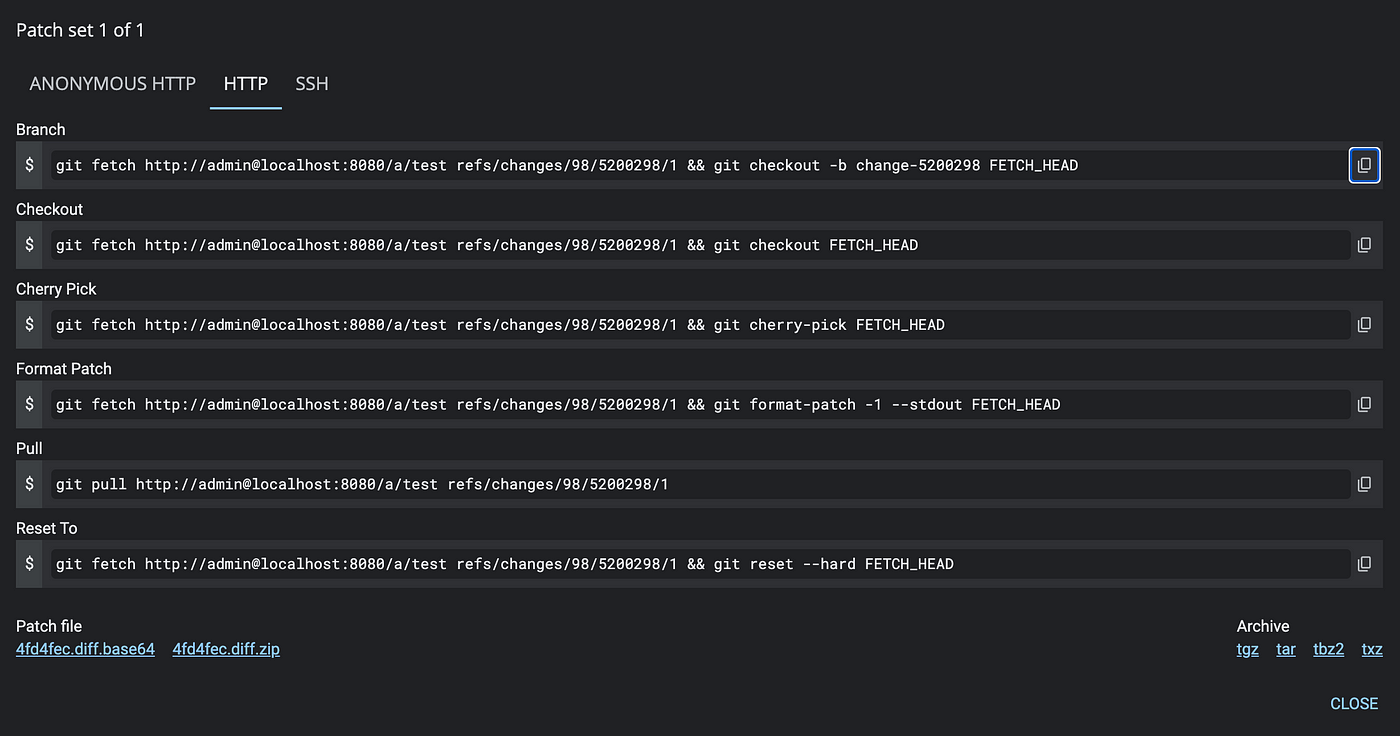
This gives me a few options for checking out said change without having to Google how to check out a specific ref or how to cherry-pick each time. So, I copy-paste the “Checkout” option and then run the following on my terminal.

You can see here that I’m not creating a new commit, but rather amending the same one.
Gerrit warns me now that I’ve not amended any files but only the commit message, no problems there, just a handy reminder.
As I’ve not changed the Change-Id, we can see that the change number is still the same. The UI now looks like this:

A few things to notice here. First, I’ve updated the commit message to add a description, great, but surely I wouldn’t want to lose track of the initial state of the change? Can I still see the previous version of this commit? YES!
When you amend your commit, you’re not losing the history of what was there before, you’re merely adding a new patchset to the change. Patchsets are what Gerrit calls each iteration of the commit.
You can also see how the next commit in the relation chain is now marked as an “Indirect relation.” This is because it is not based anymore on the latest version of its parent commit, which as just been updated, so let’s go ahead and fix it. First, we’ll need to select the commit we want to update and then click on the handy “Rebase” button, which will show the following modal

As this is a straightforward case, we’ll confirm the rebase on the parent change.

We can now see that the indirect relation message has disappeared. But how did Gerrit keep track of that? By creating a new patchset which tracks the updated version of the parent commit! Pretty neat, huh?
This leads us to our next topic:
Meaningful commit messages by design
Another problem I see with the PR workflow, or at least how it’s been implemented by the most popular tools today, is that it essentially leaves it up to each individual developer to commit meaningful messages. Whatever merge strategy you pick, neither of them allows for the commit message to be reviewed before it gets merged.
In Gerrit there is no PR description, the commit message IS the “PR description”. Further more, the commit message appears as file in its own right and users can comment on it. This allows reviewers to actually add comments on the message itself to ensure it’s up to scratch with whatever the company standards are.

Submitting the change
Finally, once the comment has been addressed and the change approved, we can click on Submit including parents, and both changes will be merged to the main.

As can be seen by running git log , which will look like this:

Conclusion
The one thing I’d like readers to take away from this article is that no, PRs are not the only way forward and there are solutions to the old problem of wanting to split up code reviews in more manageable chunks.
So let’s quickly review how Gerrit works:
You create changes by pushing commits using the “magic” command refs/for/<bran-name> .
When you want to update a change, you don’t push a new commit; rather, you amend the existing one. Gerrit keeps track of each update in the form of patchsets so you can see how each commit evolved over time.
You can then chain commits as you wish, allowing you to split your work in easily reviewable units.
Finally, commit messages are treated as first class citizens, they’re like any other file in the change, they can be reviewed and commented on, ensuring that no un-helpful commits are merged to the target branch.

 GerritForge Blog