Hi everyone, We are thrilled to announce the Gerrit User Summit 2026, taking place on November 9th and 10th.
This year, our event is incredibly special. Thanks to the generous support of Google, we are hosting the summit at their campus in Sunnyvale, California.
The Google campus in Silicon Valley is the birthplace of Gerrit Code Review: hosting the summit at the Moffet park campus makes it a true homecoming—the absolute perfect setting for our global community of contributors, users, and enterprise leaders to reunite, share ideas, and shape the future of code review right where it all began.
Gerrit meets Jujutsu (JJ)
In addition to our traditional, deep-dive Gerrit sessions, we are excited to expand our horizons this year by co-locating the event with the JJ (Jujutsu) user group USA.
Gerrit and JJ share a deeply aligned vision for the future of Change-based version control and a workflow that is ready for today’s requirements for Human + AI agentic workflows. We can’t wait to explore these synergies, showcase future integrations, and discuss how we can push the boundaries of developer productivity together.
REGISTER AND JOIN THE SUMMIT
We want to hear from you! Whether you are a long-time core contributor or a Gerrit / Git SCM administrator working on the enterprise scalability of your infrastructure, your voice matters, we would like to hear your story!
🎙️ Submit a Talk: The Call for Papers (CFP) is officially open. Share your success stories, unique workflows, and innovative ideas. Submit your proposal on Sessionize.
🎟️ Register & Updates: Secure your spot and find the latest agenda updates on our official website: gus26.gerritforge.com.
💻 Post-Summit Hackathon
The summit will be immediately followed by a 3-day Hackathon reserved for maintainers or long-time contributors. We are incredibly grateful to Nvidia for organising and hosting this at their nearby offices. More details and logistics will be shared on the maintainers’ mailing list in due course.
We look forward to seeing you all back again in Sunnyvale.
Daniele Sassoli – Gerrit Contributor and Community Manager Luca Milanesio – Gerrit Maintainer, Release Manager and member of the Engineering Steering Committee
AI-assisted coding and automated agentic development pipelines are overwhelming Git repositories. Rapid packfile accumulation breaks traditional maintenance, causing severe bottlenecks in Git’s “Counting” and “Search-for-Reuse” (SFR) phases. Fast pushes suddenly become agonizing delays.
Our 12-hour stress tests proved that standard solutions fail under scale. Doing nothing leads to server collapse. Scheduled Garbage Collection (GC) is just a band-aid, creating unstable performance until the system finally chokes under heavy traffic.
The solution is adaptive intelligence. Git-at-High-Speed (GHS) uses reinforcement learning to trigger lightweight, proactive repository adjustments. GHS keeps system load flat, drops latencies under 50ms, and entirely eliminates massive GC disruptions.
Introduction
Modern software organisations are rapidly embracing AI-generated code and content, dramatically increasing the volume and velocity of changes flowing into their repositories. As this wave of automated contributions accelerates, version control systems such as Gerrit must sustain ever-increasing data ingestion without degrading developers’ experience or the reliability of CI/CD pipelines. Maintaining high throughput and low latency under continuous, AI-amplified load is no longer optional; it is foundational to engineering productivity and operational stability. As repositories grow and CI/CD activity intensifies, the cost of managing pack files inside Git becomes critical.
Every push or fetch triggers internal Git phases that prepare the objects to send to the client. First, Git performs a Counting phase, where it walks the repository graph to determine which objects need to be included in the pack being generated. It then scans existing pack files to determine whether objects can be reused, a step known as search-for-reuse (SFR). These stages can become bottlenecks when too many pack files accumulate, resulting in slower pushes, fetches, and clones, and higher CPU load.
To understand how different maintenance strategies affect Counting, SFR, and overall system stability, we conducted stress tests that mimic a realistic enterprise workload. Each simulation ran for 12 hours with 70 concurrent users, blending Git read/write operations with REST API calls. We compared three scenarios:
Baseline (no garbage collection) – no attempt is made to repack or compact the repository during the test.
Rule‑based GC (current industry standard) – full garbage collection is scheduled periodically (every 15 minutes) regardless of current load.
GHS (Git‑at‑High‑Speed) – an adaptive agent monitors repository state and chooses between several actions (create bitmaps, repack references, pruning, do nothing, etc) based on reinforcement‑learning rewards.
The core focus of this analysis is how each strategy influences the Counting and search‑for‑reuse metrics over the full 12‑hour window.
Why Counting Time Matters
Before pack generation begins, Git performs a counting phase to determine which objects must be included in the pack sent to the client. During this step, Git walks the commit graph and object references to build the list of objects that need to be transferred. If the repository contains many changes, branches, and references, this traversal can become expensive and increase the time required to prepare the pack. We measure this latency as the counting time. High counting times indicate that Git is spending significant effort discovering the objects to send, which delays the entire operation. Conversely, low counting times indicate that the repository structure allows Git to identify the required objects quickly.
Why Search‑for‑Reuse Matters
When a Git server receives a push or serves a fetch, it may need to create a pack file. Git attempts to reuse objects that are already stored to avoid duplicating data. It does so by scanning the indices of existing pack files. If there are many small pack files, the scan can touch thousands of index entries, dramatically increasing latency. We measure this latency as the search‑for‑reuse time. High SFR times indicate that Git spends too much time searching for existing objects, thereby bottlenecking the entire operation. Conversely, low SFR times indicate the repository’s internal structure is healthy and that operations can proceed quickly.
Workload Model
To evaluate Gerrit under realistic conditions, we modelled three concurrent workloads using Gatling: developer activity, CI/CD clone jobs, and CI/CD fetch operations. Each workload runs with 70 concurrent virtual users, resulting in 210 active clients interacting with Gerrit simultaneously throughout the simulation.
All workloads run continuously for 12 hours while maintaining a constant number of concurrent users. This creates sustained system pressure and avoids the unrealistic burst patterns often seen in short benchmarks.
Developer Simulation
The developer simulation models the typical workflow of engineers interacting with Gerrit. Virtual users continuously perform common code-review activities such as creating changes, uploading new patch sets, rebasing work, reviewing code and submitting approved changes. These operations generate a steady stream of Git pushes and server-side processing, closely resembling the activity of a busy development team.
CI/CD Clone Simulation
The CI/CD clone simulation represents build systems that regularly clone repositories to run builds and tests. Each virtual pipeline repeatedly performs repository clones followed by verification steps. Because clones require Gerrit to generate pack files and search for reusable objects, they place a significant load on the repository storage layer.
CI/CD Fetch Simulation
The CI/CD fetch simulation models pipelines that periodically fetch updates from the main branch to detect new changes. These incremental updates are lighter than full clones but still exercise Gerrit’s pack generation and object lookup mechanisms, contributing to the overall system load.
Controlling Operation Distribution
To keep the workload realistic, each action includes a configurable pause with a small amount of variation. This prevents request bursts and allows the simulations to control the relative frequency of operations such as pushes, submissions and repository fetches, producing a steady and predictable workload over the entire test duration.
Baseline: Unsustainable Growth Without Maintenance
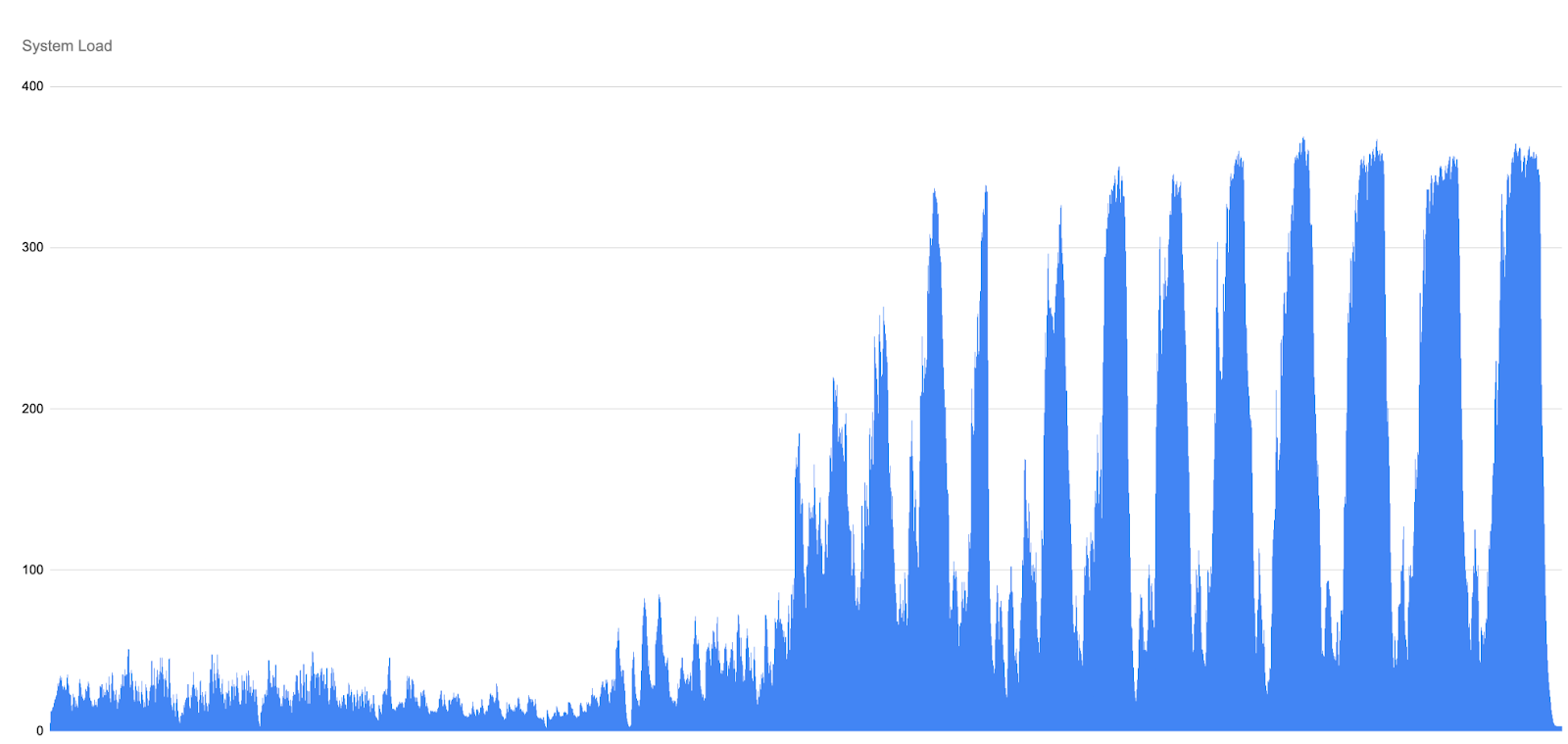
The baseline scenario intentionally performs no maintenance on the repository. Early in each run, the system is in a relatively healthy state: push traffic is stable, CPU load is moderate, SFR and Counting latencies rise steadily and predictably. As the Gatling simulation continues, however, the number of pack files grows unchecked, and the overall system load, driven by the combined cost of counting objects and searching for reuse, begins to climb.
Only once the load crosses a certain threshold does Gerrit begin rejecting HTTP requests. Interestingly, this rising load appears before any HTTP rejections occur. These rejections act as a form of back-pressure: with a fixed pool of HTTP threads, Gerrit limits the number of incoming requests in order to protect the server from complete overload.
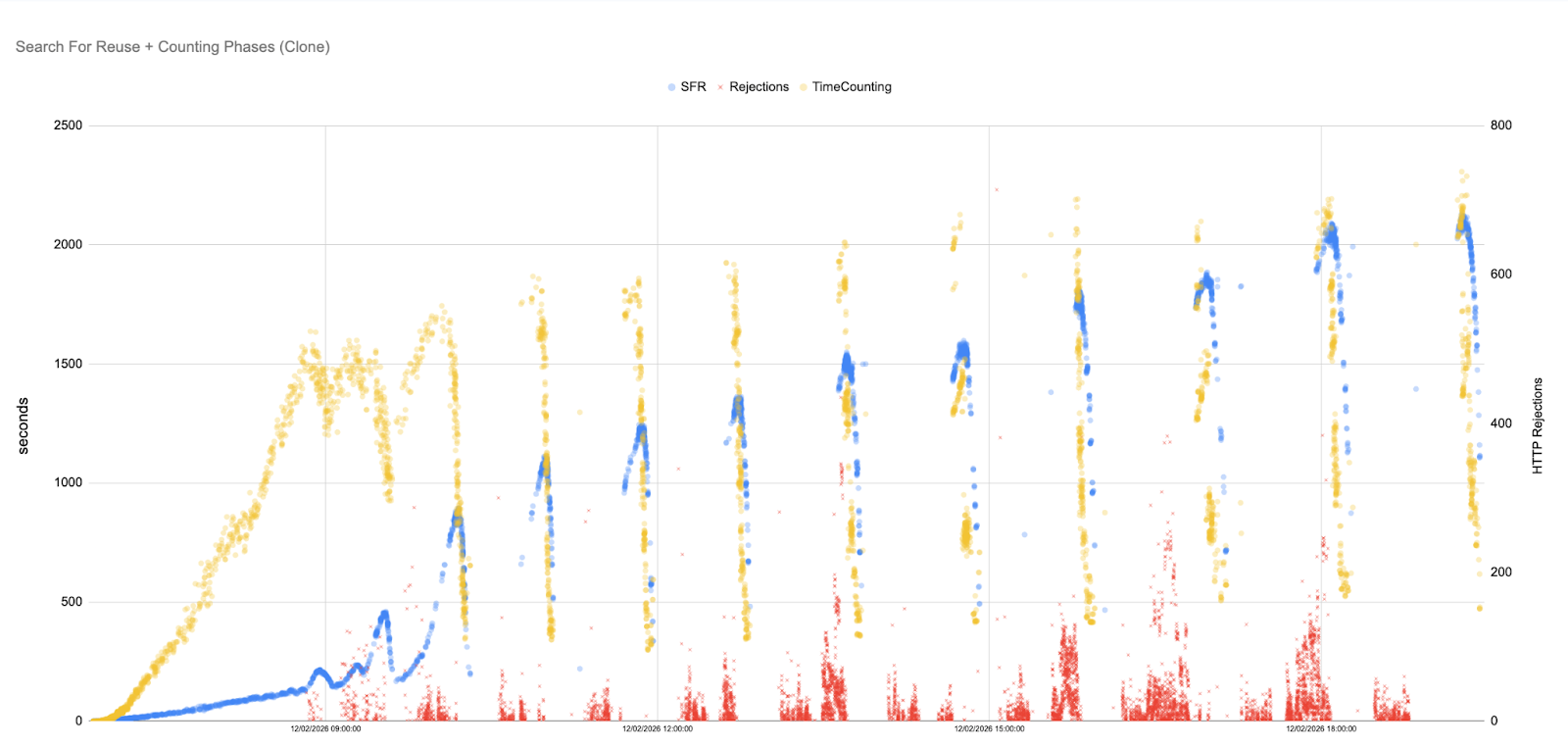
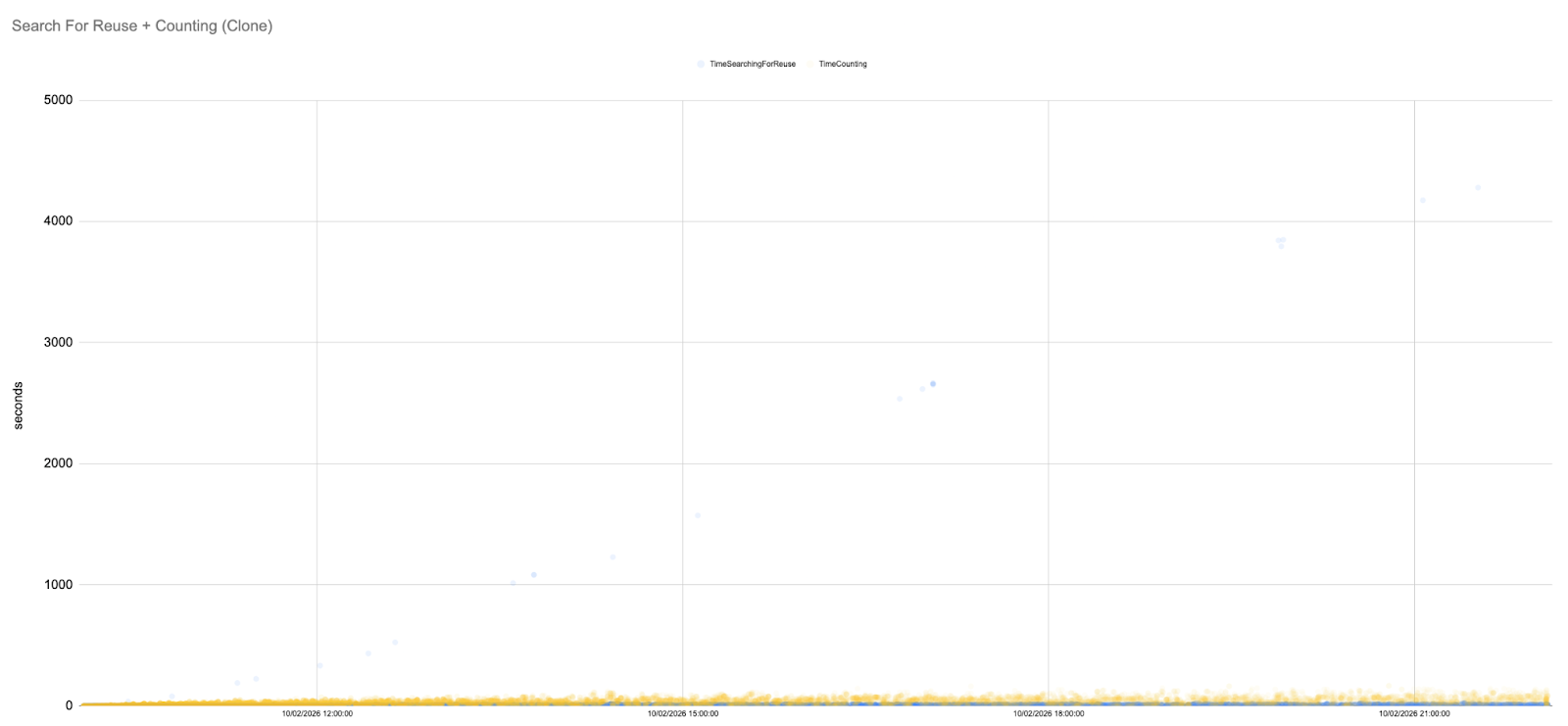
This behaviour is clearly visible in the following Counting and SFR graph. As the load builds up, the curve becomes steeper and more unstable. Distinct “waves” start to appear in the data.
Each wave represents a cycle of overload and partial recovery. When the system becomes saturated, Gerrit rejects more requests (shown as red crosses in the graphs). This temporarily reduces the amount of new work entering the system, allowing some ongoing operations to complete and causing Counting and SFR latencies to drop slightly. However, as soon as some headroom becomes available, new requests are accepted again, contention builds up, and latencies begin climbing once more.
The important detail is that each recovery is only partial. The next Counting an SFR peak is higher than the previous one. Over time, the system enters a repeating pattern of build-up, throttling, and renewed overload rather than returning to a stable state.
By the middle of the simulation, Counting and SFR peaks reach hundreds or even thousands of seconds, and latency never returns to the low levels seen at the start of the run.
Without any intervention, the baseline runs invariably end, with the system saturated: pushes and fetches stall, HTTP rejections become constant, and SFR and Counting both continue to grow. The ever‑increasing peaks in the above graph illustrate how an unmanaged repository accumulates pack files until normal operations are no longer feasible.
Key observations:
Trend: The run begins with slow growth, enters a phase of rising oscillations as load builds and then ends in runaway SFR and Counting growth.
Cycles of overload and throttling: SFR and Counting rise in waves, driven by the server alternating between taking on work and aggressively throttling to survive.
Implications for users: Rising SFR and Counting times directly translate into slower pushes and fetches. Developers and CI jobs see spiky latencies that grow from seconds to minutes, and eventually operations time out completely as Gerrit exhausts its HTTP thread pool.
Rule‑Based GC: Periodic Relief, Growing Spikes
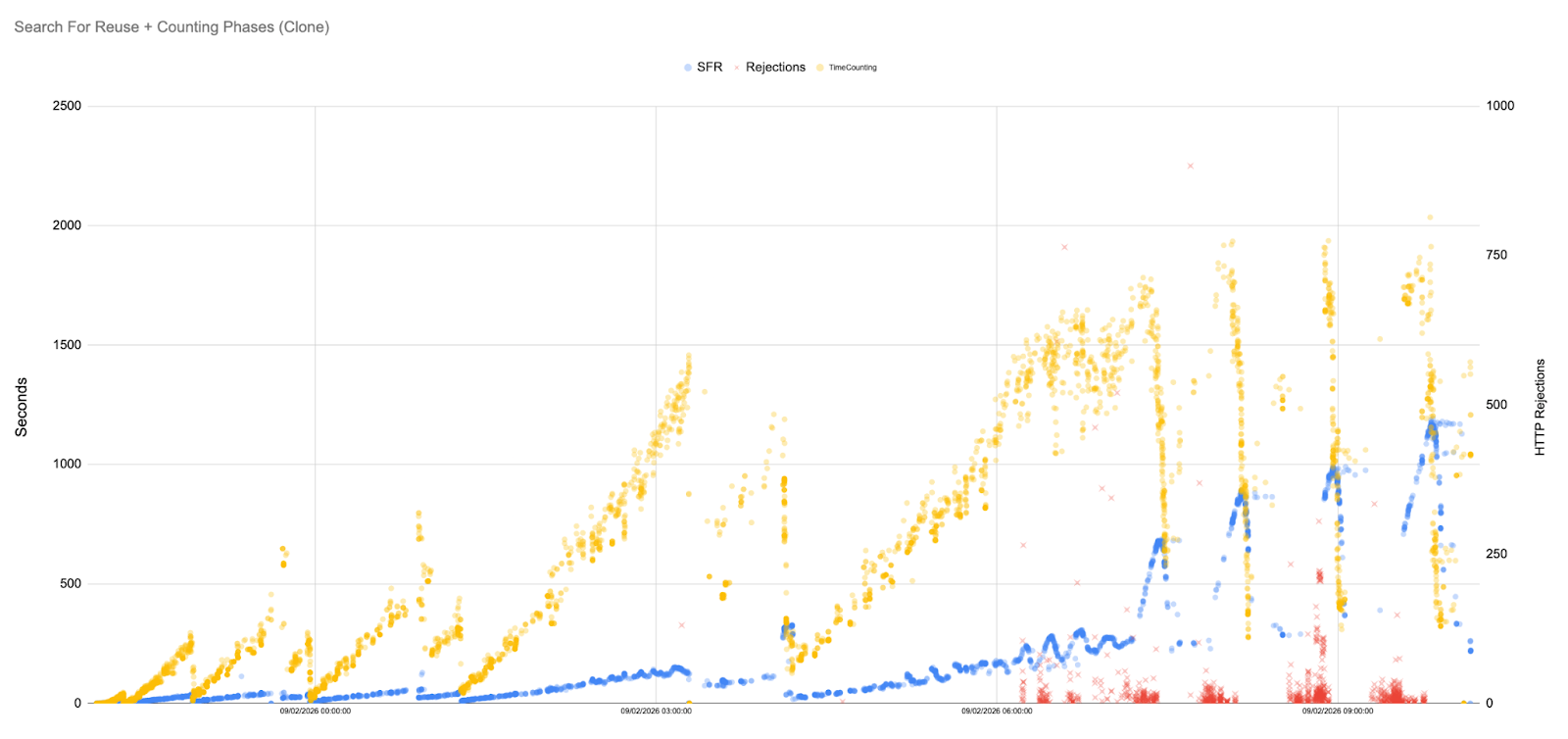
To mitigate uncontrolled pack growth, the rule-based scenario performs a full garbage collection every 15 minutes. This approach reflects the most common maintenance strategy used in Git environments. Each GC run repacks objects and temporarily reduces the number of pack files. This produces a saw‑tooth pattern: immediately after a GC run, SFR and Counting times fall dramatically, but as users continue pushing and fetching, new pack files accumulate, and times rise again until the next GC triggers.
The scatter plot for the rule-based runs shows initial latencies of only a few seconds, but as the simulation progresses, they climb into the hundreds of seconds, with later peaks reaching well over a thousand seconds. Each subsequent GC run yields diminishing returns because the maintenance cost grows: from seconds to minutes, and later ones well over an hour. As a result, the time between the end of one GC and the start of the next gradually shrinks, and the system spends an increasing fraction of its time running GC rather than serving user requests. Eventually, GC cycles grow longer than the 15-minute scheduling interval itself. When this happens, the next scheduled GC attempt overlaps with the previous one and is aborted because it cannot obtain exclusive access to the repository.
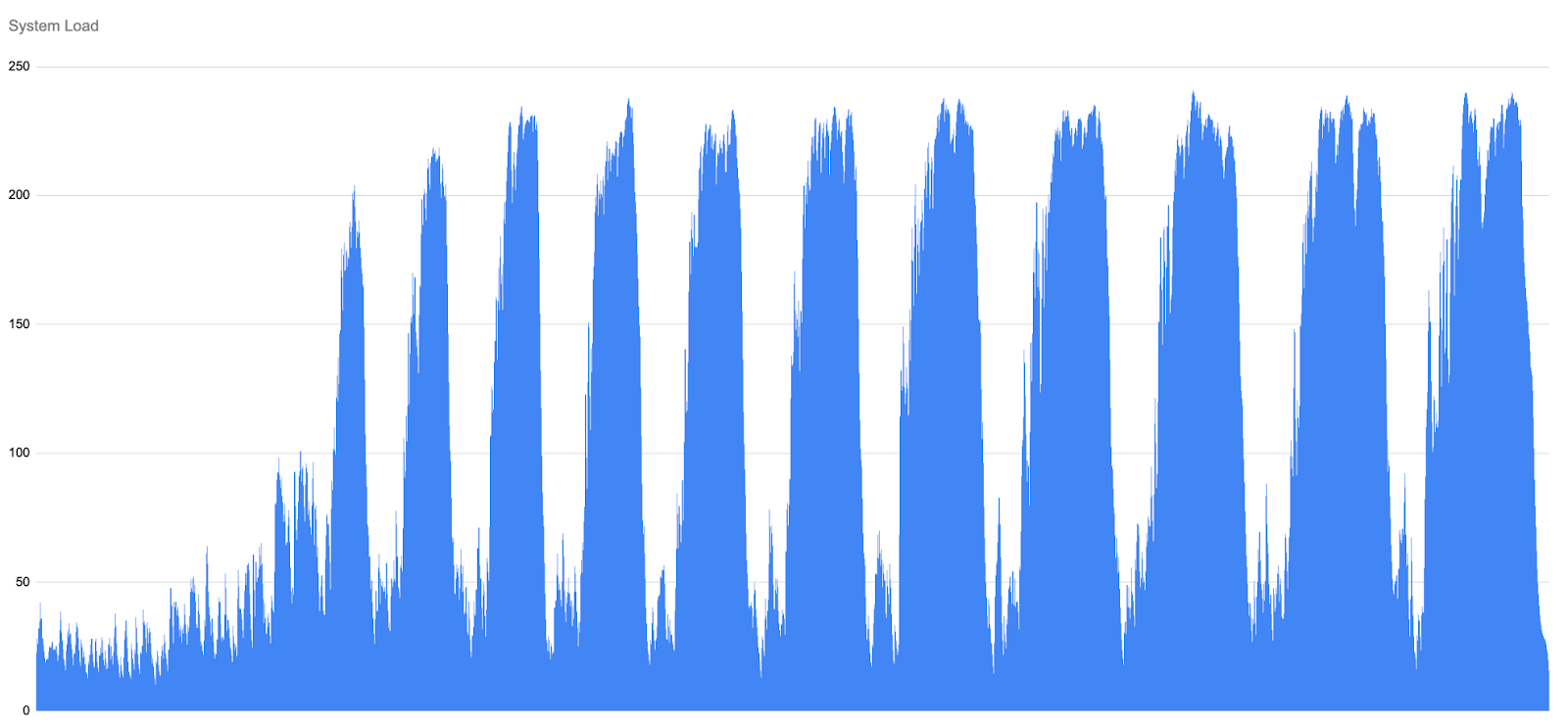
GC does eventually repack objects, but the system-load graph shows a delayed saw-tooth pattern: each GC cycle briefly relieves pressure, then load builds again as new work accumulates, with progressively higher peaks as as GC executions become so expensive that they can no longer keep pace with incoming traffic.
Key observations:
Temporal instability: The saw‑tooth pattern leads to oscillating performance. Users see periods of good throughput immediately after GC, followed by worsening latencies until the next GC fires. This instability is visible even when the average throughput remains high.
GC cost escalation: Each successive GC run takes longer because the repository is larger and more fragmented. The schedule does not adapt, causing GC to run during peak load and further slow down the system.
Partial improvement: Compared with the baseline, rule‑based GC delays the point of collapse. However, it fails to maintain low Counting and SFR times for more than 12 hours and introduces performance jitter that developers and CI systems will notice.
Alternatives
A natural question at this point is whether alternative strategies, such as geometric repacking, could be used instead of traditional GC.
In practice, when it comes to JGit, which Gerrit relies on, this is not really an option, as geometric repacking is not currently supported.
Even if we tried to run it externally using C Git, it would not integrate well with Gerrit. Packfiles would be replaced abruptly, continuously invalidating JGit caches, and the resulting layout would not be ideal, as C Git does not separate heads and non-heads packfiles.
For these reasons, we focused on approaches that are commonly used in practice and that fit naturally within Gerrit’s execution model and repository structure.
GHS: System load stabiliser and performance accelerator
The GHS approach uses an intelligent agent to monitor repository metrics and decide when any action is required. At each decision point, the agent can either do nothing, create bitmaps, repack references, prune packfiles, and perform other actions. A reinforcement‑learning reward function balances the cost of maintenance against the benefit of reducing future SFR times. As a result, GHS tends to perform less-expensive actions early and avoids the expensive full GCs.
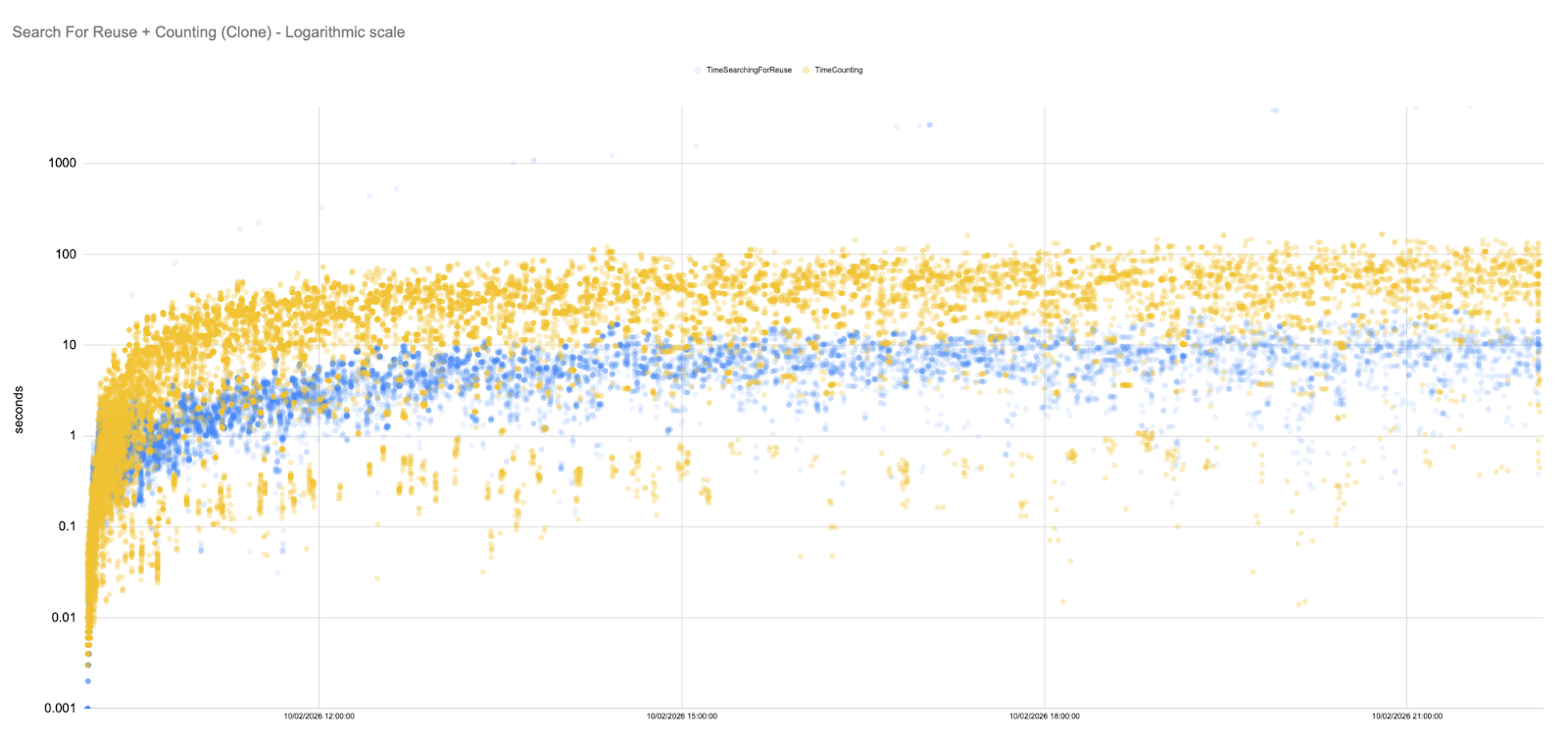
Our GHS runs exhibit remarkably stable SFR and Counting times. The scatter plot below shows most samples concentrated below 500 ms, with only a handful of outliers.
In fact, for long stretches of the simulation, the SFR latencies hover in the 5–50 ms range. To fully appreciate this, it is useful to plot the data on a logarithmic scale.
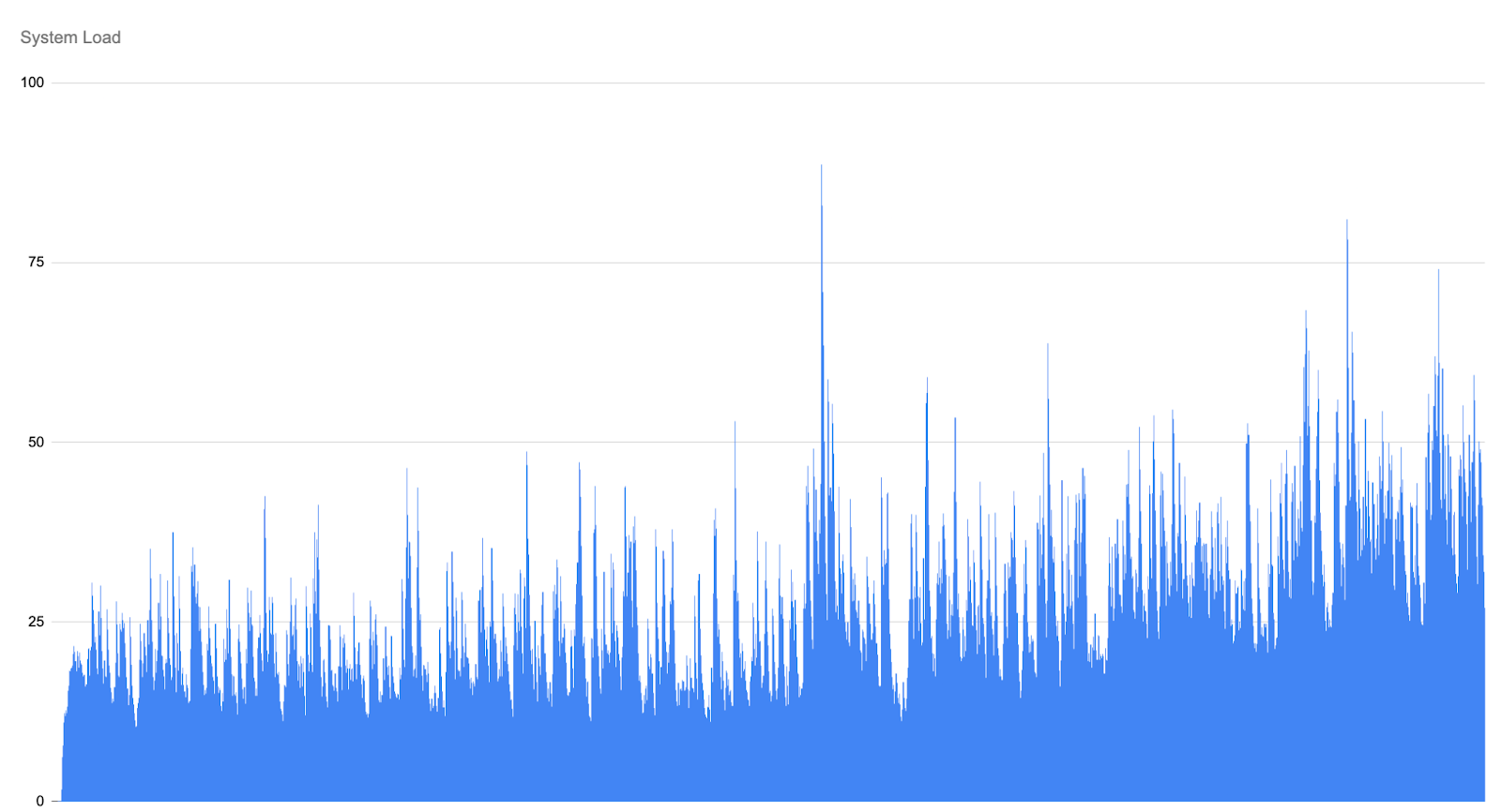
System‑load graphs remain flat, indicating that maintenance tasks performed by GHS are highly optimised and far less expensive than a full GC cycle.
Key observations:
Flat trend line: Unlike the baseline and rule‑based scenarios, the Counting and SFR metrics under GHS do not grow super‑linearly. Minor fluctuations are present, but the overall trend is remarkably flat.
Proactive actions: GHS performs frequent, inexpensive, locally optimal tasks, avoiding unnecessary overhead and maintaining high read and write throughputs at minimal cost.
Learning and improvement: The agent learns from experience. Chosen actions change as the agent converges on an optimal policy.
Comparative Insights
The three maintenance strategies yield starkly different outcomes.
Without GC, SFR and Counting latencies climb linearly, and the repository becomes unusable after a few hours. Rule‑based GC delays but does not prevent this collapse; it introduces periodic relief but suffers from growing GC costs and oscillating performance.
Not only does GHS keep SFR and Counting times low and stable across the entire 12‑hour simulation, but it does so by leaning much less on system load.
In practical terms, these findings suggest that adaptive optimisations are essential for large Git-based installations: scheduled GC can help, but must be complemented with cheaper, more frequent actions.
GHS is uniquely positioned to decide when such actions are beneficial, especially as modern development workflows, including AI-assisted coding and automated tooling, continue to increase the volume and frequency of changes flowing into repositories.
Conclusion
Search‑for‑reuse and Counting are critical metrics for understanding Git repository health.
Our 12‑hour stress tests show that no maintenance leads to runaway SFR and Counting latencies and system collapse, while periodic GC offers only temporary relief and introduces instability.
In contrast, GHS employs reinforcement‑learning and a palette of actions to keep the repository efficient. The result is a dramatic reduction in SFR and Counting latencies, keeping them as efficient as possible, and sustained throughput throughout the simulation. Importantly, GHS achieves these gains while consuming far less CPU and memory: system‑load graphs remain flat, the agent helps reduce the need for expensive full-GC runs, and the server never approaches the overload thresholds seen in the baseline and rule‑based scenarios.
This lighter footprint translates into lower infrastructure cost, fewer cores and smaller memory footprints are needed to support the same workload, while simultaneously improving user experience. For DevOps engineers and Git administrators, these results highlight the importance of intelligent, adaptive acceleration strategies. Deploying a tool like GHS can transform the developer experience from unpredictable slowdowns to consistent, high‑performance operations, and do so economically by minimising resource consumption.
Performance has always been one of the core features of Gerrit, after all this was a topic very dear to the project’s co-founder, Shawn Pearce, who always use to say “Performance is a feature”. It is no surprise then that when there is a plugin that allows you to speed up some of the most important features of Gerrit, like clones/fetches, change creation, change submission, ACL evaluation, it catches our attention. So let’s dive into how Cached-RefDB works and how it achieves such incredible results.
Before we get started though, you can also watch the talk I gave on this topic at:
The Issue
Our story starts with the apparently unrelated Change 260992. Digging back all the way to 2020, in this change our colleagues at Google highlight something that is crucially important:
Data on googlesource.com suggests that we spend a significant amount of time loading accounts from NoteDb. This is true for all Gerrit installations, but especially for distributed setups or setups that restart often.
Since Gerrit 3.x introduced NoteDB, pretty much any operation in Gerrit needs to read or write to disk, since everything is stored in Git itself. This can become extremely heavy; therefore, it becomes highly crucial to cache code-paths that are executed often. And very few code paths are executed more often than accessing a user’s details, which include ACLs, which are essential for deciding what operations the user can perform anywhere in the platform.
As part of said change, Google introduced an extremely interesting approach to cache-eviction where, by virtue of adding the ObjectId to the cache key, cache entries would be automatically invalidated when an account is updated, without the need to explicitly propagate cache evictions, which comes at a significant cost.
To do this, they modified the AccountCacheImpl to look like this:
public ImmutableMap<Account.Id, AccountState> get(Collection<Account.Id> accountIds) {
We can see here that, for every operation, to determine whether the cache entry corresponds to the latest state on disk, we actually need to open the repository and retrieve the exact ref for that user to find the ObjectId.
This immediately raises a few eyebrows. In order to not access the disk, we’re constantly accessing the disk, a bit of a nonsense, isn’t it?
The whole background to this can be found at Issue 40014084, but for the purposes of this conversation, what we care about is Luca’s comment where he reports a huge performance regression, where the Accounts Cache latency goes from 0.000196ms (a number that I even struggle to pronunce) to 0.5ms, a huge equivalent to 2600 times slower, you read that right: 2600 TIMES SLOWER! Mad!
To further compound on the issue, as mentioned before, this cache is used almost everywhere in Gerrit, with simple installations easily calling this method thousands of times per second. 2600x slower, thousands of times over, and the recipe for disaster is complete.
How was this not caught before?
One might wonder how Google didn’t catch such a performance regression in their performance testing, and that would be a very fair question. Well, turns out that in their internal JGit installation, these calls were actually cached at the repository level, so whenever we open the repository and call exactRef, they weren’t really interacting with the disk but with a cache layer that non-googlers didn’t have access to.
This poses the question: What are non-googlers supposed to do to get around this issue?
Cached-RefDB – The solution
The answer to this question is, in my opinion anyway, Cached-RefDb.
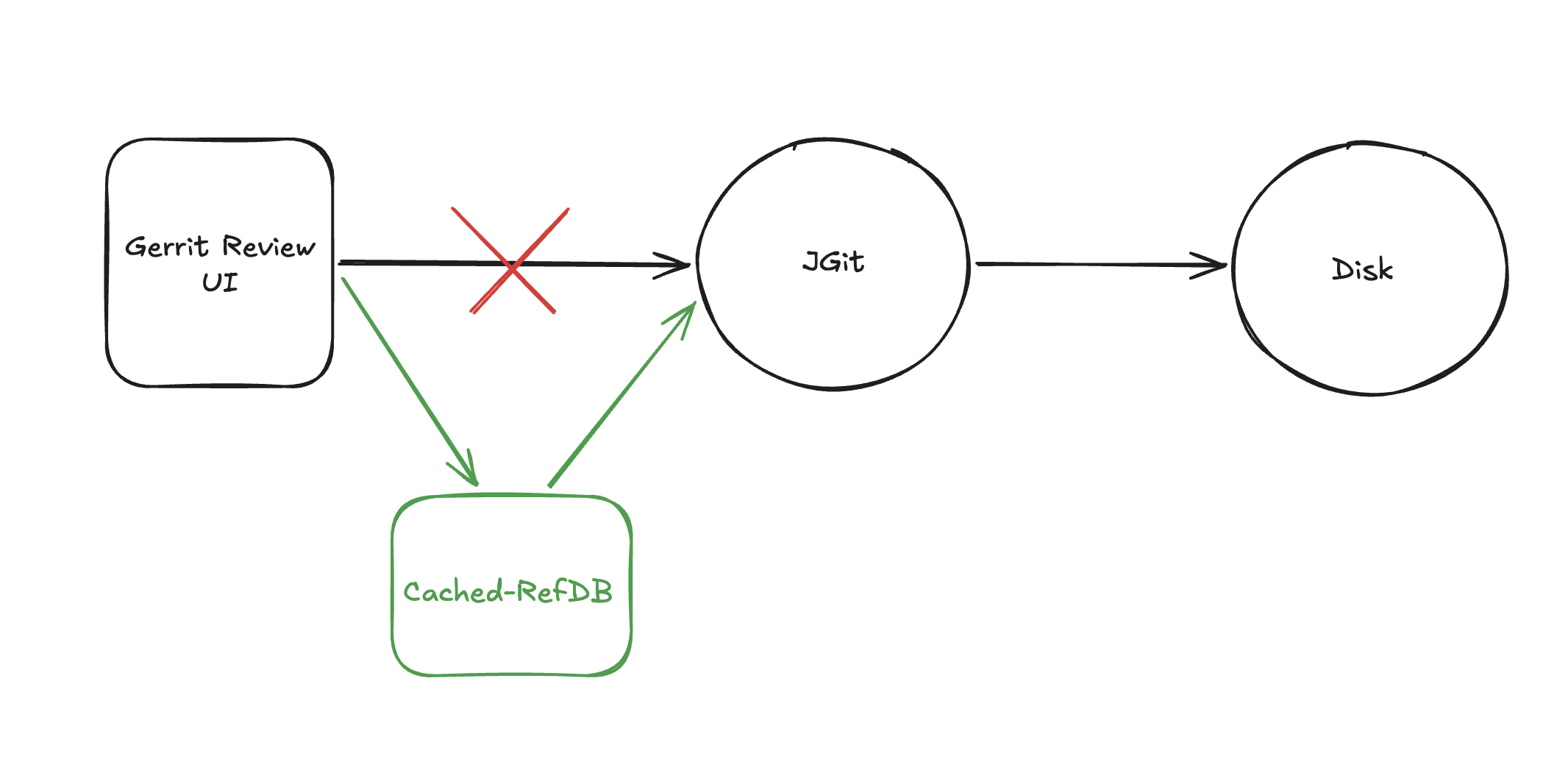
What this plugin does is extremely simple in concept: it makes calls to the RefDatabase and injects a cache layer before we go to actually check on disk. If we found the element in the cache, great; otherwise, we delegate to the provided implementation of the RefDatabase, incredibly simple in concept, but incredibly powerful in practice. And, to be clear, as mentioned above, this doesn’t just impact Accounts cache access; virtually any operation can benefit from using this new cache layer, including your CI/CD clones and fetches, as well as your developers’ pushes and change submissions. CRAZY, CRAZY GAINS!
As the injected cache is by all means like any other Gerrit cache, the eviction is handled seamlessly by Gerrit’s internal mechanism’s.
Let the numbers speak – Benchmarking
Let’s now see how a vanilla Gerrit compares to a Gerrit with cached-refdb installed.
First: the testing field
We used our local testing environment, the same one we use when we need to really push Gerrit. It’s composed of a physical machine with: – 128 CPUs -128GB of Memory – Intel(R) Xeon(R) Gold 6438Y+ processors – local SSD disk.
For the repository, the primary metric we’re interested in is the number of refs. We used a repository with 1.5 million refs, big, but not huge. If your repository has very few refs and many large binary objects, you’re unlikely to see the kind of performance improvements I’m about to present.
And finally the config.
For the non-cached-refdb scenario, we first used a plain-vanilla Gerrit, whereas in the cached-refdb scenario it’s crucial to set core.usePerRequestRefCache = false in your etc/gerrit.config. This is because this setting introduces a per-thread, in-memory cache for each operation which causes scenarios where Gerrit can go into split-brain even if running a single node installation. At GerritForge we usually recommend disabling this setting anyway, but as it does provide a performance boost, even if at the cost of potentially serious issues, and we wanted to test against the fastest vanilla Gerrit that we could, we leaned towards enabling it for the purpose of the test.
Another important setting to look at is in your jgit.config, with:
[core]
trustFolderStats=always (default)(DEPRECATED - now trustStat)
We’ll revisit the meaning of this setting in a minute, but for now, it’s sufficient to know that this is the default setting and also the one that guarantees the best performance from a jgit perspective; more on this later.
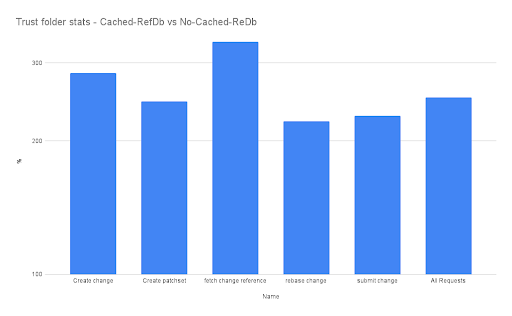
In this graph, we see how much quicker, in percentage, Gerrit with Cached-RefDB is compared to vanilla Gerrit. We can see how essential user journeys can be to gain a massive advantage from using cached-refdb, improving performance by 2 to 3 times! This is an enormous increase in a world where we often aim for a few percentage point improvements, suddenly delivering 2 to 3 times the performance is HUGE.
But what about resource utilization I hear you ask?
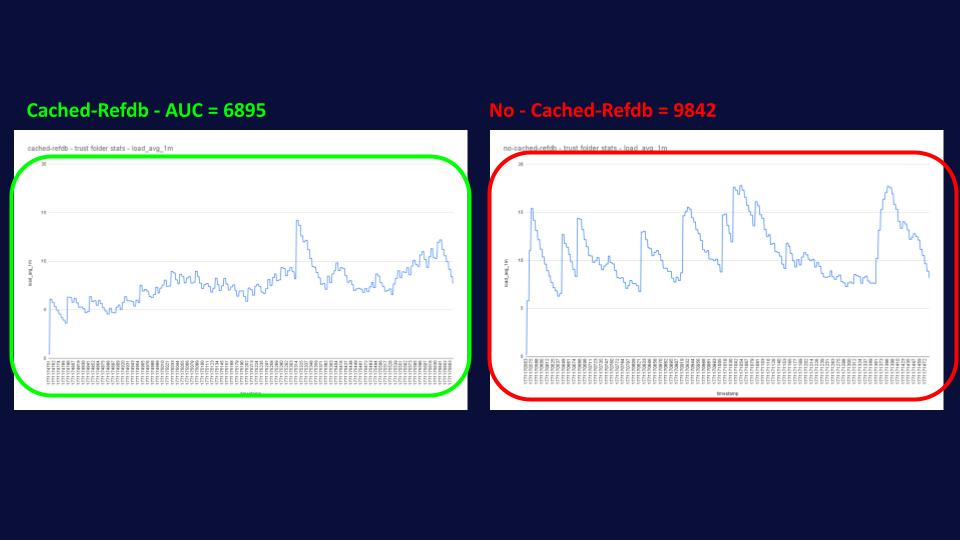
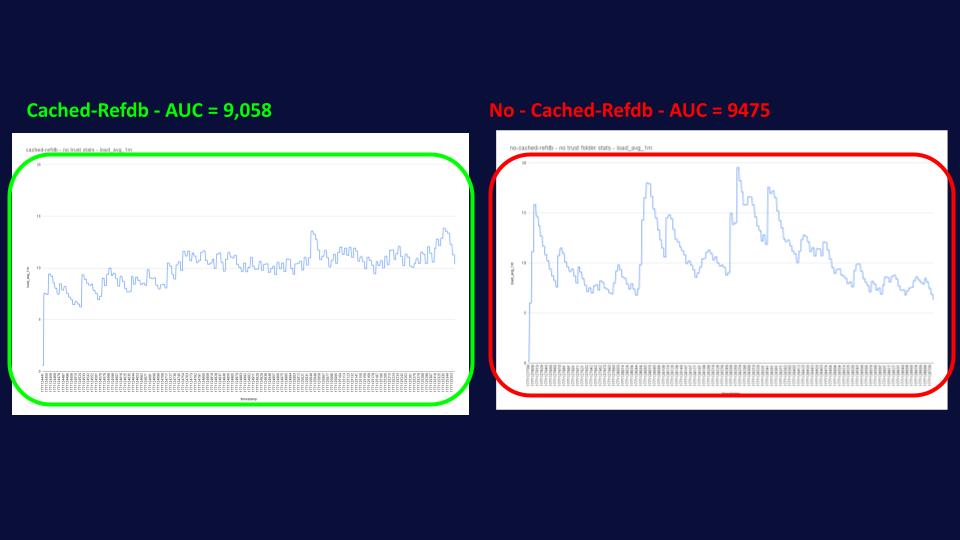
Well, that’s where it gets really interesting, as you can see from the graph below, cached-refdb delivers this massive performance boost, while using fewer resources and in a more predictable way, reducing spikes in system load and helping admins with their capacity planning.
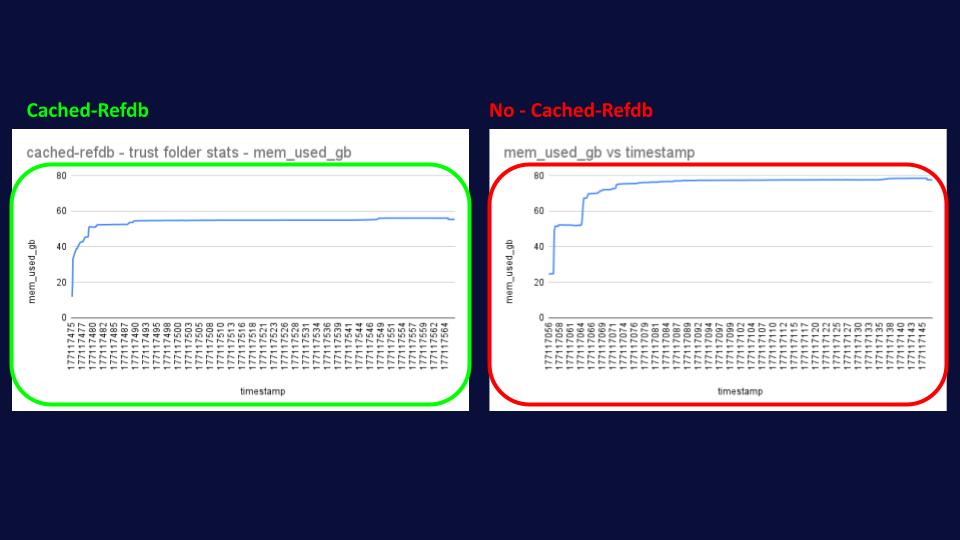
As if all of the above wasn’t enough, we also observed a HUGE reduction in memory utilization of up to 25%, going from 80GB in the no-cached-refdb simulation to only 60GB in the cached refdb. This might sound a little bit counterintuitive, as we’re allocating more memory for cached-refdb as we need to store an extra cache; however, what’s happening behind the scenes is that without cached-refdb, JGit needs to allocate and deallocate objects much more
frequently, causing greater fragmentation in the heap memory that clearly Java isn’t able to GC as efficiently as in the other scenario.
But let’s go back to our configs, in particular `trustFolderStats`, I promised you more details, and here they are. This setting controls when JGit reloads files from disk. By setting it to always, we tell JGit to assume the stats in memory for the file are correct and not reopen it. That’s fine for a single-node installation, since no other processes should be modifying the files on disk, so JGit can assume the latest information it has for them is the current one. When we move to highly available installations, though,
In particular, the high-availability plugin, this assumption no longer holds true, as multiple Gerrit nodes are writing to disk without the others knowing.
This means that if you’re running Gerrit with a high-availability setup, it’s imperative that you have the following configuration in your jgit.config:
[core]
trustFolderStats=false (DEPRECATED - now trustStat)
trustPackedRefsStat=after_open
This tells JGit to never assume that the file hasn’t changed and always go and read it from disk, unless it’s trying to read the packed-refs file. In that case, it can trust that it’s the up-to-date version while it keeps it open, but if it closes it, it’ll need to go and re-read it. That’s because operations on the packed-ref are locking; therefore, there’s less risk of another process modifying it while you hold the lock.
Overall, these settings can have huge performance impacts on Gerrit, potentially seriously affecting throughput and system load.
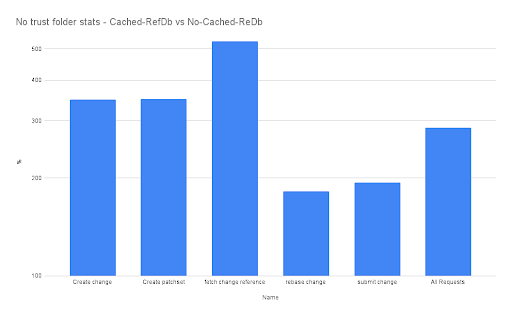
It’s in this scenario that cached-refdb once again shines, helping JGit maintain the same level of disk access as before. In this case, we can see that the difference in latency between the cached-refdb and the vanilla Gerrit with this setting is even greater, with common operations now being 3 to 5 times quicker!
3 TO 5 TIMES! THAT’S HUGE!
And again, we can observe that the system load for Gerrit with cached-refdb hasn’t changed much, while the one without cached-refdb is even a bit more spiky than before.
Regarding memory consumption, as expected, the profile is exactly the same as above, with cached-refdb using 25% less memory than its counterpart.
Conclusion
All in all, cached-refdb is a relatively small plugin, especially given the HUGE performance boost it can provide for your Gerrit installation. It’s available for Gerrit 3.2 and later, so it can cater to a wide range of modern Gerrit versions.
We encourage you to try this out. You can download the plugin from the CI at [1]. Please note that if you use it with Gerrit 3.13+ and your company’s revenue exceeds $5 million, a license from GerritForge is required. You can get in touch at sales@gerritforge.com to know more.
GerritHub has been steadily growing, with more teams choosing Gerrit-based workflows. With a larger and more diverse set of projects using the platform every day, it becomes increasingly important to keep the service ad-free, open and fair for everyone.
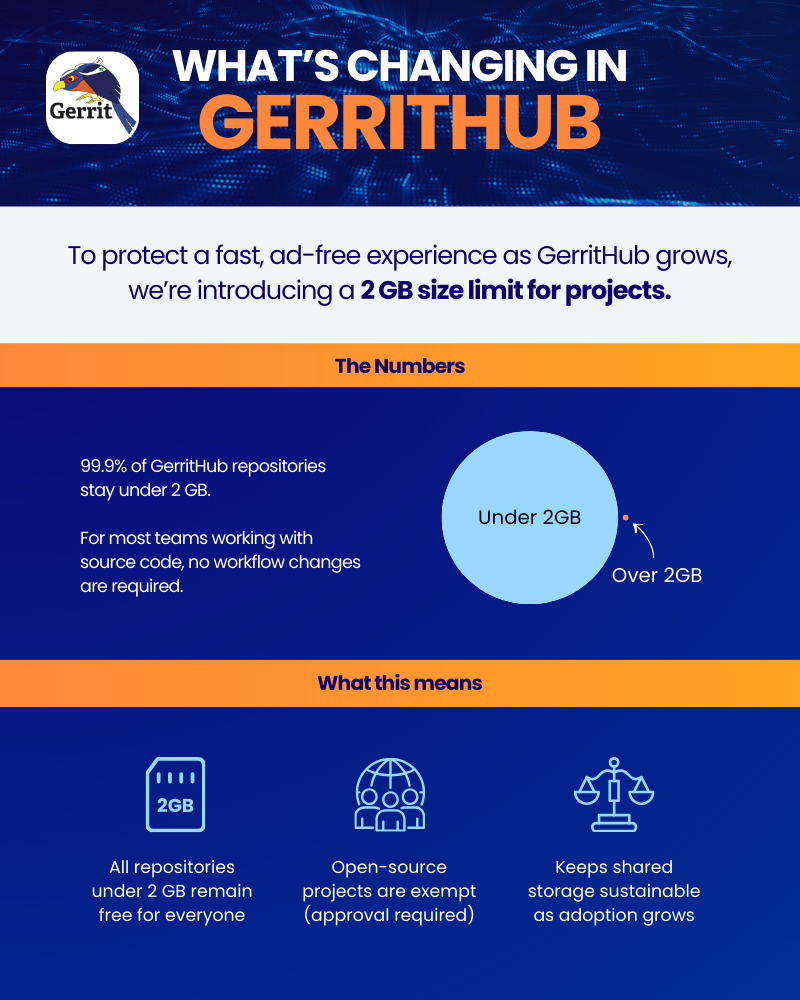
Our analysis shows that less than 0.1% of all the repositories hosted on GerritHub exceeds the 2 GB mark, therefore to ensure we can continue providing high-quality, free hosting for the vast majority of our community, we are introducing a disk size limit for projects on GerritHub. This allows us to guarantee that all repositories under 2 GB remain free for everyone as we scale up the storage capabilities.
Please note that the 2GB limit will not apply to open-source projects, however, they’ll be required to reach out to us for explicit approval.
What does this mean in practice? Repositories imported from GitHub that exceed the 2 GB limit will fail the import into GerritHub, and new pushes that would grow an existing project beyond that threshold will be rejected with a clear, helpful error message explaining why, as follows:
➜ test git:(580cdcf) git push origin HEAD:refs/for/master
...
fatal: Unpack error, check server log
error: remote unpack failed: error Exceeded quota request for project repo/test. Maximum 2GB allowed. If you need a higher limit, reach out to us at GerritForge.com/contact to discuss your needs.
To https://review.gerrithub.io/repo/test
! [remote rejected] HEAD -> refs/for/master (n/a (unpacker error))
error: failed to push some refs to 'https://review.gerrithub.io/repo/test'
This helps keep storage usage under control and ensures that everyone gets a fair use of the common GerritHub.io platform. For most users, especially those working primarily with source code, this limit is generous and should not require any changes to everyday workflows.
This update reflects the healthy and continuous adoption of GerritHub by the community. As usage increases, small operational improvements like this one help us maintain a stable and welcoming environment for all users. We are thankful to everyone who relies on GerritHub for code review and collaboration, and we remain committed to improving the service as it grows. If you require a higher limit than this, please feel free to reach out to us at GerritForge.com/contact to discuss your needs and how we can help you further.
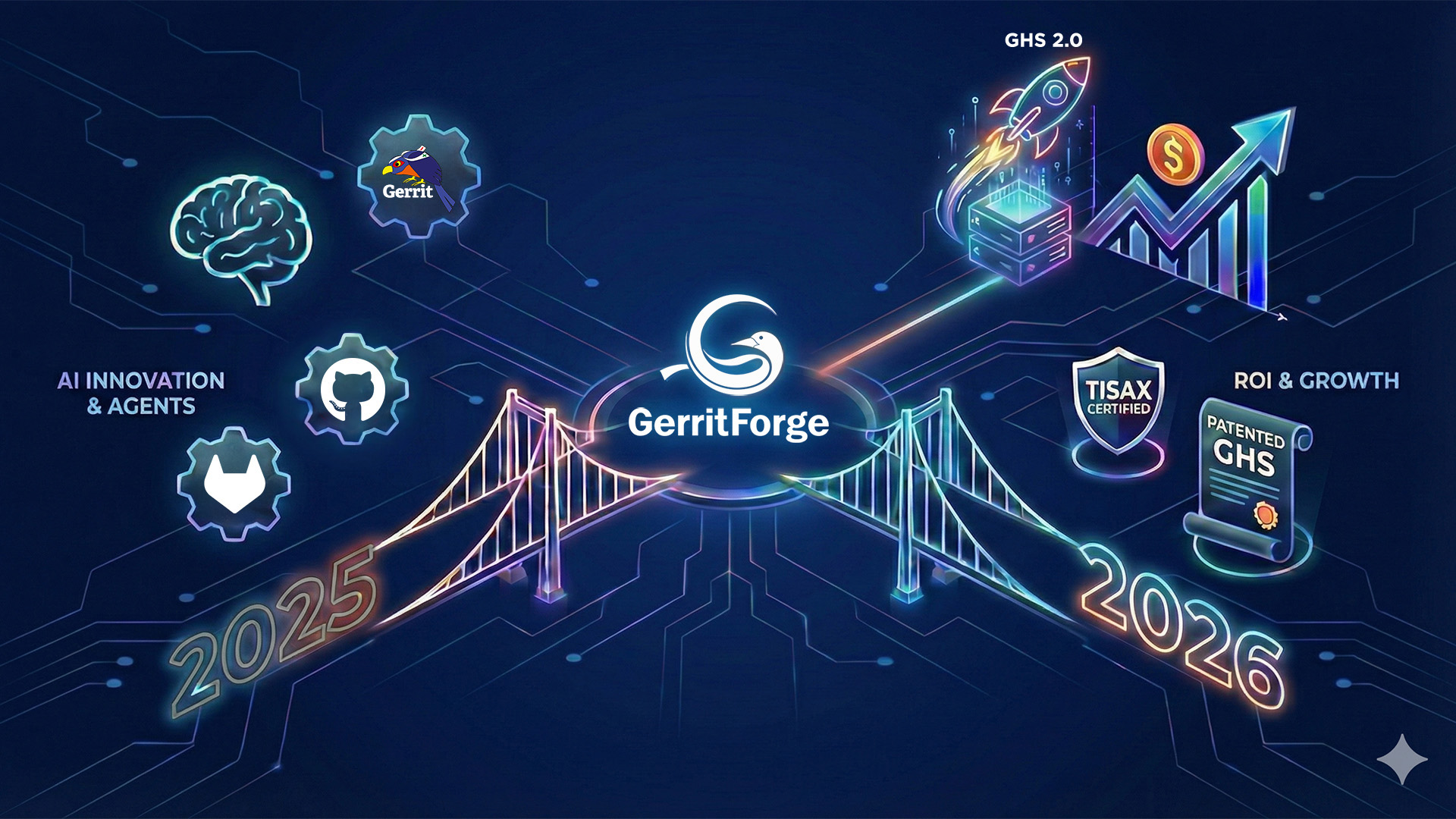
In 2025, GerritForge solidified its leadership in the Git ecosystem by securing TISAX certification and patenting our Git At High Speed (GHS) technology, proving our commitment to enterprise-grade security and performance. However, the rapid industry shift toward “Agentic Software Development” has created a critical challenge: current infrastructures are struggling to convert high-volume AI code generation into measurable business value, often leading to repository slowdowns and inflated costs rather than faster releases.
Our 2026 roadmap directly addresses this “ROI Gap” through a new “Assess, Measure, Improve” framework. We are launching GHS 2.0 to scale Git specifically for AI traffic, introducing server-side autonomous agents via the Gerrit Model Context Protocol (MCP), and deploying cross-platform metrics to monitor Git repository health in real-time. This strategy ensures your SDLC infrastructure not only withstands the load of AI agents but also integrates them securely to deliver the efficiency your investments demand.
2025 in Numbers
Our commitment to the open-source community and our customers is best reflected in the sheer volume of work our team has accomplished over the past 12 months.
Changes contributions to the Gerrit ecosystem
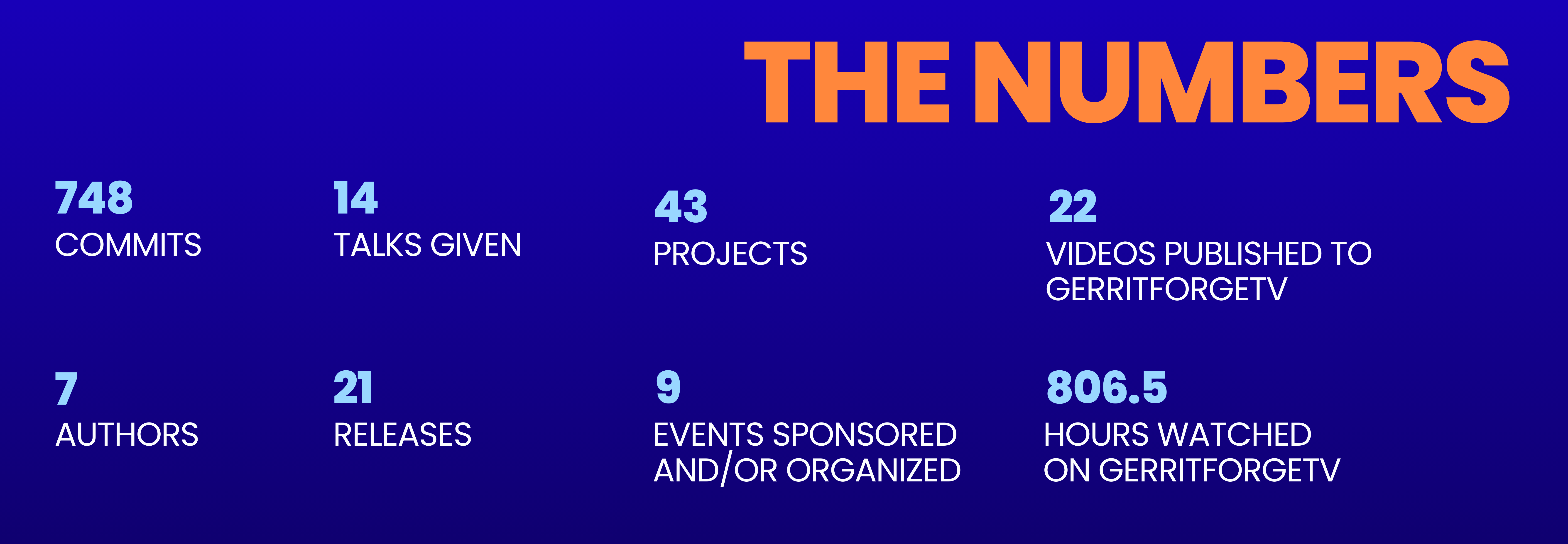
748 commits across 43 projects, driving the Gerrit project forward.
7 authors contributing consistently to core and plugin development.
21 releases delivered, ensuring stability and new features for our users.
14 talks given at international conferences, sharing our expertise with the global dev community.
9 GerritMeets & Conferences sponsored or organized, fostering a vibrant local and global community.
GerritForgeTV: the live stream of the gerrit community
Our YouTube channel keeps being a central knowledge and stage for showcasing the most recent innovations for Gerrit administrators and developers. This year was no exception; we kept updating it with new and engaging content and keeping it relevant to the latest trends in the Git and VCS world.
22 new videos published, staging key international speakers from some of the largest companies in the world, including Google, NVIDIA, Qualcomm and GitLab.
126,483 impressions in the last 12 months.
807 total watch hours, proving that the demand and interest for high-quality Git and Gerrit technical information and innovation is stronger than ever.
Major Successes & Milestones
GHS: From Vision to Patented Standard
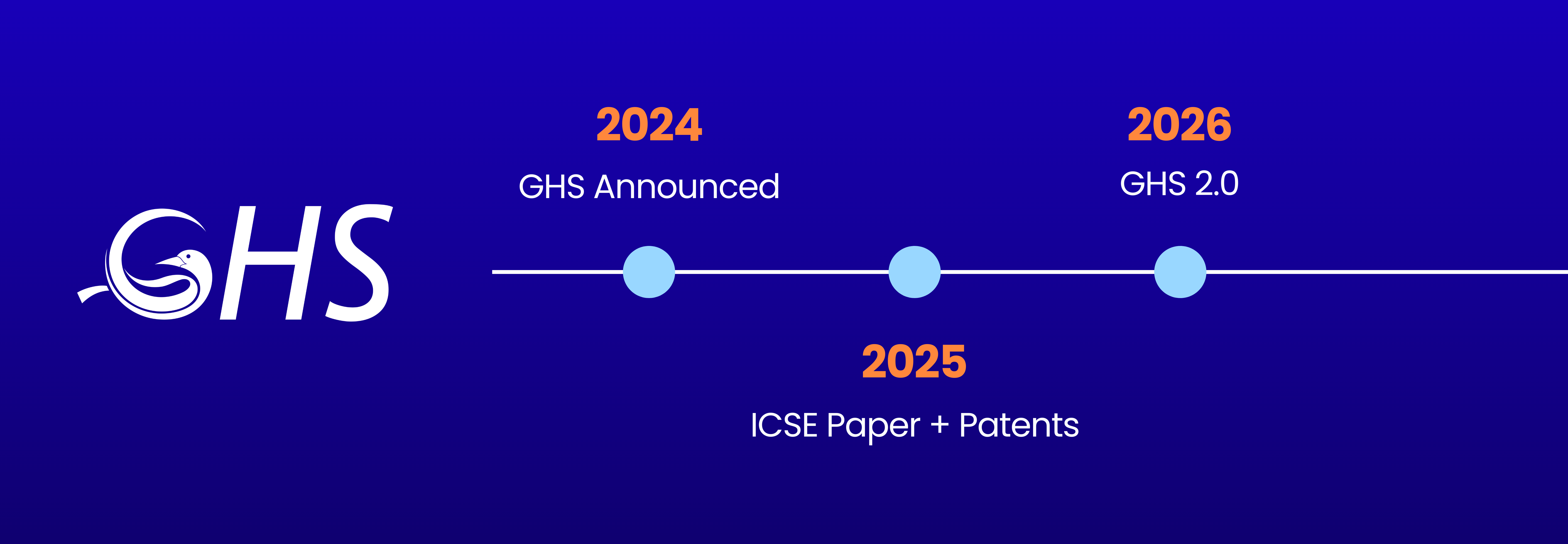
In 2024, we announced Git At High Speed (GHS); one year later, we delivered on the initial promise of groundbreaking Git performance speedups and brought Git performance to the next level. We are proud to announce that GHS has now been officially submitted for US and EU patents. Furthermore, our commitment to scientific rigor led us to present the GHS Paper at ICSE 2025, where it was recognized by the global Computer Science Academic Community as a significant advancement in improving Git SCM performance.
Gerrit community Growth and stewarship
The GerritForge team remains central to the Gerrit project. This year, our team member Ponch was elected as a Maintainer, bringing the total to five GerritForge’s Gerrit Maintainers, on top of that Luca was re-elected to the engineering steering committee, and Dani to the community managers. GerritForge’s deep involvement with the Gerrit Community ensures that our customers’ needs are always represented at the core of the project’s development.
Security and Compliance: TISAX Certification
In 2025, we reached a significant milestone in enterprise trust by achieving TISAX certification, which is key for every software supplier to the modern Software-Defined Vehicles industry. For all industries, security and compliance are non-negotiable. Achieving TISAX certification represents our commitment to the highest levels of these standards.
Product Evolution: Gerrit BSL
For 17 years, GerritForge has operated on a 100% open source model. However, the landscape of software development is changing. Cyber threats and supply chain security compliance require a level of certification and long-term maintenance that the pure open-source model struggles to address on its own.
We introduced Gerrit Enterprise, a subscription carefully designed to shake up the Gerrit ecosystem:
The “Open-Core” Vision: We have separated the “Gerrit Core”—which remains 100% open source under Apache 2.0—from our high-performance enterprise plugins, which are released under BSL.
What is BSL? The Business Source License is a “source-available” model. It allows for public viewing and non-production use, but requires a license for commercial use.
Commitment to release as open source: An essential part of our BSL is the fact that after 5 years, any BSL-licensed code from GerritForge automatically converts to Apache 2.0. This ensures that while we fund today’s innovation, the community eventually benefits too.
This move will provide a sustainable path to continue investing in the Gerrit core platform, its ecosystem, and the community events we all rely on to keep the project alive and thriving.
We also had the most successful GerritMeets to date, dedicated to the Code Reviews in the Age of AI, hosted by Google in Munich, reaffirming Gerrit’s vital role in large-scale professional software development and its integration with the latest AI technologies to improve and accelerate the entire SDLC.
Paving the Way with AI
The future of Gerrit Code Review is happening now. In 2025, Gerrit Code Review v3.13 released a suite of new AI features and tools, including the brand-new MCP (Model Context Protocol) server open-sourced by Google. These tools are the foundation for a new way of interacting with code, paving the way for deeper integrations that make software development and code review faster and smarter.
Looking at 2026: the future is now
All the evolutions we saw across major industries in 2025 are reshaping the landscape of Git and the entire SDLC. The introduction of “Agentic Software Development” has created shockwaves across the industry and changed how we interact with and use these tools.
Using AI chats to vibe-code, cooperating and orchestrating AI Coding Agents, and generating and reviewing code automatically put tremendous strain on all the existing machinery that was never really designed to perform and scale at this rate.
All the major companies in the SDLC are looking at developing and leveraging LLMs in their products, adding the AI vibe to their product lines; however, there is a lot of work to do to make this generational transition to AI really work for everyone.
Productivity vs. Output Gap AI tools provide significant productivity gains in code generation, code review, debugging, and testing; these improvements do not always translate into faster release cycles.
Developers’ Productivity vs. Actual Changes Merged Engineers using AI tools are saving time in some of the repetitive coding tasks, such as prototyping and scaffolding. However, the generated code often gets stuck in the validation queue and does not become a valuable company asset until it is properly merged.
The Promise of High ROI from AI According to a recent Deloitte study, very few AI implementations across the entire SDLC deliver significant ROI. Progress is hard to measure, and the majority of organisations with substantial AI spending still fail to achieve tangible benefits. Only 6% of projects see returns in under 12 months, whilst most will take at least 2 years of continuous investment.
Agentic AI Future vs. Reality Agentic AI has been made possible by increased accessibility to the existing knowledge base and SDLC infrastructure by LLMs and promises a full end-to-end automation. However, only a small fraction of companies started using it, and of those, only 10% are currently realizing significant ROI.
GerritForge bridges the gaps between AI innovations and ROI
Our mission in 2026 is to help all organisations achieve the expected ROI from their AI investments by identifying and filling the gaps that hinder the success of their SDLC implementation.
The way forward is to engage with current and new customers and introduce new technologies and innovations into their existing infrastructure.
Assess, measure, improve, repeat.
We do believe that everyone can make progress and, at the same time, do more with the money they have invested in AI. We are truly believers that data is the only truth that can drive progress forward and on which everything should be based.
Our product plans for 2026 are all based on a smarter way to measure and improve:
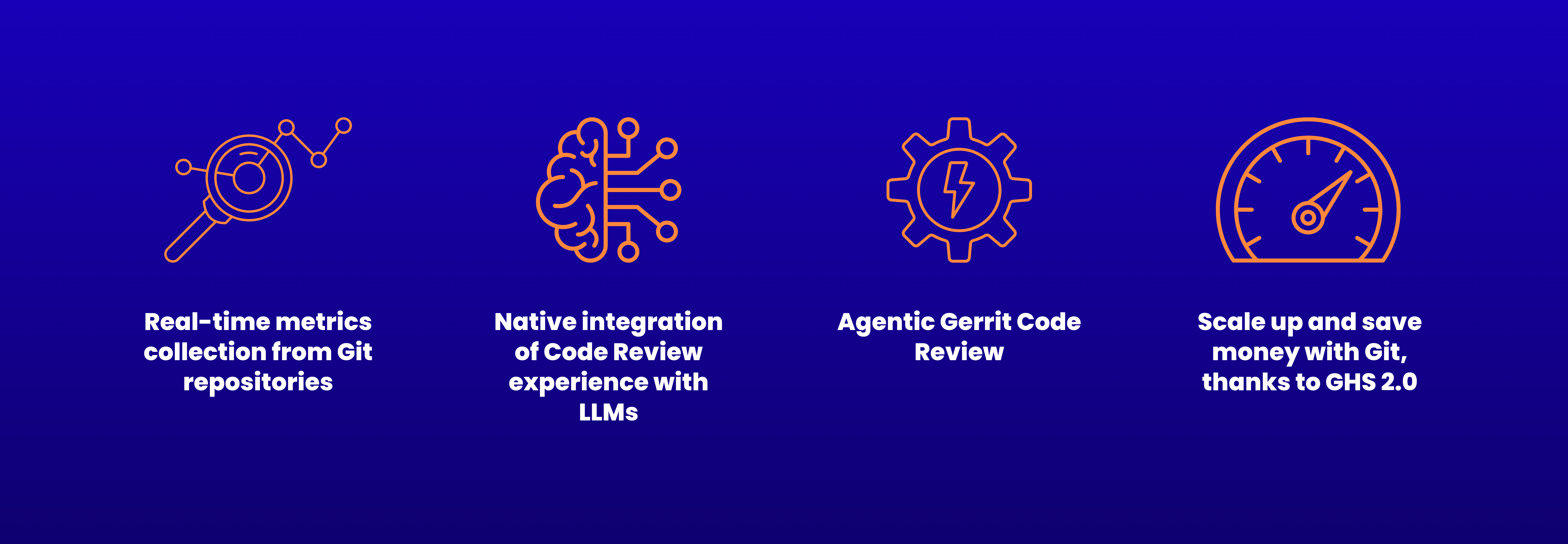
Real-time metrics collection from Git repositories We will introduce a brand-new real-time data collector, based on the 3 years of R&D and investments made on repository performance, published at the ICSE 2025 in Ottawa (CA). The new component will be able to detect and advertise any repository slowdown caused by AI. The component is planned to support GitLab, GitHub Enterprise, Gitea, in addition to Gerrit Code Review, and is extendible to all Git-based SCM systems.
Native integration of Code Review experience with LLMs Gerrit Code Review v3.14, planned to be released in Spring 2026, will introduce the _”AI Chat”_ with any LLMs. GerritForge will take native support to a whole new level, enabling end-to-end communication and integration with Google Gemini, ChatGPT, and many other popular LLMs.
Agentic Gerrit Code Review Gerrit MCP, now Open Source, helps developers improve their client-side integration between Gerrit and LLMs using their own credentials. GerritForge will bring this paradigm to the server-side and enable real-life AI Agents to leverage Gerrit MCP for performing analysis and taking actions autonomously, without sacrificing confidentiality, security, and compliance.
Scale up and save money with Git, thanks to GHS 2.0 GerritForge is bringing its GHS technology to a brand-new level, with all the experience and learnings in understanding the traffic generated by AI Agents. The new 2.0 will bring new modern actions and an improved learning model that will be able to react more accurately and bring system resources and costs into the ROI equation.
The future of Git, Gerrit Code Review, and the entire SDLC is now. AI has accelerated the race for innovation, adding speed to the competition. GerritForge is there with you, helping to endorse it and ensuring the whole pipeline will scale, and you can really achieve the ROI that makes your company stand against the competition.
Thank you to our team, our customers, and the incredible Gerrit community for making 2025 a year to remember. Let’s make 2026 THE ONE to remember as a turning point for the whole project, the Git ecosystem, and the community.
Gerrit Code Review 3.13 has landed, bringing a significant wave of security enhancements, powerful automation, and next-generation AI features designed to streamline your development workflow. This release reflects a healthy, growing open-source project, with a focus on improving both the user experience and the underlying security and configurability of the platform.
Here are the top 6 features and improvements you need to know about in Gerrit 3.13:
Introducing Gerrit Flows for Powerful Automation
Gerrit Flows is a game-changing new concept that introduces automation rules for changes. It is a powerful generalization of the logic previously found in issue tracker plugins (like its-jira), allowing you to define a sequence of actions triggered when specific conditions are met.
This is a pluggable service, meaning that while the core functionality is in Gerrit, community plugins can easily integrate it with systems like Jira, GitHub Issues, or internal tools.
An example could be to add reviewers only after the CI/CD has validated the change, so that the reviewer doesn’t waste time reviewing a change that will ultimately receive a minus one from the build process.
HTTP Auth-Tokens Replace Long-Lived Passwords
In a major security upgrade driven primarily by SAP’s contribution, Gerrit 3.13 deprecates long-lived HTTP passwords in favor of secure, time-limited Authentication Tokens (Auth-Tokens).
This enhancement addresses two long-standing security concerns with previous HTTP passwords:
Expiration: Tokens can now be set to expire, allowing organizations to enforce rotation policies that were previously not enforceable when using Git or the Gerrit REST API over HTTPS.
Multiple Credentials: Users can have more than one token with friendly names, enabling proper credential rotation (like blue/green deployment) for automated scripts without downtime.
Tokens are a full replacement of the legacy HTTP passwords, as the ability to define their maximum lifetime is often a prerequisite for security compliance. Generating a new token credential would automatically remove the deprecated passwords stored in the account’s profile.
Next-Gen AI Assistance: AI prompt generation for Code Review
Gerrit 3.13 firmly steps into the era of AI-assisted development by enabling its foundational AI features by default and introducing native facilities to request help to review incoming changes using an external LLM.
AI-Assisted “Generate Prompt” Feature: This feature was previously released as an experiment and is now enabled by default. It helps users generate rich, explicitly crafted prompts for LLMs (such as Gemini, ChatGPT, or Claude) to assist with code reviews. Users can ask for help with the commit message, request improvements, or check for security concerns.
Dedicated UI for Project Labels and Submit Requirements
Configuration and administration are significantly simplified with the introduction of dedicated UI panels for managing Project Labels and Submit Requirements.
Interactive Project Configuration vs. config file editing: Previously, defining these project settings required cloning and editing the project.config file, either offline or online, a process described as difficult and error-prone for most users.
Submittability Split: This reinforces the modern split where Labels are just votes, and Submit Requirements formally define the logic for a change’s submittability.
End-to-End Group Deletion \o/
This was a long-awaited quality-of-life feature: Gerrit 3.13 provides full end-to-end functionality to delete internal groups directly through the UI and a dedicated REST API.
Administrative Control: In the past, groups, once created, were permanent. Now, administrators can remove them.
Prerequisite: A group cannot be deleted if it is referenced in any ACL (access control list). Admins must first reshape their ACLs before removal. The community has acknowledged that the resulting error message needs improvement to show where the group is referenced.
Significant UI/UX Updates, Including Drag-and-Drop
Gerrit continues its modernization effort, focusing on a cleaner, more efficient user experience, thanks largely to contributions from Paladox/Wikimedia.
Drag-and-Drop Reviewers: Users can now drag and drop reviewers and CCed users to move them between fields, eliminating the annoying multi-step process of removing a user from one list and adding them to the other.
Mobile and Material Updates: The release includes extensive modernization, replacing older components with @material/web, and a redesigned mobile UI for improved navigation.
Gerrit 3.13 By The Numbers
A Community Effort Gerrit 3.13 saw a significant push in core development, reversing the trend of previous releases that focused more heavily on plugins. The number of commits in Core Gerrit went from ~600 in Gerrit 3.12 to over 900 in Gerrit 3.13, showcasing an amazing increase of pace in the development speed of the project, which is great to see.
The open-source health of Gerrit is strong, with no single organization contributing over 50% of the changes. The contributions are spread across many companies, demonstrating the actual value of open source and the good health of the project. Google continues to lead the project from the forefront with almost 40% of commits.
GerritForge’s Contribution
Here at GerritForge, led by maintainer Luca Milanesio, we contributed 28% of the commits to the past 12 months of the Gerrit project contributions! We also, as usual, performed the crucial work required to take the finished code and turn it into a consumable release for the world, including, but not limited to, managing the whole release process and continuing to host the CI/CD pipelines for the project.
This dedicated effort ensures the smooth, professional delivery of every new version of Gerrit.
However, the world it was built for – local repositories and teams, along with simple, human-centric CI/CD pipelines – no longer exists.
Today, codebases are massive. Teams are global. And AI is generating code faster than ever before. Our infrastructure hasn’t kept pace, and traditional Git servers are reaching their limits.
Development Has Outgrown Traditional Git
Software development has exploded in both volume and velocity. According to Archive Market Research, the global software repository market will hit $15 billion in revenue in 2025, growing at 15% annually through 2033. GitHub now hosts over 420 million repositories, supporting more than 100 million developers – each pushing more commits, more frequently, and with more automation than ever.
At the same time, 97% of teams now use AI-assisted tools for vibe-coding, AI-agents for creating PRs and commits, automated AI-code-review, and AI-generated documentation. This results in a massive surge in server traffic, particularly read operations from increased test jobs and automated quality-checking processes, which are literally exploding.
Traditional scaling methods – adding more servers, bigger instances, or wider clusters – simply don’t address the core issue: the world has changed since Git was built 20 years ago.
The Breaking Point for Traditional Git Servers
The symptoms are now familiar to most engineering teams:
Slow performance. Git clones and fetches are taking several minutes or even timing out instead of completing swiftly in a few seconds.
Pipeline delays. CI/CD is waiting for repositories to be available for cloning or fetching, which delays the feedback cycle.
Storage capacity strain. Larger monorepos or multi-repo setups are hitting massive BLOB count and hitting ref limits. When storage is hosted on the Cloud or on shared disks, the increase in the directories and I/O transfer makes Git almost unusable.
Rising costs. Over-provisioned infrastructure is trying (and failing) to keep up. The provisional or elastic filesystem limits increase significantly, bringing operational costs to new heights never seen before, and putting more pressure on the budget.
The Archive Market Research report warns: “The rising complexity of software development necessitates efficient and reliable repositories for managing code, dependencies, and artifacts.”
In other words, the systems we depend on to deliver software are now slowing software down.
Scaling Smarter, Not Harder
At GerritForge, we believe that simply throwing more hardware at the problem is no longer enough: it is Git and its utilisation that need to be smarter. We have been researching on the use of AI for optimising the performance and scalability of repositories for over 3 years and shared our findings with the global scientific community.
That’s why we built GHS, an AI-powered accelerator for Git-based SCMs.
We have simulated and demonstrated how traditional tools would collapse and developed GHS, a brand-new model to overcome the traditional limitations of the Git repositories.
GHS learns how your repositories behave, your access patterns, your CI/CD workflows, and your traffic peaks – and, using reinforcement learning, automatically optimises performance in real-time.
With GHS, the whole development team will experience:
Up to 100× faster Git operations. Clones and fetches keep on completing at raw speed, without slowdowns, timeouts or slack.
Real-time auto-optimisation. The Git repositories are automatically monitored and optimised for speed, without manual operations.
Lower operational costs. The CPU and storage do not suffer from the overload of incoming traffic, delivering better performance on existing hardware. There is no need to scale up the infrastructure and costs massively.
Increased reliability. Git servers remain stable even under extreme load, eliminating the need for emergency restarts or maintenance.
Traditional scaling adds more servers. GHS scales using its sophisticated AI model to get the most out of what you already have.
The Gerrit User Summit 2025 made one thing clear: the era of traditional scaling is coming to an end.
As repositories grow and workflows evolve, the next generation of developer infrastructure must be intelligent, simplified & resilient. AI isn’t replacing developers – it’s augmenting them. But if your Git infrastructure can’t keep pace with this new level of activity, your entire SDLC pipeline will suffer.
2025 marks a turning point for software delivery. Traditional Git servers can’t keep up, but that doesn’t mean your team can’t. Because in modern DevOps, speed isn’t just efficiency, it’s a competitive edge.
Slow Git isn’t just annoying – it’s expensive for everyone: developers wait for a CI/CD validation of their changes, SCM admins are wasting their time in fire-fighting SCM slowdown and broken pipelines, IT managers are wasting millions of dollars in CPU and Disk hosting costs.What if your Git operations could be up to 100x faster, and keep up with the new AI-vibe coding landslide of PR and changes?
100x Faster Git, Powered by AI
GHS is an AI-based accelerator for Git SCM that redefines performance:
Up to 100x faster clones and fetches.
CI/CD pipelines that run without SCM barriers.
Adapt automatically to your repository shape and make it faster.
Scale without slowdown even under heavy loads
This isn’t traditional “tuning.” GHS learns your repos and access patterns, then continuously optimises them so your Git server is always running at maximum speed.
How Does GHS Deliver 100x Faster Git?
Measure Everything It collects detailed metrics in realtime on your repositories.
Spot Bottlenecks GHS AI model is trained on recognizing the bottlenecks and take immediate action, before they become a problem
Stay Fast Your Git stays consistently accelerated, not just temporarily boosted.
Why Speed Matters
Developers stop wasting hours on slow fetches and builds.
Release managers push features out faster.
IT leaders reduce infra costs by doing more with less.
Admins no longer fire-fight performance issues.
Every 1% of time saved in Git can add up to days of productivity across a large team. Imagine saving 100x that.
Who Needs 100x Faster Git?
Repositories of all sizes: AI-driven code generation and “vibe-coding” have dramatically accelerated the pace of software delivery.
Enterprises that have adopted the AI-pipeline want that value delivered faster to production.
Any team frustrated with slow CI/CD pipelines.
The GHS Advantage
Transformative speed: not just 2x or 5x faster, but up to 100x
SCM expertise: GerritForge’s decades of enterprise SCM know-how built in.
Proven reliability: Stability and uptime as performance scales.
Get Started Today
You can try GHS free for 30 days and experience the difference for yourself.
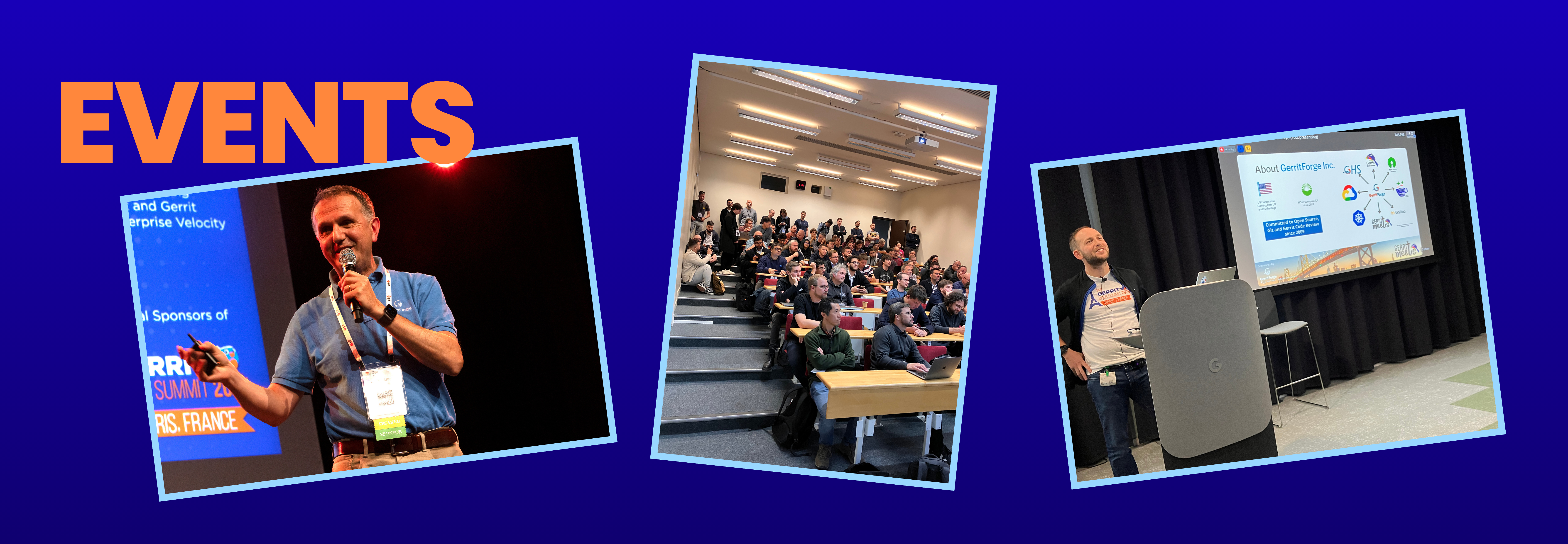
First, a huge thank you to the OpenInfra Foundation for hosting this event in Paris. Their invitation to have the Gerrit User Summit join the rest of the community set the stage for a truly collaborative and impactful gathering.
Paris last weekend wasn’t just a conference; it was a reunion. Fourteen years after the last GitTogether at Google’s Mountain View HQ, the “Git and Gerrit, together again” spirit was electric.
On October 18-19, luminaries from the early days (Scott, Martin, Luca, and many others) reconvened, sharing the floor with the new generation of innovators. The atmosphere was intense, filled with the same collaborative energy of 2011, but focused on a new set of challenges. The core question: how to evolve Git and Gerrit for the next decade of software development, a future dominated by AI, massive scale, and an urgent demand for smarter workflows.
Here are the key dispatches from the summit floor.
A Historic Reunion, A Shared Future
This event was a powerful reminder that the open-source spirit of cross-pollination is alive and well. The discussions were invigorated by the “fresh air” from new-school tools like GitButler and Jujutsu (JJ), which are fundamentally rethinking the developer experience.
In a significant show of industry-wide collaboration, we were delighted to have GitLab actively participating. Patrick’s technical presentation on the status of reftable was a highlight, but his engagement in discussions on collaborative solutions moving forward with the Gerrit community truly set the tone. It’s clear that the challenges ahead are shared by all platforms, and the solutions will be too.
Scaling Git in the Age of AI
The central theme was scale. In this rapidly accelerating AI era, software repositories are growing at an unprecedented rate across all platforms—Gerrit, GitHub, and GitLab alike. This isn’t a linear increase; it’s an explosion, and it’s pushing SCM systems to their breaking point.
The consensus was clear: traditional vertical and horizontal scaling is no longer enough. The community is now in a race to explore new techniques—from the metal up—to improve performance, slash memory usage, and make core Git operations efficient at a scale we’ve never seen before. This summit was a rare chance for maintainers from different ecosystems to align on these shared problems and forge collaborative paths to solutions.
Dispatches from the Front Lines: NVIDIA and Qualcomm
This challenge isn’t theoretical. We heard powerful testimonials from industry giants NVIDIA and Qualcomm, who are on the front lines of the AI revolution.
They shared fascinating and sobering insights into the repository explosion they are actively managing. Their AI workflows—encompassing massive datasets, huge model binaries, and unprecedented CI/CD activity—are generating data on a scale that is stressing even the most robust SCM systems. Their presentations detailed the unique challenges and innovative approaches they are pioneering to tackle this data gravity, providing invaluable real-world context that fueled the summit’s technical deep dives.
Beyond the Pull Request: The Quest for a ‘Commit-First’ World
One of the most passionate debates centered on the developer workflow itself. The wider Git community increasingly recognizes that the traditional, monolithic “pull request” model is ill-suited to the “change-focused” code review that platforms like Gerrit have championed for years.
The benefits of a change-based workflow, cleaner history, better hygiene, and higher-quality atomic changes—are driving a growing interest in standardizing a persistent Change-ID for each commit. This would make structured, atomic reviews a first-class citizen in Git itself. The collaboration at the summit between the Gerrit community, GitButler, JJ, and other Git contributors on defining this standard was a major breakthrough.
This shift is being powered by tools like GitButler and JJ, which are built on a core philosophy: Workflow Over Plumbing. Modifying commits, rebasing, and resolving conflicts remain intimidating hurdles for many developers. The Git command line can be complex and unintuitive. These new tools abstract that complexity away, guiding users through commit management in a way that feels natural. The result is faster iteration, higher confidence, and a far better developer experience.
AI and the Evolving Craft of Code Review
Finally, no technical summit in 2025 would be complete without a deep dive into AI. The arrival of AI-assisted coding is fundamentally shifting the dynamic between author and reviewer.
Engineers at the summit expressed a cautious optimism. On one hand, AI is a powerful tool to accelerate reviews, improve consistency, and bolster safety. On the other, everyone is aware of the trade-offs. Carelessly used, AI-generated code can weaken knowledge sharing, blur IP boundaries, and erode a team’s deep, institutional understanding of its own codebase.
The challenge going forward is not to replace the human in the loop, but to strengthen the craft of collaborative review by integrating AI as a true co-pilot.
A Path to 100x Scale: The GHS Initiative
The most forward-looking discussions at the summit centered on how to achieve the massive scale required. One of the most promising solutions presented was GHS (Git-at-High-Speed). This innovative approach is not just an incremental improvement; it’s a strategic initiative designed to increase SCM throughput by as much as 100x.
The project’s vision is to enable platforms like Gerrit, GitLab, and GitHub Enterprise to handle the explosive repository growth and build traffic generated by modern AI workflows. By re-architecting key components for hyper-scalability, GHS represents a concrete path forward, ensuring that the industry’s most critical SCMs can meet the unprecedented demands of the AI-driven future.
The Road from Paris
The Gerrit User Summit 2025 was more than a look back at the “glorious days.” It was a statement. The Git and Gerrit communities are unified, energized, and actively building the next generation of SCM. The spirit of GItTogether 2011 is back, but this time it’s armed with 14 years of experience and a clear-eyed view of the challenges and opportunities ahead.
I started my business 17 years ago, with a simple mission: spread the use of Git into large enterprises worldwide. The goal was simple and challenging: convincing large companies to trust Git and fill the gaps separating them from migrating from their legacy systems.
The first product that came out of it was, not surprisingly, Git Enterprise. You can still access its official launch YouTube video (https://youtu.be/unJxlD2aopY), which attracted over 5k views and interest. Since then, my blog has been called GitEnterprise. My mission to work with large companies intensified, and I successfully reached my first client, who agreed to abandon Subversion, which was the de facto standard at that time, and adopt Git after seeing my product.
I didn’t know that Google had started with a similar idea for a different purpose: making Git suitable for large enterprises to cooperate on developing the Android Operating System. The Google project was called Gerrit Code Review, inspired by the Gerrit Ritvield Code Review tool built by Guido Van Rossum after he joined Google.
I donated all the code of GitEnterprise to the Gerrit Code Review project and joined the endeavour under the leadership of Shawn Pearce, the Gerrit project founder. Inspired by the new partnership, I also changed the name of my company to GerritForge to represent its new mission.
Fast forward to today, and a lot has changed. Gerrit is a complex ecosystem comprising a central Gerrit with its core plugins and a constellation of 200+ plugins created by a universe of over 800 contributors. GerritForge has also grown and started expanding to new countries, opening an HQ in Sunnyvale, California. After the passing of Shawn Pearce in 2018, who died from lung cancer, we also took over the management of the global community events and local meetups, to serve the need of coordinating and fostering collaboration amongst contributors and users worldwide. We owe it to honour Shawn’s legacy to make his project successful. He used to call Gerrit Code Review his “130% Google side-project”, as it was more of a mission than a $DAY_JOB for him.
The 100% pure Open-Source model I adopted over 17 years ago must be upgraded to tackle the new challenges of managing and supporting a larger organization and community, and ensuring that it will continue to innovate and evolve in the years to come.
Re-licensing GerritForge plugins
GerritForge has helped many organizations worldwide get the most out of Gerrit Code Review and benefit from a 100% Open-Source business model while relying on rock-solid Enterprise Support with quality gates, longer-term maintenance, and strict SLAs.
However, the marketplace is evolving, and fewer companies are willing to invest in pure 100% Open-Source communities. On the other hand, the recent threats from Cybercriminals targeting the supply chain have driven Enterprises to request a higher level of software and supplier certification, which may interfere with a 100% pure Open-Source contribution model.
After exploring many other options, including joining software foundations or traditional contracting, I have decided to switch from a pure Apache 2.0 Open-Source to a mixed Open-Core contribution model for creating a rock-solid Gerrit distribution that can satisfy the more stringent requirements of certification and compliance.
I have called this new software Gerrit Enterprise to avoid confusion with the Gerrit core, which remains 100% Open-Source.
GerritForge confirms its commitment to the Gerrit core and core-plugins Open-Source contributions under the current AOSP Apache 2.0 license. Some of the plugins developed almost exclusively by GerritForge will continue to be developed as a Commercial Product with a new software licensing model.
To explain the re-licensing policy with a formula: Gerrit Enterprise [Commercial Product] = Gerrit Core [Open-Source Apache 2.0] + GerritForge plugins [Commercial Product].
The licensing model we have chosen is called “Business Software License”, aka BSL.
What is BSL, and what does it mean
The term BSL or “BSL license” was used for the first time by Cockroach Labs (the creators of CockroachDB) back in 2019. “BSL license” most commonly refers to the Business Source License. This source-available license allows for public viewing and non-production use of source code but restricts commercial or production use unless a specific “additional use grant” is provided by the licensor. After a predetermined period, the BSL automatically converts to a fully Open-Source license. This model balances software developers’ need for revenue with the benefits of Open-Source, making software source-available while ensuring it eventually becomes Open-Source.
In a nutshell, the GerritForge plugins released under BSL will have more restrictions compared to the current Apache 2.0 Open-Source:
The requirement to receive a formal BSL License by GerritForge.
The Software License will be FREE of charge for small businesses up to $5M annual revenue, non-profit organizations, and non-productive environments.
Does not allow bundling, reselling, or reusing in other products and services without the written consent of GerritForge
All contributors to the plugins under BSL will have to sign a specific CLA with GerritForge
The source code cannot be modified, fully or in part, or reused in source or binary form in any other Open-Source project before the expiration of the BSL
After 5 years of the GerritForge’s plugins released date under BSL, the code will be automatically released as Apache 2.0 to the Gerrit-Review main repository.
The BSL model allows us to continue to develop our plugins in the Open and support the current versions under Apache 2.0, but it will ensure that we are in control of the way the software is certified, distributed, and guaranteed to all the users who benefit from it.
This initiative fosters a virtuous cycle of mutual benefit. The support from companies adopting Gerrit and GerritForge plugins will directly fuel the community, allowing us to reinvest in core software development, key summits, and local meetups, ensuring the ecosystem thrives.
Which GerritForge plugins are going to be under BSL?
The plugins chosen to be converted to a BSL license are the ones that are developed and maintained by GerritForge for at least 80% of the code in the past 24 months.
Also, GerritForge has decided to leave as Open-Source under the Apache 2.0 license the ones that are widely used by the community or reused in other projects.
The major plugins involved in the re-licensing as BSL are:
Gerrit Multi-Site, with its associated components, Kafka/Kinesis/PubSub brokers, Zookeeper/DynamoDb refdb, Healthcheck-Enterprise, and Websession broker
Pull-replication plugin
GitHub and Virtualhost plugins, which are the basis of GerritHub.io
Cache-Chroniclemap lib module
Gerrit and Git analytics, including git-repo-metrics
AWS deployment for Gerrit
Other minor plugins may be added at a later time
The re-licensing means that the new development will happen on the GerritForge organisation (https://github.com/gerritforge) on GitHub and GerritHub (https://review.gerrithub.io), and the current master branch will be deprecated on Gerrit-Review.
What happens to the current GerritForge plugins on the stable branches?
GerritForge confirms its commitment to continue supporting all the existing plugins, either from GerritForge or other contributors, on the stable and supported non-EOL versions (see https://www.gerritcodereview.com/support.html#supported-versions) on the current Google-owned Gerrit-Review site.
What happens to the current GerritForge plugins on the unsupported EOL branches?
What if I am using those plugins in production now?
The current version of the plugins you have installed in your production environment will continue to work and be under Apache 2.0 on the Gerrit-Review site. Once you upgrade to the newer version of Gerrit Code Review (e.g., Gerrit v3.13 or later), you must contact GerritForge (www.gerritforge.com/contact) to obtain a license key before proceeding with the upgrade in production.
What if I am a GerritForge customer and want to upgrade to a new BSL version?
All GerritForge customers have automatic access to the BSL version of the plugins under support. Their Gerrit Enterprise Support contracts and associated policies have not changed. The BSL will not have any impact on their budget or the service they receive today.
What if I have both Open-Source and BSL commercial plugins from GerritForge installed?
You need to obtain a BSL license for the ones released by GerritForge, and you can use them alongside any other Open-Source plugin. The Open-Source plugins are released under the Apache 2.0 license and hosted on Gerrit-Review, and are not subject to any BSL license.
Questions or Concerns?
I am happy to address your concerns and answer any questions you may have about the move we are making for GerritForge; feel free to ask questions on this blog post or get in touch with me through https://gerritforge.com/contact.
Our goal is to continue to exist and support the Gerrit Code Review community, today and for the foreseeable future. GerritForge BSL will allow us to continue to innovate and bring even more contributions and features to Gerrit core and its plugins.
Thank you for supporting us in the past and in the near future!
Luca Milanesio GerritForge co-Founder and CEO Gerrit Code Review Maintainer & Release Manager Member of the Gerrit Code Review Engineering Steering Committee