Gerrit Code Review Hackathon in London – 7-9th of May 2013

gerrit-hackathonGerritForge is proud to organise the first European Gerrit Code Review Hackathon in London (UK) for three days: 7th, 8th and 9th of May 2013.
The Hackathon is a great way to have the core Gerrit developer Team working side-by-side on some new exciting new features for the OpenSource community. Some of the major improvements in Gerrit architecture and functionality came out from past Hackathons.

New exciting features are going to be proposed and implemented: see the Gerrit Hackathon topics and comments at http://gerritforge.com/gerrit-london-hackathon.html

GerritForge Ver. 2.5.2 released and available for Download

GerritForge Ver. 2.5.2 is now available for download at http://www.gerritforge.com/download.html.

Additionally to important Gerrit Ver. 2.5.2 fixes, it includes additional improvements to the GerritForge Enterprise Plug-ins:

  • Management of Jira redirection when validating Git commits against issues moved across Jira projects.
  • Improvements of the git client error messages when one commit is rejected because of missing or invalid Jira associated issue.

In order to discover the full list of changes, you can access the GerritForge 2.5.2 Release Notes.

Go Agile with Git Part 3 of 3: Hands-On Lab with Gerrit & Jenkins

git+gerrit-webinar LM-20130208-Series-3 LS

Thank you to CollabNet Inc. for the opportunity to showcase Gerrit Code Review “in action” to a broad audience of over 120 attendees from all over the world ! During the last Session we have seen how to create your first Code-Review with Gerrit and getting automatic validation through Jenkins Gerrit-Trigger-Plugin.

NOTE: Unfortunately the session was broken in the middle of Q&A due to a technical issue with the Webinar conference tool: we invite you to comment on this blog by posting your additional questions, we will be happy to answer all of them.

GerritForge LLP is proud partner of CollabNet Inc. and invites you to replay the three webinars of the series:

  1. Workflows, Branching & Merging (View on demand)
    Learn the basic concepts of Git and Gerrit and see explore the power of merging and applying code from different branches thanks to recursive merge, rebase and cherry-pick.
  2. Peer Programming & Code Reviews (View on demand)
    See how Gerrit Code Review can enforce full code collaboration and collective ownership, similarly to peer programming you can achieve faster and better code delivery. Learn how to integrate Jenkins CI into the development process and have automatic validation to feedback into your code review workflow.
  3. Hands-On Lab with Gerrit & Jenkins (View on demand)
    Step-by-step hands-on with Gerrit to learn how to move your first steps with Code Review: contribute your change, trigger your Jenkins CI validation and learn how to understand the feedbacks and amend your code for achieving a successful merged change into the main branch. Learn how to manage multiple reviews when the code evolves.

See below the log of Question and Answers of the Gerrit Code Review webinar, brought to you by GerritForge LLP in order to give you the opportunity of getting more insight on Gerrit and trigger more discussion and feedback on Code Review.

Gerrit Code Revew – Q&A

Q: Is refs/for/master branch created for each user by gerrit?.
A: Gerrit automatically manages the “refs/for/<target-branch>” logical branches (not real branches on Git Server). Whenever a commit is pushed to a “refs/for/<target-branch>”, Gerrit capture the commit and creates (or add to) a Change for review  for the target-branch indicated. Different commits pushed by different users create different changes.

Q: would you reccommend using -SNAPSHOT in the POM’s version during development phase, if so when to remove it for prod releases?
A: Yes, it is a common and good practice to use -SNAPSHOT suffix for labelling maven artifacts that are still in development. On stable branches however it is recommended to edit (possibly via scripting) all the pom.xml and use a final version number, without the -SNAPSHOT suffix.

Q: Is it possible to share the job configurations from Jenkins
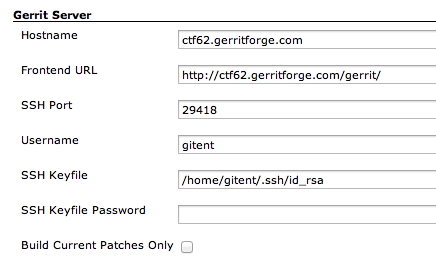
A: Jenkins has been integrated with Gerrit using the Git Plugin Ver. 1.1.18 plus Gerrit Trigger Plugin Ver. 2.5.2; Gerrit configuration can be found in the global Jenkins configuration screen:

Screen Shot 2013-02-18 at 08.25.49

Gerrit Trigger contains the SSH details to connect from Jenkins to Gerrit Server (gitent and /home/gitent are the CollabNet TeamForge 6.2 user and user home directory under which Jenkins CI is running on):

Screen Shot 2013-02-18 at 08.29.29

Jenkins Job configuration / Git settings, needed to instruct the Git plugin on the ref-spec and branch to clone when a new Gerrit Change is pushed:

Screen Shot 2013-02-18 at 08.35.43


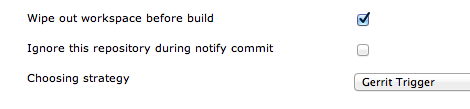
Git plugin advanced options are specified:
1) wipe out the workspace before build (as changes could be taken from completely different branches every time)
2) Trigger a build from Gerrit events / changes.

Screen Shot 2013-02-18 at 09.07.47


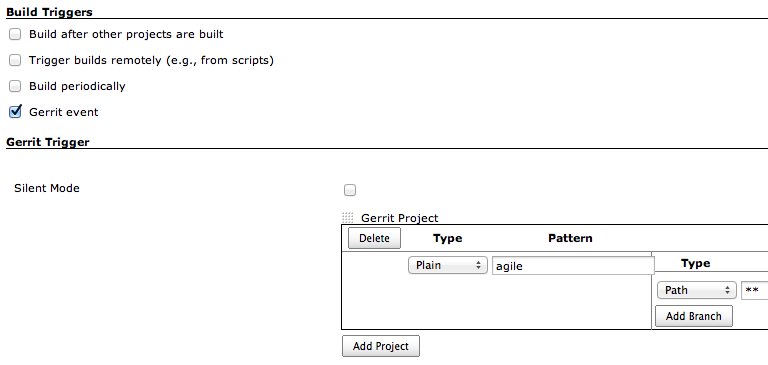
Gerrit Trigger settings on the Jenkins Job:

Screen Shot 2013-02-18 at 09.09.58

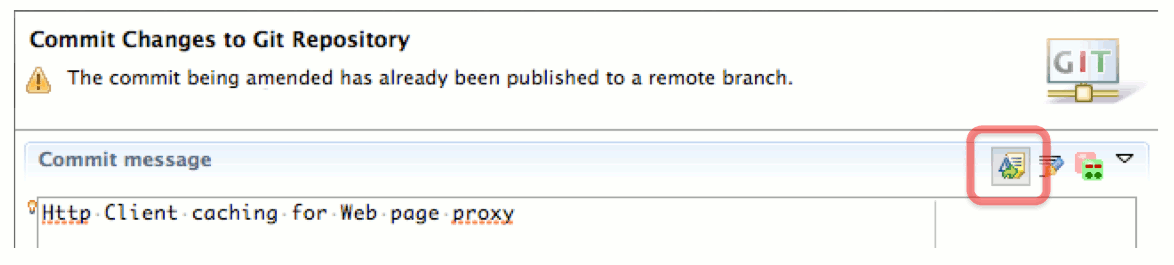
Q: Is ammend command part of git? Can it be done via eclipse or some other IDE?
A: The “–amend” option allows to edit the last commit objects in HEAD. EGit (Eclipse Git plugin) allows to amend using  a specific icon on the top-right corner of the commit window.

egit-amend

Q: what code deployment tools are recommended with GIT/Gerrit/Jenkin teamforge solution
A: CollabNet recommends UC4 (See: http://www.collab.net/deploy). Please refer to a CollabNet tech sales representative for more information.


Thank you again for your attendance to all the three webinars and stay tuned as new Webinars and training material on Git and Gerrit is coming soon !

Go Agile with Git Part 2 of 3: Collective code ownership with Code Review

Gerrit Code Review

Thank you to all the attendees of the second webinar of the Series “Go Agile with Git” sponsored by CollabNet Inc.

Session was about an high level view of the Gerrit Code Review workflow and his benefits in encouraging collaboration around the code and collective ownership of the Software Project. Moreover we have seen how Code Review and Continuous Integration can bring the “early integration” together with the scoring and promotion of changes into mainstream branches.

GerritForge LLP is proud partner of CollabNet Inc. and invites you to replay the first two webinars and register to the last webinar of the series:

  1. Workflows, Branching & Merging (View on demand)
    Learn the basic concepts of Git and Gerrit and see explore the power of merging and applying code from different branches thanks to recursive merge, rebase and cherry-pick.
  2. Peer Programming & Code Reviews (View on demand)
    See how Gerrit Code Review can enforce full code collaboration and collective ownership, similarly to peer programming you can achieve faster and better code delivery. Learn how to integrate Jenkins CI into the development process and have automatic validation to feedback into your code review workflow.
  3. Hands-On Lab with Gerrit & Jenkins (February 12th) << Next Webinar
    Step-by-step hands-on with Gerrit to learn how to move your first steps with Code Review: contribute your change, trigger your Jenkins CI validation and learn how to understand the feedbacks and amend your code for achieving a successful merged change into the main branch. Learn how to manage multiple reviews when the code evolves.

See below the full log of Question and Answers of the Gerrit Code Review webinar, brought to you by GerritForge LLP in order to give you the opportunity of getting more insight on Gerrit and trigger more discussion and feedback on Code Review.

Gerrit Code Revew – Q&A

Q: Please stop selling and instead show us the features.
A: The initial two webinars focus was more on the concepts introduced by Git and Gerrit, alongside with their support in commercial tools such as CollabNet TeamForge ALM product: this may have been perceived as “product selling” rather than functional and conceptual introduction to Code Review; that was not really our intention.
The third Webinar of the series (Hands-On Lab with Gerrit & Jenkins – February 12th) includes a step-by-step hands-on lab on how to use Gerrit from both Web-UI and command line for managing the Code Review workflow in a real-life environment, integrated with Jenkins CI Gerrit Trigger plug-in for code Validation. We will use Gerrit 2.1.8 embedded in CollabNet TeamForge 6.2 for our lab exercises, however they same exercises can be repeated with any other version of Gerrit.

Q: what were the three branches you mentioned? (1: _____ branch, 2: stabilization branch, 3: ______ branch)
A: You typically have at least three branches on your Git repositories: 1. main development branch (master), 2. stabilisation and release branch, 3. production and maintenance branch. The level of access control and code-review workflow you may want to apply to different branches is potentially different: Gerrit Code Review allows the definition of ACLs on a per-branch basis, allowing to easily manage a more fine-grained access to contributors on development branch whilst putting more strict control and validation on stabilisation and production branches.

Q: I tried to POC Gerrict but fell at the 1st hurdle – the login to webiste was insisting on an OpenID logon – we run behind a strict firewall so OpenID did not work – is there a way to allow a simple logon process at least for the QA
A: Gerrit Code Review set-up typically requires to have an existing user registry for authenticating users: I suggest to use a simple plain LDAP configuration rather than OpenID (i.e. you could download ApacheDS to set-up a sample registry) or download the CollabNet TeamForge 6.2 VMware appliance that includes Gerrit 2.1.8 integrated with CollabNet user registry.
For a more recent Gerrit 2.5.1 binary distribution, you could download the GerritForge 2.5.1 binary distribution that includes a step-by-step setup procedure that provides: 1. creation of an initial administrative account without the need of any external user registries or LDAP, 2. initial configuration of groups and roles, 3. sample repositories ready to be used as templates.

Q: Can Gerrit be used in Linux and Microsoft OSes ?
A: Gerrit is a Java EE based application; can be hosted in any OSes that supports Java JDK 1.6 or later. There is still a binary dependency on Git executable in the Gerrit wrapper start-up shell: this can be simply resolved by porting the gerrit.sh to the target Operating System you want Gerrit to be hosted.
GerritForge 2.5.1 for instance is available for all major UNIX platforms, Mac OSX and Microsoft Windows Servers and is integrated as automatic native system service.

Q: How Gerrit was different from sonar and hudson integrated to SVN ?
A: Sonar and Hudson are excellent tools for executing of a number of quality checks every time that a commit is created. However they do not include the ability to provide change-promotion based on voting plus collaboration tracking in terms of ideas and comments to the code. They remain however excellent tools that can be used as complement to the Code Review process, for providing additional automated score on change-sets uploaded to Gerrit.

Q: Is there any good web based code review tool like Gerrit on Subversion?
A: There are definitely other tools on the market, for instance CollabNet TeamForge includes ReviewBoard whilst Atlassian has its own Crucible commercial product: both can be used on top of other SCMs including Subversion. They are not comparable to Gerrit though, because the underlying SCM is not powerful as Git: when managing code-reviews you do need the ability to amend your code history and merge changes back to the target branch when review is completed. Subversion and other SCMs do not provide that flexibility, as a consequence the code-review on top of it cannot provide all the functionalities provided out-of-the-box by Gerrit.

Q: Can we integrate Bugzilla and / or QC with Team Forge
A: CollabNet provides integration to HP QC with his connector architecture; potentially its CollabNet Connector Framework would allow integration with other SCMs such as Bugzilla.
ccf 4-3-09
If you would like to just integrate change-sets to issues, Gerrit includes a generic Issue-Tracker Connector framework that allows to connect to potentially any external Issue-Tracker. Bugzilla has been recently supported by WikiMedia and HP QC is currently in the GerritForge 2.6 pipeline: those plugins allow Gerrit to talk directly to QC and Bugzilla for associating code commits and code reviews to existing issues and linking their respective workflows together.
GerritForge4HPQC-Ver.2.6

Q: What are the major differences between Gerrit/Jenkins and existing enteprise application testing tools such as Junit/ANT or Oracle Application testing framework? Can they be integrated with Eclipse IDE for code reviewing and testing purposes?
A: Gerrit/Jenkins are not integrated out-of-the-box with Junit/ANT or Oracle Application Testing tools: main purpose of Gerrit is not to execute tests against the code but enforcing maximum visibility of changes in the Development Team and beyond.
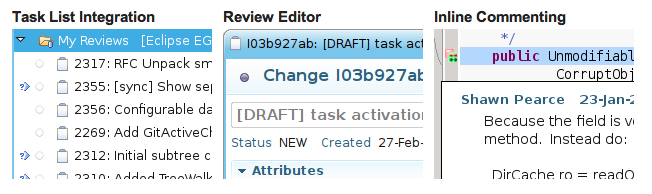
Gerrit itself does not enforce the numbers and nature of checks against your code; however Gerrit can be potentially integrated with Junit/Ant and Oracle Application Testing tools to collect their feedback and track as score into a change-set review. From Gerrit 2.6 the code-review functions will be available even via RESTFul API: automation through Ant will be possible via scripting or custom tasks. Gerrit is already integrated with Eclipse IDE via Mylyn and its native Gerrit plugin: it allows to receive feedback in realtime on incoming code-reviews and display comments as annotations inside Eclipse standard code editor.

Screen Shot 2013-02-03 at 19.50.45

Q: Can we Integrate Maven and / or Ant with Team Forge
A: TeamForge provides a SOAP Interface and both Java and Python interface to access via external tools or scripting. This means that potentially both Maven and Ant can be used for accessing TeamForge artifacts.

Q: Can we block commits to the master branch and only use ref/for/master and force commits to gerrit code review ?
A: Yes, by using Gerrit fine-grained ACLs to refs/heads/master and allowing push for review to refs/for/refs/heads/master.

Q: Slide #28 (Gerrit workflow): What happens if master contains code conflicting the check-in of A2* (because this check-in was done prior to change A2*)? Can Gerrit auto-resolve this conflict?
A: No, as Gerrit does not know how to resolve automatically a conflict: Gerrit can try to merge the code anyway, depending on the Gerrit project settings, but if a conflict is detected, change-sets cannot merged back into the branch.

git+gerrit-webinar LM-20130126-Series-2-Final.workflow

Q: That overview graph (CI + CR with traffic lights, branches) you showed was very helpful, to see what you are talking about. Which tools were you saying that covered? Gerrit and Git? TeamForge?
A: Workflow shows the usage of Git, Gerrit Code review and Jenkins CI together to validate a Change-Set and merging it to master branch. Master branch is always with a “green” street light (Build is healthy) whilst the “red” and “amber” lights are only on the refs/for/master (code-review branch) and do not impact the rest of project team development. TeamForge is the ALM to connect everything together (Git, Gerrit and Jenkins) in a unique environment.

Q: Is there integrations between other CI with TeamForge?
A: TeamForge provides integration with Cruise Control and Maven as well. Potentially other Continuous Integration tools can be integrated with TeamForge by using the SOAP or Java and Python API.

Q: Just wondering number of paritcipants on call, to relate to % in polls. 
A: 138

Q: How would you recommend a small distributed group (4 devs, 2 testers) to sort of “try out” this complex approach you are promoting here, while continuing to maintain our daily work via Subversion?
A: Git allows to pull and push back to Subversion, using the “git svn” commands. You can dedicate a branch (i.e. trunk-review) to experiment Gerrit code-review workflow, whilst keeping the rest of the development on the standard trunk branch. Once code-review is completed and merged to trunk-review, branch can be pushed back to Subversion and tracked as a normal regular commit. Bear in mind that Subversion does not have all the power of Git on merging code together, you may need extra manual work then to bring the changes back into the main trunk.

Q: How does Teamforge run Gerrit? Can Gerrit run as a Windows service?
A: TeamForge runs Gerrit into a separate JVM, activated and managed in the same way as any other TeamForge daemons. Gerrit itself can be activated either via gerrit.sh wrapper script or as standard Java WAR application into a standalone Servlet Container (i.e. Tomcat). In this second form it can be technically executed into a Windows service, such as Apache Tomcat running into a Java Service Wrapper.

Q: We’re using TeamCity as CI, can it be used and integrated with Gerrit ?
A: In theory they can be integrated, using Gerrit SSH or RESTFul (from Gerrit 2.6) scripting. See this example from Timothy Basanov BLOG. Unfortunately TeamCity is not OpenSource and thus has a more limited community of plugin developers providing integrations for Git and Gerrit. Jenkins CI  has the world’s largest community of plugin developers for a Continuous Integration engine and already provides support for Gerrit Code Review workflow.

Q: Gerrit or Team Forge can help to migrate code from ClearCase to GIT?
A: Not really, they are not intended to drive migration from one SCM to another.


Thank you again for your attendance and don’t miss our next Webinar with CollabNet Inc, Tuesday, February 12, 10:00 AM – 11:00 AM PST.

Git plug&play ? Git-in-a-box !

Want to get started quickly with Git ? … all you need is “Git in a box” ! 🙂gitinabox

GerritForge LLP is proud to announce the availability of the first private beta of Git-in-a-box, download today at http://www.gitinabox.com/download.

Git-in-a-box is the revolutionary HTML5 User-Experience to get started using Git on your premises with a “plug & plan” Server installation.

In order to get started, simply execute the following three steps:

  1. Download from here the gitinabox.jar Java executable archive
  2. Double-click the gitinabox.jar file OR execute the following command in a terminal:
    java -jar gitinabox.jar
  3. Wait for Git-in-a-box to get initialised and started: you will see this icon Screen Shot 2013-01-29 at 14.06.59 on the system tray, click and select “start” from the menu and wait until it becomes green Screen Shot 2013-01-29 at 14.08.41

Git-in-a-box will be running on your local hostname  and will be “ready to go” for creating your first Git repository for you and your local development Team. Open your browser to the Git-in-a-box URL (i.e. http://127.0.0.1:8080and start enjoying Git Server without hassles !

Background.

Git-in-a-box is a revolutionary HTML5 UX based on the popular Google Gerrit Code Review Project (see http://code.google.com/p/gerrit/)

It is based on a restricted set of RESTFul API on top of Gerrit 2.5.1 and allows to leverage the power of Gerrit, one of the most reliable and secure Git Server, without the need to be a Gerrit expert.

Git-in-a-box UX is simple and straightforward, works nicely on most HTML5 enabled browsers and integrates with your system notification to provide you updates of what happens on your Git repositories.

Tablet and Mobile-enabled.

Git-in-a-box UX is based on a fluid layout and automatically resizes in order to fit nicely with nowadays iOS and Android Tablets and even SmartPhones.

Provides RSS support to get real-time information on your Team Development, without being overloaded by notification e-mails.

Roadmap.

Git-in-a-box is currently in private Beta till end of March 2013. With all the feedback received and the stabilisation fixed, the final release of Git-in-a-box will be officially available for Download from April 2013.

Enjoy Git “plug & play” with Git-in-a-box and let us know what you think about it.

Go Agile with Git Part 1 of 3: Workflows, Branching & Merging

git+gerrit-webinar LM-20130111-Series-1 LS final-LM-fixes

The first webinar of the CollabNet series “Go Agile with Git” had a great audience of over 200 attendees from all over the world !! A big THANK YOU to all the attendees for the great result and the great questions during the webinar.

Unfortunately not all of the questions could be answered during the Webinar because of the limited time available. You can find below all the Webinar questions and answers on Git and Agile Development … and feel free to post additional ones by commenting this post: you will definitely get our answer shortly on the blog.

GerritForge LLP is proud partner of CollabNet Inc. and invites you to replay the first webinar and register to the following two webinars of the series:

  1. Workflows, Branching & Merging (View on demand)
    Learn the basic concepts of Git and Gerrit and see explore the power of merging and applying code from different branches thanks to recursive merge, rebase and cherry-pick.
  2. Peer Programming & Code Reviews (January 29th) << Next webinar
    See how Gerrit Code Review can enforce full code collaboration and collective ownership, similarly to peer programming you can achieve faster and better code delivery. Learn how to integrate Jenkins CI into the development process and have automatic validation to feedback into your code review workflow.
  3. Hands-On Lab with Gerrit & Jenkins (February 12th)
    Step-by-step hands-on with Gerrit to learn how to move your first steps with Code Review: contribute your change, trigger your Jenkins CI validation and learn how to understand the feedbacks and amend your code for achieving a successful merged change into the main branch. Learn how to manage multiple reviews when the code evolves.

Workflows, Branching and Merging – Q&A

Q: Do you have any tool to migrate source code of one SCM tool to GIT ?
A: Git native distributions already include tools that allow to fetch code from external SVN repository and push to a Git, including their history and branches. For other SCMs (i.e. CVS, Perforce, TFS) there are OpenSource and commercial tools to migrate the full history of your repository into Git.

Q: Gerrit Dashboards already works?
A: Dashboards have been introduced in Gerrit in November 2012 hackathon and are one of the major features of Gerrit 2.6. For more information on the Gerrit roadmap see our previous post.

Q: how can use GIT to map it ClearCase UCM
A: Git is not really comparable to ClearCase UCM. Gerrit Code Review plus the additional ALM features provided by CollabNet TeamForge or the Enterprise Issue-Tracker integrations of GerritForge LLP, can really be mapped to ClearCase UCM concepts as both define the concept of “project” and “tracking” between code changes and work items into your development lifecycle. Git can be mapped to ClearCase whilst Gerrit and its Issue-Tracker integrations map to UCM with the role of associating one or more Git commits to a delivery or set of issues tracked in ClearQuest.

Q: will we cover Gerrit and AD integration? or Git AD integration ?
A: Git does not provide AD integration out-of-the-box, unless integrated and customised through an HTTP front-end (i.e. Apache) to resolve user credentials authentication. Gerrit provides AD and industry-standard LDAP support and will be covered in the second and third webinars in the series.

Q: are there any danger when auto-merging?
A: It depends on whether you have Gerrit triggering your Jenkins CI to “protect” from wrong auto-merges or if you just rely on nightly builds and standard QA validation: when Gerrit and Jenkins are integrated, even auto-mergine is not a risk as the consistency of the code-merge is validated. Typically a code-review workflow requires the change to be already “rebased” on the branch candidate to receive the change, otherwise you would run into the risk of validating a change on the wrong context.

Q: If someone commits a huge binary file by accident and pushes it to the origin/master, can that be undone or is it there to stay forever? Or is this also covered in history protection link?
A: Git always allows to “remove” commits permanently, using “git reset” or “git rebase -i” (interactive rebase) to remove or amend the commit containing the huge binary file. However Git keeps the binary blob into its objects until garbage collection will trigger an physical removal of all unreferenced objects, including the huge binary file. With CollabNet TeamForge history protection you have full control of when and what to remove completely from your Git history (in this case the huge binary file).

Q: Can roles in Gerrit be defined in ldap?  If so, what are the requirements? Can roles in Gerrit be defined in an external source?
A: Gerrit allows the usage of RBAC (role-based access control) through its group level permissions. Groups can be defined in LDAP and Gerrit Ver. 2.5 can use them and retrieve them dynamically using the its pluggable “group backend” infrastructure. Groups LDAP entry points need to be configured in gerrit.config in order to be fetched by Gerrit. Similarly other external sources can be plugged as “group backend” into Gerrit by implementing the connector interface to the external roles as Gerrit plugin. For more information on how to create a Gerrit plugin see our talk on “How to cook a Gerrit Plugin in 10 mins” presented @GooglePlex in Mountain View in November 2012.

Q: You mentioned Jenkins fits the best here. How do you compare it with Team City in this regard? 
A: TeamCity is a very advanced CI system and has introduced the concept of “test build” and “private builds” to prevent faulty code to break the team build, same battleground of Code Review to improve Team Agility without loosing control and code quality. Unfortunately TeamCity is not OpenSource and thus has a more limited community of plugin developers providing integrations for Git and Gerrit. Jenkins CI  has the world’s largest community of plugin developers for a Continuous Integration engine and already provides support for Gerrit Code Review workflow.

Q: How many people voted on Gerrit poll?
A: 183

Q: What is the minimum number of branches needed if two geographically seperated teams are sharing the same codebase and committing to the same codebase? e.g. production, master, dev1, de2, etc. How many should we maintain to be minimal?
A: Minimum number of branches is actually one, the master. Two repositories in two locations have already a “copy” of the “master” branch and then are effectively different branches that can be merged during the repository synchronisation process across locations. In practice it is recommended to have at least one active development branch (“master”) and then one branch per stable release, independently from the number of geographically separated teams. Additionally you may want to develop features in parallel using the “topic” branches and then having them merged into the “master” as they are validated through Code Review by the Teams.

Q: We are about to start the migration from SVN to GIT and are worried about the best way to train the developers – can you give any tips of the best approach
A: Git requires a lot of “day-by-day” support from the beginning, especially for Teams coming from a SVN experience. Concepts are different and sometimes SVN command names have a different meaning and behaviour in Git. It is recommended to carefully tune Gerrit permissions to avoid “dangerous” pushes  from “beginners” Team members (i.e. disabling forge identity and forced push) and start with a dedicated Git training to a group of “champions” that will be then spread across all of the Teams to provide support. Those “champions” will become then the “day-by-day” tutorials of the other Team members learning how to use Git in everyday work. P.S. Stick the “Git cheat sheet” on the wall of every Team room to enforce the Git development SCM workflow.

Q: How do users use git on windows systems? Is there a tool like Tortoise?
A: Yes and its name is TortoiseGit (no surprise here !) but it is only a GUI front-end to Git for Windows that needs to be installed as pre-requisite. However I do encourage the Teams to use the Git command line in order to first understand the concepts and then to learn how to get the best from the tool when they need it. For most common operations they can use TortoiseGit or any other Git client GUI tool (personally I use and like a lot GitX on MacOS) but they need to understand the underlying commands that are executed and generated as Git actions on the repository.

Q: How to find out which files someone has edited over history of project?  It is easy in a specific commit, but seems hard over the life of the project …
A: Git is a very powerful tool designed to provide full history inspection and code search. Each command is very sophisticated and flexible to perform even complex tasks. This specific task mentioned is not complex for Git, the following example provides a list and stat of lines changed by someone@somecompany.com over the current branch:
git log –author someone@somecompany.com –numstat

Q: Do you have any best practices to migrate from Subversion to GIT?
A: My best suggestion is to assure consistency of Subversion vs Git usernames and e-mails. You wouldn’t like to loose visibility and association of who made a commit in SVN and his identity in Git. In order to enforce consistency make sure that “forge identity” permission is disabled when start using Git after the initial migration, in order to keep your ex-SVN users always aligned with their own identity in Git. “Forge identity” can then be granted gradually as developers become more aware and familiar with the Git tool.

Q: C1 to C5 is like Team Branch. C6, C7 is like Dev Branch.

recursive-merge

A: C6-C7 is more like a “topic-branch” where one or more developers are working on a specific feature. Master is the main development branch.

Q: Why do we need a Contributor who is NOT a commiter?
A: Anybody in the Team or outside the Team (when authorised to do so) should be able to provide their ideas and possibly even their fixes to the code; however you do not necessarily want to allow everybody to commit and merge a change (potentially flawed) and break the Team master build, causing delay on your project sprint. Defining “contributors” you can allow everybody to provide their changes into the Team’s discussion and promote them through automatic validation (Jenkins CI builds) and collective code-review, avoiding the risk of breaking the build by unwanted or not validated changes. You can then differentiate them from the “Senior Team Members” (Committer) who have the technical ownership of the design and timelines of the Team Project.

Q: any comment on gerrit vs sonar code reviews?
A: Sonar is a fantastic infrastructure to trigger code quality checks but not necessarily to action on code promotion. Gerrit is the place where people decide what to do with regards to a change, whilst Sonar is only providing a feedback on “how the change looks like” without any active review action on it. However it would be possible to integrate Sonar feedback into Gerrit code-review lifecycle developing a Sonar plugin for Gerrit or simply getting Sonar feedback into Jenkins build and then providing a validation result to Gerrit through the Jenkins Gerrit plugin.

Q: In the Git merge slide, what’s the recursive option?
A: Recursive merge strategy (the default merge option in Git) allows automatically to detect complex branches history and merge them together by walking recursively into each branch history and looking by a common ancestor branch point.

Q: does Gerrit only works with Git?
A: Yes, mainly because the it needs all the power and ability of Git to merge and rebase changes once they have been reviewed, approved and then submitted. Additionally Gerrit uses Git ability to define custom “hidden branch namespaces” to store Security and Roles definition of the repository itself.

Q: will Gerrit work with Git Fusion? Do we need a mirror repository in that case?
A: Perforce Git Fusion, used as “blessed Git repository” is a Perforce instance that “talks” the Git protocol to allow cloning and pushing to it. However Gerrit uses JGit to access its Git repository on the Filesystem and cannot then use a Perforce backend. However Perforce Git Fusion could be used as synchronisation peer of a Gerrit repo, through the usage of the Git replication protocol.

Q: how does the distributed scm work in git when the development teams are spread across geographical locations?
A: You typically configure one Gerrit replicated instance per geographical site, in order to allow maximum performance on the “git pull” operation. However for minimising conflicts during geographical repository replication, it is important to perform “git push” to only one of the repositories replicas; all the others will get the changes eventually thanks to the Gerrit replication events being propagated.

Q: how does git auto resolve work, how does git know which files to merge first in order to keep all changes from all submits?
A: Git has a lot of powerful commands and hidden (or semi-hidden) functionalities, waiting to be discovered and leveraged !
I think you refer here to the “git automatic conflict resolution” (aka git rerere) described in this Git documentation link. Git stores the “history” on how a conflict was resolved in the past and then reuse the same info to resolve future conflicts. Functionality is normally disabled but can be turned on with the following command:
git config –global rerere.enabled true

Q: Can you please explain what’s ther diff between Recursive Merge vs Rebase? the diagrams look very similar
A: There is one fundamental difference between “merging” and “rebasing” two branches: in the first case the merge preserves the full history of the two branches and creates one extra commit containing the “merged code”; in the second case the rebase modifies the history of the branch by “replaying the changes” on top of the target branch, as you were in a time-machine and you would push changes into a future state and the branch point was never created in the past. In a nutshell, the “merge” can be reverted because doesn’t change the history (removing the merged commit would suffice) whilst a “rebase” cannot be reverted easily as the “rebased branch” history has been modified and reapplied in the future. Rebase however has the effect of “flattening up” the branch history and allowing a more concise and readable set of commits on a development branch.

Thank you again for your attendance and don’t miss our next Webinar with CollabNet Inc, Tuesday, January 29, 10:00 AM – 11:00 AM PST.

GerritForge 2.5.1 released

Gerrit 2.5.1

New maintenance version of GerritForge has been released today and is available for download from http://gerritforge.com/download.


Our commitment: up-to-date with Gerrit Code Review, always !

GerritForge confirms its commitment to be aligned with Gerrit Code Review in order to guarantee to our customers the best up-to-date features and most critical security fixes.

Noteworthy fixes included in GerritForge 2.5.1.  

Gerrit 2.5.1 includes important fixes with regards to Git protocol over HTTP and Security.

  • Restriction to ‘set-project-parent’ to Gerrit Administrators. Previously the “door was left opened” for project owners that were trying to workaround the security check granting access to refs/meta/config branch.
  • Correct categorisation of Git over HTTP commands as “GIT operations” and not Web-UI. This was creating confusion on the way access control to repos was evaluated.
  • RequestCleanup exception on Server threads for Git over HTTP: this was creating random exception when using Git over HTTP and “connection reset” seen on the Git client side. Problem was not impacting Git over SSH.

Fixes and enhancements on GerritForge Enterprise plugins.

GerritForge 2.5.1 adds additional fixes and extensions to the Enterprise plugins, such as:

  • Additional documentation on the delete-project plugin.
  • New plugin to remove Gerrit internal groups.
  • Fixes on the GitBlit plugin on the repository names duplicates and Git clone URL is now populated correctly.
  • Additional support for non-UK and non-US Java default locales.

Wants to know more ?

Gerrit roadmap: a bright future ahead !

Gerrit roadmap for 2013 is really amazing:

Gerrit 2.6 – Feb/Mar 2013

  • Major enhancements to the Gerrit plugin architecture, including pluggable 3rd party authentication and user-registries.
  • Introduction of the Gerrit RESTFul API: this will allow easier integration for batch operations using simple CURL commands and more stable API available for integrating with plugins.
  • Project dashboards: for the first time Gerrit allows projects to have custom dashboards to show a set of selected data extracted from the project itself.

GerritForge 2.6 additional enterprise features

  • Additional issue-tracking association plugins, including CollabNet TeamForge, Rally, Serena and HP Quality Center.
  • Group backends for Atlassian Jira and CollabNet TeamForge, allowing to use existing ALM Roles in Gerrit access control lists.
  • Gitblit 1.2.0 plugin

Gerrit 2.7 – June/July 2013

  • Multi-master replication: allows multiple Gerrit Servers to run in parallel on the same set of Git and relational data-set replicated in different locations. Consistency and control of the replicas is automated and is working out-of-the-box. Users can push and pull to any of the Gerrit master replicas.

GerritForge 2.7 additional enterprise features

  • Multi-tenant support and multi-authentication domain for the same Gerrit Server
  • Delegation of Gerrit administration to Web-UI roles.

Stay in touch 😉

Do you want to know more or want to be always informed of what’s next ? Register your interest in our contacts page and we will always let you know what is going on on Git, Gerrit and the Enterprise !

GitEnterprise new face and new mission

Welcome to the new face of GitEnterprise.com !

GitEnterprise is different, not only in his new external facing web-site but also deep inside in his mission and focus.

We have been providing cloud and hosted services powered by gitent-scm.com to provide a superior support for repository management, users and groups security and full audit-trail for around 2 years: now is time to make a bit leap forward.

One size does not fit all enterprises.

Can one solution be good enough for companies of all sizes ? We thought that we could build that solution and we started proposing our product in both hosted and cloud deployments for all our customers: over 7000 users registered to gitent-scm.com and created more than 10,000 repositories.

First phase of Git adoption is very much about discovery and gitent-scm.com has been a straightforward way to explore some enterprise-features such as role-based access control and branch-level security.

Once companies become familiar with Git and its usage in the Enterprise, the adoption really starts with the identification and exploration of the functional and ICT Security requirements needed by the organisation: different companies do have different requirements and integration with different systems.

Individual contractors.

The smallest of the Enterprises is the one-man-band where a single contractor is engaged by different companies for different projects. No specific requirements are needed other than private repositories with regular security and backup; Git Server is best hosted in the Cloud as minimises maintenance and operations costs whilst reducing risks of personal hardware failure.

Even though gitent-scm.com could be a cost-effective solution, it is possibly too complicated as RBAC and branch-level security are not needed and could be seen as repository administration burden.

We designed a “all-in-one” Git Server solution to combine ease of administration and personal security and confidentiality: his name is Git-in-a-box and requires no installation or administration, just download and use it.

Hosted: get Git-in-a-box and execute on your favourite Server to have a fully features Git Server without hassles.

Cloud: Git-in-a-box can be used in any private Cloud Server and can use any sort of Cloud storage backup. When a FREE Cloud Solution is required, the only choice on the market is BitBucket.org that offers privacy and space at no charge.

Small to medium Enterprises.

Teams are typically co-located in a single Office and additional requirements start to become recommended if not mandatory depending on the industry sector.

Most companies can still have a Git Server hosted in the Cloud without breaking any specific company policy whilst others such as Finance Software Development companies have stricter requirements to address their internal auditing constraints.

Cloud: when cost reduction is the main focus and source-code is not subject to strict ICT Security requirements, gitent-scm.com can be a good compromise as it provides 10-users / 1 GByte FREE Subscription with added Role-based Access Control and Web-based audit-trail. Security administration is easy and users can be self-provisioned and invited to join the company domain later on.

Hosted: for small companies without specific security requirements, Git-in-a-box is still our favourite choice of simplicity and functionality. Companies working in the Finance sector anyway have additional ICT Security requirements that involve compliance with SOX / PCI regulations. GerritForge is a cost-effective solution to provide governance, audit and integration with existing ICT Security assets such as LDAP User-registry and password enforcement and producing audit-trails for compliance inspections and reports.

Large Enterprises.

Teams can be even huge and distributed over the globe: they include developers with different skills-set and level of maturity of the adoption of Git as SCM tool. Most of them are possibly coming from a Subversion or SourceSafe background and need a more user-friendly and safer interface to Git.

100% pure Cloud hosting is typically not an option whilst some of them may want to use a more flexible hybrid-cloud model combining a traditional data-center hosting with additional private clouds located in remote geographical locations to reduce latency on remote sites.

The following key requirements become mandatory for a corporate adoption:

  • Integration with Corporate User-registry such as corporate LDAP and Directory Services.
  • Single-Sign-On with existing authentication system and credentials.
  • Reuse of existing Corporate roles in the definition of the access control to Git repositories.
  • Git over HTTP/S for SSL and X.509 Certificate validation.
  • Full tamper-proof audit-trail of every operation triggered either via Web UI or Git client.
  • Delegation of control across your organisation.
  • High-availability of both Web/Git Services and data-storage.
  • Multi-site replication across all the Corporate offices.
  • 24×7 Support on the full Git stack.
  • Existing rock-solid user base and Corporate reference in the same Business area.
  • Integration with existing Corporate Workflow and Application Lifecycle Tools

Git was not designed to fulfil all of those Enterprise requirements, most Cloud or Hosted Services such as GitHub:Enterprise or Atlassian Stash provides coverage for only some of them such as LDAP integration and could be accepted in some departments with reserve from Corporate Security. gitent-scm.com and Git-in-a-box are definitely not the solution either as do not support full multi-site replication or workflow and ALM integration.

The only solution on the market is Gerrit Code Review: it has been designed and implemented by Google for the distributed and collaborative development of the Android OS, based on ashes of Guido Van Rossum’s experiment named Google Mondrian Code Review.

Gerrit Code Review is the only Git Enterprise tool adopted on a large scale by Companies such as SONY, Garmin, Qalcomm, SAP, Intel, HP, Deusche Bank and the list is growing on a daily basis.

Starting from Gerrit 2.5, announced @GooglePlex in Mountain View in November 2012, Gerrit is now extensible and can be integrated then with other tools and issue-tracking systems. We demoed the integration between GitBlit and Gerrit whilst providing full access to the OpenSource community to our Atlassian Jira integration.

GerritForge hosted is the Enterprise version of Google Gerrit Code Review with all the additional Enterprise Integrations you need to provide RBAC, Auditing and Application Lifecycle and Workflow.

GerritForge added the “missing pieces” for plugging it into a Corporate Environment:

  • Issue tracking association and enforcement
  • Workflow definition and automation
  • Tamper-proof audit-trail
  • 24×7 Support on the full Git and Gerrit software stack
  • Single-sign-on and 3rd party authentication plugins, such as CollabNet TeamForge.
  • Formal native packaging and installation procedure.
  • Access to ad-hoc patches for production issues even on older branches and releases.

We do believe so much in Gerrit that we have rebuilt all our product offering using Gerrit as foundation:

Git-in-a-box is a Gerrit 2.5 engine with an HTML5 / RESTFul API layer to provide ease-of-use and plug&play installation.

gitent-scm.com is a Gerrit 2.2.2 engine with a JavaEE WebUI for automating common administration tasks.

GerritForge is Google Gerrit, with the same core code-base and version numbering.

Want to know more on Google Gerrit ?

For an initial introduction, the Google Gerrit Code Review Wikipedia page is the best place to start.

More detailed Wiki and project information can be found at Google Gerrit Code Review home page.