Gerrit User Summit 2023 – Recap and Survey Results

The Gerrit User Summit 2023 took place in-person simultaneously in Sunnyvale, California on September 30th and in Gothenburg, Sweden until October 1st 2023. To accommodate the global community, it was live streamed on GerritForge TV so that individuals in various locations could participate, share their experiences, and contribute their ideas.

If you were unable to attend the Summit, you can find all the presentations and content online . Additionally, recordings of the presentations and Q&A sessions can be accessed on GerritForge’s TV channel on YouTube.

Stats and attendee feedback around the 2023 Summit

Snapshot

  • 2 days
  • 2 locations
  • 84 registrations
  • over 70% attendance
  • 34 companies
  • 16 sessions
  • 18 presenters from 8 organisations

Despite the challenges posed by the time difference, the community still got involved showing its commitment.

What is the opinion about the Summit?

A survey was sent to all of the attendees on both locations and even though there was a 30% response rate in USA and 17% in Sweden we delved into the details, and these are the comments received:

Q1: How would you rate the Gerrit User Summit 2023 edition?
GUS 2023 - Rate - Sweden

GUS 2023 - Rate - USA

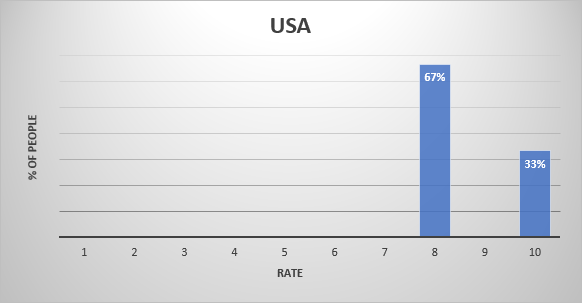
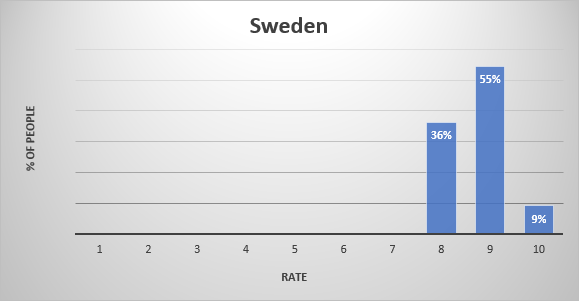
While in USA, 9% of the respondents rated their experience at a 10, 55% rated it at a 9 and 36% gave an 8; in Sweden the great majority rated it with an 8. Where 10 was the highest positive rate, this feedback gives an idea of how satisfied attendees were in general with the User Summit. Understanding individual experiences and perceptions allows us to evaluate the event and identify areas for improvement.

Q2: What did you like the most about the 2023 Summit?

Attendees in California were thoroughly impressed with the technical excellence of the talks at the event and appreciated the valuable networking opportunities. On the other hand, Gothenburg attendees raved about the fantastic space and location of the venue. They found the off-camera discussions, presentations, and Q&A sessions incredibly interesting and enjoyable. Thought the use of Slido for Q&A was highly effective, giving attendees ample time to contemplate and engage with the speakers.

They also loved hearing organisations share their stories and the collaborative atmosphere for creating new design documents and proof-of-concept code. The attendees were left with the impression that the event brought together a multitude of talented individuals who delivered engaging talks. The event left high expectations for upcoming features and created an enthusiastic, positive atmosphere.They truly valued the chance to engage with fellow attendees and found the experience rewarding.

Q3: What did you not like about the 2023 Summit?

Attendees from both locations expressed their concern about the division of the summit into two locations and time zones, which made it challenging to connect with the entire group. While the idea of having simultaneous locations was appreciated, attendees in Gothenburg felt disadvantaged as they were unable to ask live questions to presenters due to the time difference with the USA. It was recommended not to repeat this approach in future events. However, overall, the attendees had a positive experience at the summit. They expressed their wish for Google to attend in the future and highlighted a missing feature in Slide that would allow for the separation of topics in questions.

Some attendees preferred the event to be held on weekdays rather than weekends, as it affected their personal time. Additionally, they expressed a preference for more user/project-driven success stories, as opposed to focusing solely on development and administrative topics. Some attendees also noted that there was a lack of diversity in the companies present. In Gothenburg in particular, they suggested choosing a venue with less noise for dinner to facilitate networking. Lastly, it was reported that the attendance felt to be relatively low especially in Gothenburg where the venue could have hosted hundreds of attendees.

Q4: What was your main objective in attending the Summit?

The attendees had two main objectives in mind: learning and networking. Going into further detail, they expressed various specific goals, including sharing research findings and enticing potential industrial partnerships. They were also keen on staying updated with the latest developments in the Gerrit ecosystem and gaining insights into how Gerrit is utilized within the community. Meeting people face-to-face was highly valued, as it provided a more personal and direct means of communication compared to email or Discord. Additionally, attendees wished to actively participate in the open-source Gerrit community and discover new directions for the product. Some mentioned that they were excited about the opportunity to listen to James Blair. For some attendees, the event offered a chance to reconnect with Gerrit after a period of absence. Some emphasised in the fact that fostering a positive open-source software community was a shared aspiration, alongside the desire to learn about how organisations utilise Gerrit in their processes. Overall, the attendees were motivated to make the most of the event, seeking knowledge exchange and valuable connections.

Q5: Do you consider to have achieved the objective?

A decisive 100% said to have achieved their goal by attending the Summit.

Reactivating the Gerrit community

Given the initiative to create a group of monthly in-person meet-ups (GerritMeets) to revive the community in the Bay Area (CA), in-person attendees at the summit in Sunnyvale, CA, were asked about their topics of interest, if they would attend in person, remotely live or watch the recorded content afterwards, and if they would participate by giving a talk.

Respondents agreed 100% that they would be willing to give a talk. They differed in the mode of attendance, as opinions were evenly divided between attending in person, joining remotely via live streaming, and accessing the recorded content after the meetup. The suggested topics were:

The invitation to these periodic meetings was extended to the global community and when asked for topics of interest, the topic ‘Hacking’ was added.

What’s next for 2024?

  • GerritMeets will start every month in 2024, from February. GerritMeets is periodic in-person meetup in the Bay Area, with the intention to live stream, so the global community can join as listener as well as with a talk, so everybody can learn & share knowledge and experience.
  • With Gerrit 3.9 been released in November 2023, 2024 will be the year of Gerrit 3.10, in May, and 3.11, in November.
  • Gerrit User Summit will be back in the autumn of 2024 with more interesting talks from the community

A genuine thank you goes out to all the participants and presenters who made the Gerrit Virtual User Summit 2023 a great success. We look forward to another exciting and even more engaging get-together next year in 2024!

Yolanda Jasso
Gerrit Code Review – Community Manager

Gerrit User Summit Survey

The 2019 has been an exceptional year, with the introduction of the next generation of Gerrit Code Review v3 releases and the largest ever Gerrit User Summit in the whole history of 11 years of the project.

As a community we want to improve even further and make the project and the community even better. Collecting metrics has been key for the improvements of the Gerrit product and its performance and, similarly, collecting feedback from the community events is the key to grow and increase the participation and sharing of the experiences about Gerrit Code Review.

Survey results

We have run a survey directed to all of those who have attended the two Gerrit User Summits this year, in Gothenburg and Sunnyvale. See below the executive summary of the results.

Did you achieve your objectives at the Summit?

Screenshot 2019-12-23 at 08.41.14

All of the attendees achieved their objective, which were different for the people, depending on their position and role in the community.

  • Getting the latest news of what’s happening in the Gerrit community and open-source product
  • Meeting the existing members of the community and welcome new contributors
  • Networking with the other Gerrit admin and users around the world
  • Influencing with ideas the future Gerrit roadmap

Overall, how would you rate the event?

Screenshot 2019-12-23 at 08.47.44

Over 76% of the people rated the event very good or excellent. However, as we strive for improvement, there is a substantial 24% of of people that are looking for a better event next year.

What did you like/dislike?

The positives of the event have been:

  • Presentation of the Gerrit roadmap and associated discussions
  • Successful mix of topics, including Zuul and JGit
  • People, atmosphere, friendship and networking
  • High quality of the talks and content

The not so positive sides where:

  • The summit covering the weekend
  • Too focused on Gerrit contributors and admins, no space for users
  • There was too much people for the chosen location
  • The talks and discussions went over the planned schedule

How organized was the event?

Screenshot 2019-12-23 at 08.56.17

89% of the people considered the event very well organized, whilst 11% are looking for improvement, possibly with a bigger venue and better timing.

What topics would you like to see covered next year?

  • Evolution of the User-Interface, roundtable with developers, user-journeys
  • Migration talks and discussions
  • CI/CD integration
  • Monitoring
  • Load testing
  • GitHub integration and pull-requests
  • Gerrit with large clusters
  • User-stories on using Gerrit

Would you like to have a workshop next year?

Screenshot 2019-12-23 at 09.02.56

The vast majority of people would like the next year event to be more informative, including a workshop for learning some of the features of Gerrit Code Review.

What would be the best time for the Summit next year?

Screenshot 2019-12-23 at 09.04.47

For the majority of people (75%) the best time for next year event would be two days during the week, rather than having it again over the weekend.


Thanks everyone again for attending the Gerrit User Summit 2019 in Gothenburg and Sunnyvale, and thanks to GerritForge, Volvo Cars and Google for sponsoring it. We are looking forward to seeing you next year.

Luca Milanesio (GerritForge)
Gerrit Code Review Maintainer, Release Manager and ESC Member.


Gerrit User Summit: Script plugins with Docker

My name is Luca Milanesio, and I work for GerritForge. My talk today is about plugins and how to create them using scripting languages.

Gerrit plugins, where it all began

My contribution to the Gerrit Code Review project started in 2011 with the introduction of plugins. To understand where we are coming from we need to back to those times when the project was just born a year earlier. Gerrit was mighty since its very beginning, and different companies that used and contributed to the tool had tailored the code base to their specific needs. When I joined the GitTogether conference in 2011, almost every user was talking about their fork of Gerrit. Forking is excellent especially in OpenSource because you can customise a project as much as you want and, we were all excited about the growing popularity of GitHub and forking was a popular concept. However, keeping a fork up-to-date is not as easy as you may initially envision. Moving on with the upstream releases is hard when you are working on a fork.

Back in 2011 when I was at the conference, I thought: “how can the Gerrit project evolve and grow if we are all working on forks?”. My way to convince the Gerrit Community to change that status quo was inviting Kohsuke Kawaguchi, the Jenkins CI project founder, to the summit. Jenkins CI is wholly based on plugins while the core does not do much: the plugins are making the whole thing work as a CI.

That was enough to convince the community that a change was needed and, during the next Hackathon in 2012, I wrote the initial version of the Gerrit plugin loader and the first “Hello world” Gerrit plugin was born.

The introduction of scripting languages

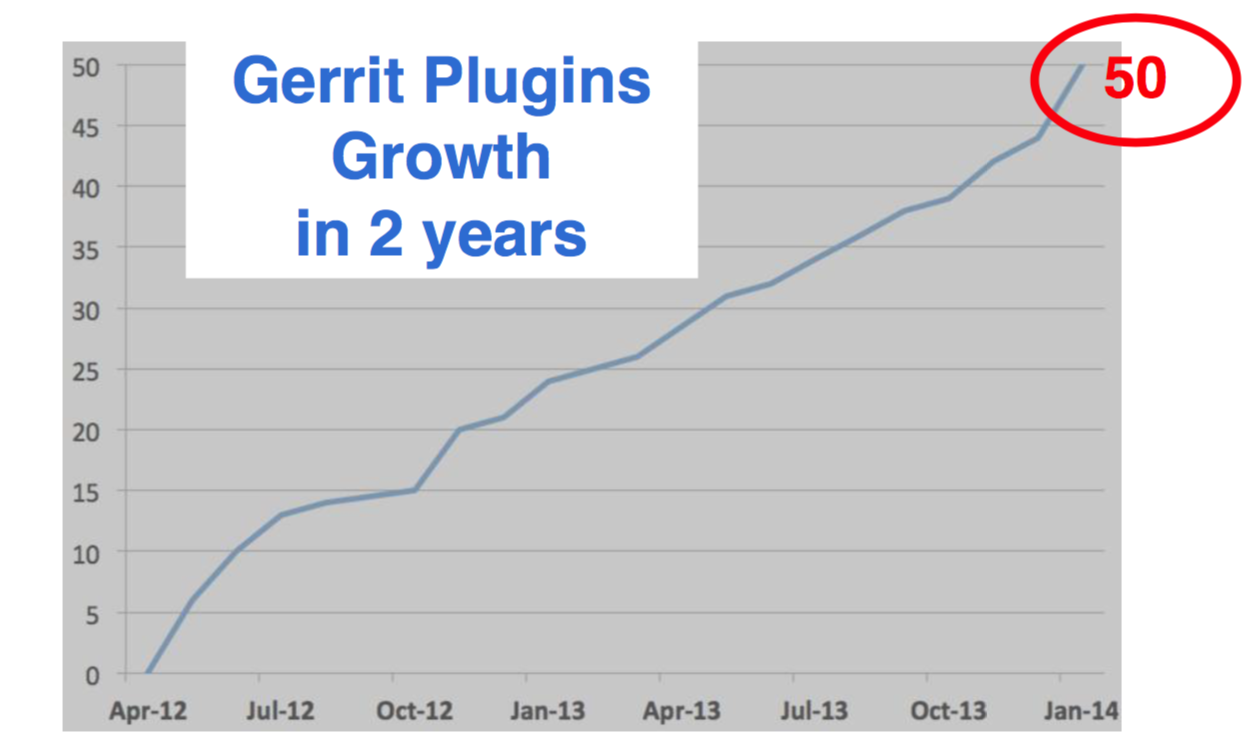
After two years, Gerrit had only 50 plugins. If you had looked at Jenkins, at that time they had over 600 plugins, ten times as many plugins compared to Gerrit. Writing a new plugin for Gerrit was still too hard for most developers and administrators.

To develop a new Gerrit plugin you needed to know way too many things and have many skills: a different build system (Buck and now Bazel), having a full development environment and all the required dependent packages.

Screen Shot 2017-11-21 at 09.38.07.png

We still had new plugins because some people went through the initial pain of setting up the environment. However, for a project to thrive, you need to get people together and embrace a diversity of skills to allow people to give the best of their knowledge.
Maybe the typical Gerrit admin is not a Java Developer, possibly could be more familiar with Groovy because the Ruby syntax is used a lot of DevOps tools. Others are more familiar with Python, and if you accept what they can contribute, the project can benefit from many more experiences from different people and backgrounds.

What does the community think about it?

Once I shared my ideas with the community, the feedback was great. However, different people with different backgrounds started asking to use very different languages, ranging from Scala to Groovy and Python. Then I realized that supporting one scripting language would not have been good enough for most of the people.

“Hello world” in Groovy

To give you an idea of how easy is to write a new plugin in Groovy, see the following example.

import com.google.gerrit.sshd.*
import com.google.gerrit.extensions.annotations.*

@Export("groovy")
class GroovyCommand extends SshCommand {
  public void run() { stdout.println "Hi from Groovy" } 
}

It is straightforward to write scripting plugins: put the above content in a hello-1.0.groovy file in the Gerrit’s /plugins directory and as soon as the file is saved the plugin is there and will be loaded in Gerrit within a few seconds.

The way that Gerrit recognize this file being a plugin is through its .groovy extension. The file name denotes both the plugin name and its version, delimited by the ‘hyphen’ on the filename. In this example the file hello-1.0.groovy identify a plugin called ‘hello’ with a ‘1.0’ version.

One warning about Groovy: it is a language that relies on Java Reflection for method invocation. Reflection is a capability of the Java Runtime and enables methods discovery which is handy to use but is slower than a native Java language.
The drawback of the ease of use of the Groovy language is the CPU cycles at runtime.

The beauty of using a scripting language for plugins is the speedup of the development cycle: as soon as you edit the Groovy file on the file system, the old plugin is unloaded and the new one loaded in Gerrit. The plugin development lifecycle becomes so much faster compared to the traditional Java application development.

Develop Scripting plugins using Docker

Slide01.jpg

Gerrit is provided as a Docker image on DockerHub. The ‘gerritcodereview’ organization has an image name called ‘gerrit’ with all the versions available denoted as tags since Ver. 2.14. Earlier versions of Gerrit docker images are available on the ‘gerritforge’ DockerHub organization.

In the following example I am running Gerrit 2.14.4 on Docker fetching the image directly from DockerHub:

docker run -ti -p 8080:8080 -p 29418:29418 gerritcodereview/gerrit:2.14.4

In the above example, Gerrit is exposed through HTTP on port 8080 and exposes its SSH interface at port 29418.

Docker is a system that allows running containers, which are application “packaged” with everything needed, including other components of libraries of the underlying operating system. The only requirement on your physical host is the Docker engine, which exists nowadays for MacOS and Windows other than Linux where it was originally designed. Whatever operating system you are running on your laptop, Docker is there.

Docker can be handy for all the contributors that are not familiar with Gerrit Development Environment. There is no need to know or install anything on the local box, other than running the Gerrit Docker container. When I am running Gerrit in this way in this example, it starts straight away, with zero installation steps or configuration.

Gerrit out-of-the-box experience

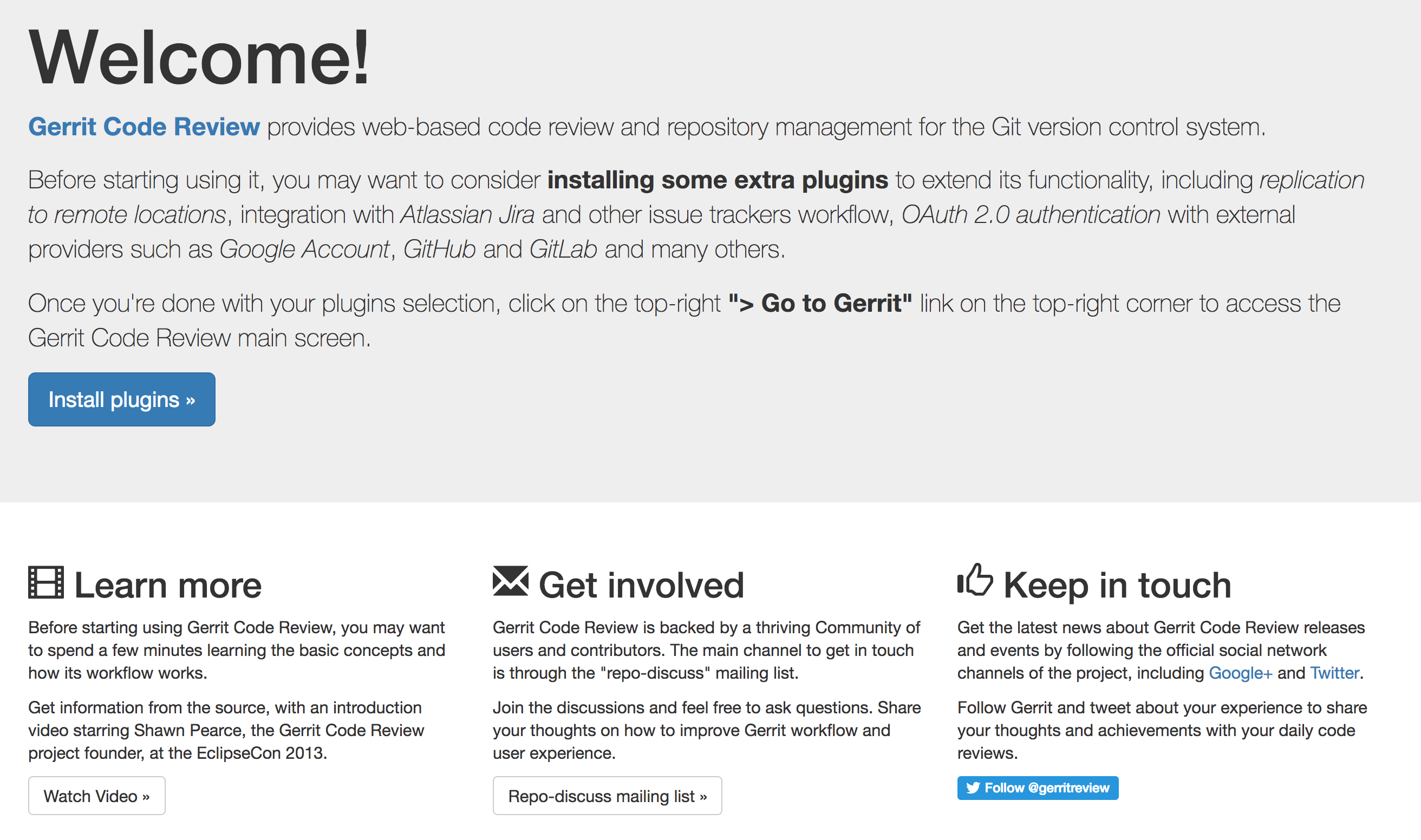
The second significant value of the Gerrit Docker container is that includes an out-of-the-box configuration, a welcome screen, and the plugin manager. It consists already a set of components that, if you are not familiar with Gerrit, will help you a lot to understand what is Gerrit and how to use it.

As you can see from this screen, Gerrit has started, and if you navigate to http://localhost:8080, it shows you an initial welcome screen.

Screen Shot 2017-11-21 at 09.42.10.png

Historically the very first screen, once you have installed Gerrit, was a blank screen. I remember a few years ago people coming to me saying that as new Gerrit users they were quite confused: they just did not know what to do with the initial blank screen. In Gerrit Docker, the initial screen is a “Welcome” which is a beautiful thing to say to people that you did not know that came to your house. Additionally, it provides some useful links and information to install plugins, which is very important because Gerrit without plugins is missing some fundamental parts of its functionality.

Playing with Gerrit Plugin Manager

By clicking the “Install plugins” button, you reach the Gerrit Plugin Manager screen. For all of those who are familiar with Jenkins, it provides precisely the same functionality as in Jenkins. If you type ‘groovy’ in the search bar, you can easily find where the Groovy scripting provider is, and you can install it with a simple click. That is the plugin you need to tell Gerrit that from now on, every file in the /plugins directory with a .groovy extension is a plugin that needs to be parsed and loaded at runtime.

Screen Shot 2017-11-21 at 09.44.14.png

You can discover and install other plugins as well. For instance, typing ‘github’ would list the integration of Gerrit with GitHub authentication and pull requests, or typing ‘jira’ would return the association and workflow integration with Jira Tickets.
The plugin manager is a fantastic discovery mechanism to understand what are the integrations available for Gerrit Code Review.

The plugin manager automatically discovers the versions of the plugins that are compatible with the Gerrit you are currently running and, when you click ‘Install’, it downloads them and installs them locally. When you are done, just click on the top-right link “Go To Gerrit” and you are straight into Gerrit UX.

How we have a running Gerrit instance that has installed all the plugins I need, including the support for Groovy plugins.

Writing plugins in Scala

If you need want to leverage the Gerrit scripting plugins, but you need optimal performance at runtime, you can use a different scripting language such as Scala.

GerritUserSummit-2017-Scala.png

The Scala language allows compiling into the native Java bytecode; it does not use reflection for method calls and, for some operations could be even faster than the Java language itself. See the same hello world example but rewritten in Scala.

import com.google.gerrit.sshd._
import com.google.gerrit.extensions.annotations._

@Export("scala")
class ScalaCommand extends SshCommand {
  override def run = stdout println "Hi from Scala" 
}

When I showed this to the community people got so excited and started writing tons of scripting plugins.

What scripting plugins do in Gerrit?

Admin tasks as SSH commands

Sometimes Gerrit admins need to automate specific tasks, however, coding an external script could be slower and difficult to implement. Inside Gerrit, there are already a lot of objects which represent pre-processed in-memory entities ready to be used. It makes sense to leverage all the information that is in-memory already and write new SSH commands like Scripting plugins to control admin tasks remotely.

Scripted REST API

At times you need as well to tailor existing Gerrit REST API to your needs. For instance, imagine that your company has specific policies for requesting new repositories: why not then creating a new ‘Create Project’ REST API tailored for your needs using the Scripting plugins and expose it through a company HTML form? You can do it without the need to be an experienced Java or Gerrit contributor and using a simple Groovy script for the new REST API.

Low-footprint hooks events

A third option is fascinating because, before the introduction of Gerrit plugins, the only way to react to Gerrit events was through hooks or stream events. Hooks are a traditional Git mechanism and, in Gerrit, have a scalability problem: they are invoked for every project and every event that happens anywhere and spawn a different asynchronous process. Over time the extra processes created can cause a significant overhead for your super-busy Gerrit server.
When a hook script needs to read from the Git repository, it would then need to process from scratch the packfiles from the local filesystem, uncompress and parse them in memory over and over again, which could slow down your server significantly.
If you are implementing Gerrit events using plugins, the same processing could be ten or even hundreds times faster.