Gerrit User Summit: Jenkins forever

This week we are going to publish a talk from the Gerrit User Summit 2017 about Gerrit and Jenkins used together. It is a real-life story on how to set up a CI/CD pipeline for a massive traffic OpenSource project such as Gerrit Code Review and the learnings of how to manage the storage and consumption of the Jenkins build logs and the associated meta-data.

Even if you are not a Gerrit Code Review user, the learnings of this talk are going to be exciting and useful for any high load CI/CD pipeline project with Jenkins.

GerritForge: Gerrit Code Review and Jenkins expertise

I am part of GerritForge, a London-based limited company not specialized in Gerrit, as the name would tell, but also on Jenkins, Continuous Integration and Delivery. Why don’t we use our skills to serve the Gerrit Code Review project? A couple of years ago the project did not have an official CI yet, so we said: “why not help the project and set up an official pipeline to verify all the incoming Gerrit changes to the Gerrit Code Review project itself?”

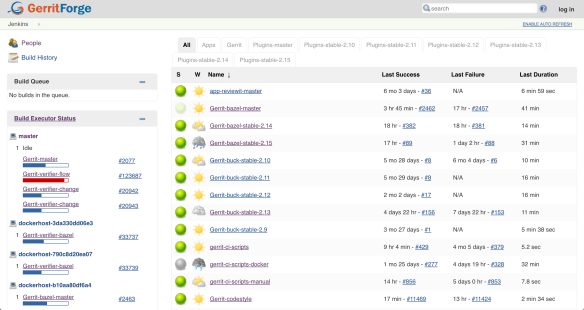
We then created https://gerrit-ci.gerritforge.com and, as you can see, it is nowadays a jam-packed CI system. We have been running a Hackathon over the weekend, and now, even while people in this room are following this talk, new changes are produced, and reviews are getting pushed to Gerrit, and that keeps our CI busy all the times.

Screen Shot 2017-10-24 at 22.51.04.png

We have a lot of slaves, some of them are provided for free by Google and others are paid by GerritForge. We have been running this service for the last couple of years, and even non-contributors to the Gerrit project like most of you guys are possibly using it for downloading some useful artifacts such as the Gerrit plugins. Additionally, if you want to download and demo the latest and greatest version of Gerrit master, as we just did with some of you before lunch, you can use the Gerrit artifacts on Gerrit-CI instead of building it yourself on your local box.

Gerrit-CI pipeline walkthrough

Let’s have a look at how Gerrit-CI works. You can log in with your GitHub credentials, and then trigger builds for your Gerrit Code Review contribution using a job called “Gerrit verifier change”. That is the most important job of the pipeline and it verifies every single change we make on the Gerrit Code Review project.

How can you manually trigger the build and verification of a change in Gerrit? You navigate to https://gerrit-ci.gerritforge.com/job/Gerrit-verifier-change/ and click on “Build with parameters” link. You enter your change number and then click “Build”: it is straightforward.

What this job does is triggering a workflow developed in Groovy language which it will provide at the end a series of feedback messages to Gerrit. When you go to https://gerrit-review.googlesource.com and list of open changes, you will notice that some of them by one guy that is called “GerritForge CI”. That means that our CI works, yeah!

houston1.jpg

At a certain point in time, someone in the Gerrit mailing list said: “Houston, we have a problem, we are too productive! We have produced so many changes and patch sets that the time you finish to build a change, we have already produced other 300 patch sets on that job and the build logs get lost”.

The Gerrit change verifier workflow

Let’s go back for a moment to review how the workflow that we came up with works. It does not rely on the Gerrit Trigger plugin, the de-facto out-of-the-box Gerrit/Jenkins integration that most of the people use, but rather on a complete “new thing” that we have built ad-hoc for our purpose.
We couldn’t use the Gerrit Trigger plugin because of two reasons:

  1. Google data-centers do not allow incoming SSH connections
  2. SSH stream event channel would not have been good enough for us, because of the parallelism needed.

The way that our workflow works if very simple.
The verifier flow requests the list of changes that need verification by leveraging Gerrit query language which allows you to search through most of the fields of changes using a Lucene syntax. For each change that needs checking, a corresponding number of parallel jobs are triggered. This parallelism is potentially unlimited; the only limit is the number of machines that Google can assign to the Gerrit-CI, if he can allocate one hundred, we will be able to perform hundreds of parallel changes verifications.

Screen Shot 2017-10-24 at 22.53.30.png

That means that we can produce a lot of verification jobs at the same time. Bear in mind that for every change we do not trigger just one build: we have NoteDb vs. ReviewDb verification, PolyGerrit UX tests, Code-Style check there was a moment in time where a single change needed up to 6 parallel builds! That resulted into a lot of builds, which, as long as you’ve got enough horsepower in the slaves, it was working fine us.

We do not send feedback to Gerrit for every single build, but we rather have a “Gerrit Verifier Change” job coordinating the workflow and makes a decision accordingly. The criteria are the number of failed builds, the build retries for flaky builds. At the end of the process, all build results are collected and a unique coordinated feedback to send back to Gerrit as a unique verification message.

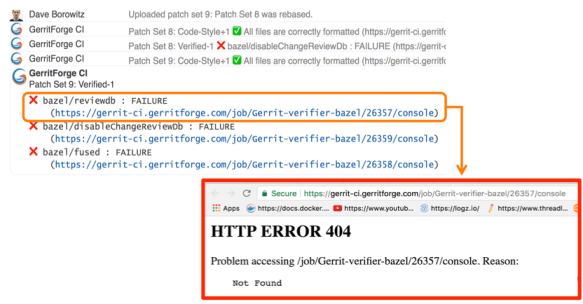
Too many logs for Jenkins lead to a 404 page.

This is all good, but as we said earlier: “Houston, we have a problem, we are too productive!”.
Here are some numbers of our productivity:

  • 300 jobs
  • 170,000 builds
  • 4.8 millions of jar artifacts produced
  • 1.7 billions of lines of logs

And of course, we want to send a link to the build logs we want to give context to the change failure or success. Unfortunately, happened to trace in Gerrit changes some nice links pointing to a quite unpleasant 404 page in Jenkins.

Why did it happen? We have a lot of contributors that generated lots of commit traffic and thus many build runs. There is a policy in Jenkins to remove “old” builds and thus happened that we lost build logs of active changes under review.

Screen Shot 2017-10-24 at 22.59.39.png

Q. (Han-Wen Nienhuys – Google) At Google internal build system we also this kind of numbers but of course with more zeros at the end, but actually we throw away our logs, and if you build binaries, they are very large.

In the beginning, we tried to keep more stuff online in Jenkins but people started saying “Luca, we have a much bigger problem now: gerrit-ci.gerritforge.com doesn’t respond anymore. When I open the Jenkins home page, it takes a very long time and eventually times out.”

That is caused by Jenkins design which is problematic when the number of logs increases considerably: everything is stored as a file and there is no efficient indexing for discovering the data on the filesystem. Additionally, if your company does not have a large infrastructure, your disk space is limited anyway. At GerritForge the Jenkins master has only 8TBytes of disk space, and we don’t have available a system with PetaBytes or more.

Keeping Jenkins logs forever

I made the Gerrit Contributors’ Community aware of the problem and I asked: do we like that? If you think about it, logs are not rubbish. Logs are of immense value, logs are like your money, and analyzing them, crunching and understanding them is our daily job. The timestamps in the logs are like precious diamonds because they tell you that you may have made a mistake in your code and some parts of your pipeline execution start taking a lot more time than before.

When you remove the “old” logs, you make much more difficult to investigate on a failed verification build: the link attached to the change verification message points to a page that returns a 404. That’s not a bug in Jenkins; it’s a feature of removing old logs and keeping the master instance fast and healthy. But actually, it is a real functionality gap because Jenkins doesn’t know yet how to manage logs archiving.

Then I asked the Community: “For how long you want your logs to be retained?” because I needed to raise a PO for a much bigger machine. “One day, one week, one month?” and the answer I got was “Forever!”

If you think about it carefully, the answer is correct. You may not need all those logs at the moment, but in a month’s time, you may need to crunch some data to extract features or metrics. Additionally, getting rid of all logs means generating broken links in my past reviews, which could be an audit requirement stored with Gerrit changes.

Sending Jenkins data to a Logstash appender

It was about time for me to think about a solution and here is a description of what I have done.

First of all, I needed to get more disk space from Google, but then how can I tell Jenkins to use an alternative disk storage mechanism for his logs?
I then started adding to the jobs a plugin called “Logstash” (https://wiki.jenkins.io/display/JENKINS/Logstash+Plugin) which is responsible for capturing and sending Jenkins data to a configured stream appender.
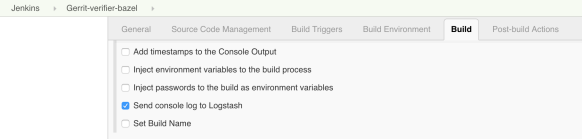
All the Gerrit CI jobs are managed through YAML files which are submitted through code-reviews, using the Jenkins Job Builder tool. However, showing the Logstash configuration on the Jenkins UI is much easier to show where the Logstash is playing a role in the Gerrit-verifier-change job configuration.

Screen Shot 2017-10-24 at 23.05.33.png

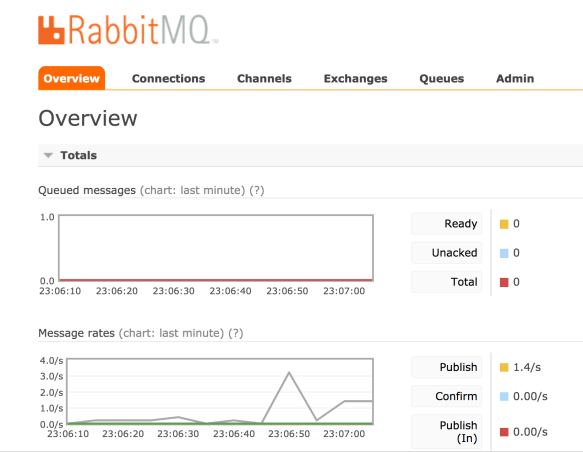
I have enabled a new feature to all the jobs to send all the log stream to the Logstash plugin. This works differently to what most of the people would do. Instead of just posting the log file into a stream of lines to ElasticSearch, this plugin gets the information directly from the JVM memory together with its metadata, the timestamp, the build parameters, the environment variables and send them to an endpoint, which could be anything. In this case, I have chosen to use RabbitMQ as stream appender. On RabbitMQ you can notice that I have created a queue for incoming Jenkins messages.

Screen Shot 2017-10-24 at 23.07.02.png

You may notice a lot of activity because every time that the Jenkins jobs produce something, a message is sent to RabbitMQ with the log and the attached meta-data. RabbitMQ is not used though as a storage system but acts only as a vehicle to transfer the information to a long-term storage system, which could be Google Cloud Storage.

The organization of files is straightforward: one file per hour. By looking at the file content, it is a very compressed JSON file that contains all the information I need: the build id, the result, the logs, the parameters.

Spark to the rescue

Problem solved? Can I tell all the Gerrit contributors that they have to look for a build result into a JSON file? Maybe this is not a very nice user experience.
I little more digging is needed to make the solution more transparent to the end user.

Screen Shot 2017-10-24 at 23.14.56.png

GerritForge as a company works and contributes to many BigData projects, including Apache Spark. Why don’t we build an elementary Spark transformation that consumes the input JSON files and materializes back the log into a readable format?
So we built a Spark job that is crunching this data and produces something very very similar to what Jenkins would render. However, we need to make sure to perform all those operations outside the Jenkins domain; otherwise, it would become very soon overloaded and thus unusable.

I have then created another directory that is not actually managed by Jenkins but gets populated by a Spark job. This parallel file structure has exactly the same organization of the build files generated by Jenkins builds.
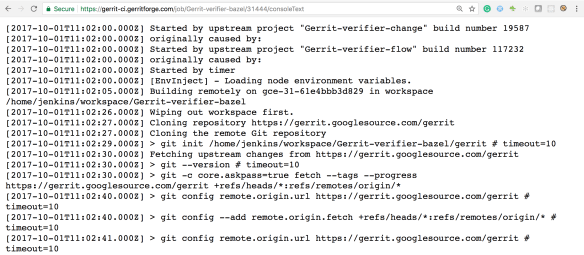
Let’s have a look for instance at the oldest build that has been recorded by Jenkins: build #31639. For sure if I go to the build #31444, which is older than the #31638, Jenkins would give me a 404 because that job execution has been removed.
However, if I try now to navigate to the build log #31444, wow, I can see the full results as the build log was still accessible.

Screen Shot 2017-10-24 at 23.09.09.png

Additionally, as this log has been produced from the previous JSON file that contains all the meta-data, I can even render more information such as the time-stamps, which are not typically available in Jenkins unless you enable a specific plugin.
Moving forward, by leveraging the same input JSON file, we could do a lot more data crunching as well. It would be interesting for instance to draw a graph of the correlation between the Gerrit changes the build execution times at the different stages.

Uncovering the hidden value of your Jenkins logs

There is a lot more we can do with the JSON I’ve shown you before. It contains not just the log messages, but everything related to the build meta-data of the build and its execution metrics. That means if we go to this change #129553, the link that points to Jenkins logs is not broken anymore, even if it is not served by Jenkins but is backed by the Spark job results.
Starting to applying the same mechanism to all the Gerrit changes and redirecting them to the Google storage where all the files are going to be archived, any change in the Gerrit history will not contain broken links anymore and will be perfectly auditable.

That means that from now, whenever you are going to receive a Verified notification from Gerrit and you navigate to your change links, you are not landing anymore to a 404 page anymore.

Questions.

Q: What if I have a Jenkins instance and I want to do some of this but I don’t have infinite disk-space as Google. Is it is possible to implement?

A: With regards to disk space, you don’t have to go to Google or AWS. You can set up an HDFS filesystem yourself. All the cloud storage implementations available on the Cloud are mainly based on something very similar to HDFS which is an open standard and is available as OpenSource. That means you can store the information there and you do not necessarily need to keep it forever. In practical terms what you need to keep is the lifetime of a release of the software, or a few software iterations, maybe six months, 12 months. As the JSON files are organized on a time-series, it is going to be very easy to remove or archive all the data you do not need anymore. I have shown you how to store those files in JSON, but you can use even more optimised and compressed format such as Avro or Parquet, which may contain 10x times the information in a fraction of disk space. Additionally, when you process them, they can be even faster because they include data encoded in binary format. In a nutshell, the term “keep the logs forever” could be read as “keep for as much as you need: one week, one month, six months, …”. The problem with Jenkins is that for very busy servers like the Gerrit CI, you cannot keep even a single day of logs and when the people are coming the next day to check what’s wrong with a failed verification, would risk having a 404 error page.

Q: So if you do compression and decompression, that needs to happen server-side, so that is transparent to the browser?

A: Yes, that needs to happen on the Server, and there are a lot of ways for doing it, it could be even done on-the-fly, streaming and is pretty fast. There will be a talk tomorrow talking about the methodology to crunch large amounts of data and about the lambda architecture.

Q: Does it generate a RabbitMQ message for each log statement or a unique one at the end of the build?

A: Yes, and the reason is straightforward: If the build crashes or gets aborted for any reason, you do not want to lose your build logs. There was an implementation of Logstash for the Jenkins pipeline that was precisely collecting the logs all at the end of the build, but the design is wrong because if the builds get aborted you do not get feedback at all. Yes, it generates a message for every single line, and possibly RabbitMQ is not the correct implementation of it. But as soon as the Logstash plugin supports the Kafka transport, the performance issues related to the use of RabbitMQ for log streaming will be resolved.

Q: The Logstash plugin that you mentioned, has nothing to do with the “ElasticLogstash” implementation?

A: Yes, it is just unfortunate naming. Actually, the Jenkins Logstash plugin was possibly born before Elastic called his implementation ‘logstash’.

Q: You mentioned that you do Spark processing at some point, but it wasn’t part of your presentation.

A: Yes, it is not part of this presentation for reasons of time, but it is trivial.

Q: Question about the GerritForge CI: I have frequent problems of the test failing not because of my code, and I want to retrigger the tests without having to add a commit to retrigger the CI. Is there a way to retrigger the CI build?

A: Yes, it can be done by going to the Gerrit-verifier-change URL, you click on “Build with Parameters” and enter your change number. You can in this way retrigger any build without having to commit anything.

Q: And if that pass that would assign the Verifier approval to the change?

A: Yes. I would like to add a Button to Gerrit-Review to avoid people to navigate to a different URL.

Q: We are relatively heavy users of Gerrit topics because we have changes that are across multiple repositories. We have a very similar job to this one but we can either put a single or multiple change IDs or a topic name, and it will work out whether it is a consistent declaration. Another thing that you can comment on, you mentioned that the verifier job which runs some independent verifications and then feeds the result as one result to Gerrit, that sounds like something we could use. What is that build using?

A: Tomorrow there will be a presentation of a brand-new integration between Gerrit and Jenkins. The rationale for writing a new integration lies on the thinking that “maybe the Gerrit project is not the only one that needs a bit more from Jenkins.” So why not creating a Jenkins plugin that takes the most of the experience we’ve made in integrating Gerrit with Jenkins for the Gerrit Code Review project and makes it available to the rest of the world? There will a plugin to implement that workflow.


PolyGerrit User Experience at Gerrit User Summit in London

Google.GerritUX_Banner_200X85_cc.jpg

With only seven days to go, the Gerrit User Summit is approaching fast! There has been a lot of discussion on the Gerrit usability on a recent discussion thread on the GoLang project. More and more the focus of OpenSource communities is the ease of adoption and contribution, after of course the solidity and efficiency of the review process. A usable interface, clear and self-explanatory even for newbies, could contribute to the success of a project.

PolyGerrit, a fresh start from the Chromium project

In July, the entire Chromium project moved from Rietveld to PolyGerrit: this event has brought a lot more users to the Gerrit platform and triggered a creative and open debate on the future of Gerrit UX. Chromium’s unique workflow has been the driver of lots of improvements, some of which will be landing in Gerrit 2.15.

Logan Hanks from Google will present at the forthcoming Gerrit User Summit in London the discoveries and developments of the v2.15 PolyGerrit UX, mainly driven by the same people that are using it every day on the Chromium project.

A new visual design for the PolyGerrit project

There is a new visual design for the change view to present. You may have already seen some elements of this design rolling out to googlesource.com. Arnab Banerjee from Google will take us through the complete design and show us where it’s going in the coming weeks.

A PolyGerrit booth has been set up at the conference to allow anyone to experiment the new UX and go through some research trials to provide meaningful feedback for the evolution of the user interface.

Only ten seats left, it’s never too late

The Gerrit User Summit 2017 is almost entirely booked: HURRY UP AND REGISTER TODAY so that you can see and be part of the evolution of the Gerrit UX. Your user-journey and requirements can be part of the next version of Gerrit, be part of the change and part of the Community.

Beyond PolyGerrit, many more talks are coming

More exciting talks to come as well, including multi-master, a brand-new Jenkins integration and an exclusive Q&A face-to-face with the Gerrit maintainers. See the full schedule at the Gerrit User Summit 2017 site.

Gerrit User Summit 2017, 2-3 Oct, London

GerritUserSummit2017-logo.png

New and exciting features are coming for this year Gerrit User Summit, with the launch of Ver. 2.15, NoteDb, high-availability, multi-master and much more.

The Summit will take place for the very first time in Europe, London, the location chosen by the community after a public consultation, the 2nd and 3rd of October at CodeNode (Skills Matter).

There are still a few places available but hurry up and register now at https://gerritusersummit.eventbrite.com.

See below an overview of the topics that will be presented and discussed during the User Summit.

What’s new in Gerrit 2.14.x.

Gerrit v2.14 was released during the last Hackathon in April and has gone through three patch releases. David Pursehouse from CollabNet will give an overview of the new features introduced which would be highly beneficial for all of those who haven’t migrated yet.

Gerrit at Google: Multi-master, Mutli-tenant.

Google is the founder, main contributor and possibly the most advanced user of the Gerrit Code Review: learning from their experience is a unique opportunity to learn and being able to leverage and use the tool at its best.

Patrick Hiesel from Google will go through the insights of their Gerrit Code Review architecture and will provide some of their metrics of scale. In addition to that, he will present some findings from the recent switch of their load-balancing infrastructure and the associated pitfalls encountered.

Google is possibly the only one in the world using Gerrit in a multi-tenant setup, having a unique multi-master installation that serves a constellation of domains and projects, including huge and familiar ones like Android and Chromium.

Standing “on the shoulders of giants” like Google helps a lot in preventing scalability issues as the audience and adoption of Gerrit Code Review grows in large companies: being part of the audience in the talk is a unique opportunity to learn and ask questions directly to the maintainers of their infrastructure.

PolyGerrit: a new UX experience for Gerrit Code Review

Google has invested a lot in reinventing and reengineering the user interface of Gerrit Code Review, which remained mostly unchanged for almost a decade. A new team has been put together in their San Francisco offices with experienced UX developers that leveraged the new Polymer framework of web components.

The result is PolyGerrit, a modern web UX which provides an unprecedented browsing speed and flexible rendering across different devices, including mobile and tablets.

The PolyGerrit Team will be presenting the findings of their user-experience research and show some of the features and insights of the new UX.

Gerrit CI and keeping logs forever.

Gerrit Code Review itself is a large project, involving over 300 developers across the globe and using the most advanced DevOps practices. The CI/CD pipeline has been provided and managed by GerritForge on the https://gerrit-ci.gerritforge.com and Luca Milanesio from GerritForge will present the latest improvements in the pipeline plus an interesting way of collecting and reusing the logs.

Leveraging the logs for identifying the bottlenecks of the CI/CD pipeline is the way to drive improvement. GerritForge leveraged the expertise of his engineers to harvest and organize data and will give it back to the community as powerful dashboards.

Beyond Gerrit.

Gerrit is great. However, it is also quite an important part of a bigger ALM process. Jacek Centkowski from CollabNet will describe how multiple tools can be unified under a single TeamForge umbrella and what are the immediate benefits of it.

What’s coming in Gerrit 2.15

After only four months, we are already close to the v2.15 of Gerrit Code Review, which would be possibly the last one before the step to the v3.0.

Dave Borowitz from Google, principal maintainer of the Gerrit Code Review project, will go through the new features of v2.15 and possibly give a glimpse in what to expect from v3.0.

Mining Gerrit Data to Study Contentious Reviews and Community Evolution

Gerrit Code Review is much more than a tool, it is a way for people working together in companies that are large and mostly distributed across the globe.

Shane McIntosh from McGill University has been running a research lab on this topic. The Software REBELs—a research lab at McGill University—mine code review data to study topics like the impact that code review practices have on software release and design quality. Our more recent work mines code review data to study the reviewing process itself. In this talk, I will describe the results of two empirical studies of data that we collected from the Gerrit instances of the OpenStack project. The first study aims to understand the reviews where reviewers disagree about a patch. The second study follows how the concerns that reviewers raise evolve as the OpenStack community ages and individual reviews accrue experience.

Gerrit Analytics: dashboards, networks, KPI

Gerrit has always been lacking major code analytics features compared to other Git Server tools like GitBlit or GitLab. GerritForge Ltd is filling the gap and adds one important asset to the Gerrit Code Review platform: code review analytics.

We need to harvest and unify the logs and events coming from the different components of the CI/CD pipeline by putting at the center of it the people and teams that are building and discussing the code on Gerrit. The resulting data-lake of information can be later analyzed and correlated to calculate the cycle time of the entire pipeline.

Luca Milanesio from GerritForge will show the new analytics dashboards that are going to be published and provided back to the Team that is developing the Gerrit Code Review project as a precious contribution to the community.

How to extend Gerrit using Scripting Plugins

Gerrit Code Review has a robust set of API that can be used to extend its functionalities and provide a more integrated development workflow for the Teams.

Luca Milanesio from GerritForge will present how to use different scripting tools to extend the capabilities of Gerrit without the need of developing and building a plugin, using Jython, Groovy and Scala.

A new simpler but powerful Gerrit Jenkins plugin

Gerrit Code Review is an essential part of a larger CI/CD pipeline. Most of the times it is used in conjunction with Jenkins, the most popular OpenSource Continuous Integration and Delivery tool.

The integration between Gerrit and Jenkins (Gerrit Trigger Plugin) was developed back in 2010 at Sony and since then has been extended and adopted in thousands of Jenkins installations. However, Jenkins has evolved too and has now a brand new concept and definition of multi-branch pipeline which struggles to be seamlessly integrated with the current Gerrit Trigger Plugin.

Luca Milanesio from GerritForge will present a brand new plugin based on the new Jenkins branch discovery API which works seamlessly with Jenkins multi-branch pipelines and provides a simpler interface with Gerrit by leveraging the new WebHooks.

Diffy with enterprise grade

Since 2012 CollabNet has been working on improving Gerrit integration with TeamForge. Many features have been created to satisfy the needs of enterprise customers. Eryk Szymanski from CollabNet will present features like RBAC, history protection, Git style notifications, quality gates, pull request and code browser which have been implemented on top of vanilla Gerrit.

Q&A with the maintainers

Have you ever wondered why something is working in a certain way? Have you ever wanted to explain any complaint about some parts of Gerrit? Would you give your congratulation to the people that made this project? Would you like to make a feature request or propose new ideas?

This is the moment where you can speak directly face-to-face to the people that are building this project every single day, the Gerrit maintainers.


The event is free for everyone, thanks to the contribution of our sponsors, CollabNet Inc, GerritForge Ltd and Skills Matter Ltd.

SponsorsBanner.png

Gerrit user data in git

I’ve been lurking in the #gerrit IRC channel regularly trying to help out Gerritors with gerrit issues.  Recently I’ve noticed that many people keep asking, where the heck does gerrit store user data, like the ssh-keys, and how do I get to it?   I’ve searched the internet myself and have not found a straight forward answer to this question.  So now I’ll provide the answer for whomever is looking.. which includes myself sometimes 🙂

Gerrit’s user data in previous releases was saved to the gerrit database however with Gerrit’s latest release, ver 2.13, that data has moved to the All-Users project.  This means that the data is now stored in a git repository.   Specifically it has moved to the git All-Users project in refs/users.  This is very similar to how it stores project data in All-Projects refs/meta/config.

To get at this data using git you’ll need to clone All-Users and checkout refs/users/user.  You’ll need to get the user id that you want to get the data for and you’ll probably need to be a Gerrit Admin to have access to the data.   So now if we want to get that info we’ll need to do something like this..

git clone ssh://$USER@$MY_GERRIT_HOST:29418/All-Users
cd All-Users
git fetch origin refs/users/$LAST_2_DIGITS_OF_USER_ID/$USER_ID:$USER_ID
git checkout $USER_ID

Now you should see a file containing the ssh public key and another file containing the user preferences info for $USER_ID.

Hope that help other Gerritors out there.  -Cuckoo-cachoo!

Code Review Analytics at Gerrit User Summit

I love hiking mountains; I always did since I was a child. There is a mix of challenges, enthusiasm, and learnings in walking for long hours through little and tortuous steep trails: it challenges your mind and body and makes you stronger.

One thing that always fascinated me is how the shape of peaks and valleys changes as you go higher and raise your perspective. When finally, exhausted, you reach the mountain peak you have a mix of pleasure and relief. You have achieved your goal, and you can, at last, have the full view on the horizon, understand how mountain chains are linked together, where rivers start and end up in lakes, and you can see far away as never before.

Continuous Delivery is a landscape of rivers, lakes, and mountains

I believe today’s landscape of Software Engineering is very diverse: there are so many powerful tools that generate streams of data continuously, and we need to get on top of them every day to be successful in an ever-evolving market space.
Continuous Delivery is the key methodology that nowadays allows the entire “software production chain” working smoothly. However, it poses challenges which are not always technical but often related to the flow of information across the systems and people.

See the big picture

To succeed, we need to raise our point of view to see the “big picture” and understand how things are connected and where are the improvement points, considering all the data we have about:

  • Tools
    collect software and system metrics, logs, test results, build trends
  • Projects
    repositories, commits, branches, pull requests, patch sets
  • People and Teams
    active and passive collaborators, contributors, reviewers, comments and replies

Collecting data is not enough, we need to raise our point of view and hike the Continuous Delivery mountain of problems and reach a point where all those elements make sense because they are:

  • all visible from a single perspective
  • correlated
  • aggregated

Yet another BigData problem

The problem is too many data sources to manage.
The typical solution to the problem is taking all logs from everywhere and publishing them to a single repository using an ELK (ElasticSearch + Logstash + Kibana) stack and building fancy dashboards. I have used this approach for small-scale projects, and it works quite well, but … when I tried to scale that to a much bigger Continuous Delivery pipeline the complexity, diversity, and granularity of data just killed my ability to see the “bigger picture” and I felt almost helpless in front of my Kibana dashboards.

Back to the source of data

Trying to understand what was missing, I ended up realizing that some of the dimensions were not taken into account and correlated: Code Reviews.

All the tooling were about test results, build, system and application logs but none of them has taken the code into account, which is the source of all the pipeline. You can understand where to go if you realize where you are coming from: the code is the source of all build chains.
When I started collecting data from the code repository and reviews, all made sense again, and I felt the I have reached the peak of my Continuous Delivery hiking effort: all made sense again and I could see the overall perspective.

Continuous Delivery Analytics

Exactly in the same way we Application Analytics are used to collecting data about our production system, split into dimensions and analyzed, we need then to start doing the same with our Continuous Delivery pipeline.

There are already some of the tools out there in the market which integrates some parts of it, but I haven’t seen a single one who can give you the bird’s eye perspective you need to understand the big picture.

That’s why I started writing one, using the only way make sense for me: writing in the open and with the help and cooperation of the OpenSource community of people and companies who share the same problem and have the same perspective.

Gerrit Analytics coming at the User Summit 2016

I presented my ideas at a couple of conferences (Devoxx, JenkinsWorld) and I received a lot of appreciation and feedback: the next one is the Gerrit User Summit in Mountain View – CA.

Large companies like SAP, Qualcomm, Ericsson,  Google and Intel are exchanging every year their problems and ideas on how to make their Continuous Delivery Pipelines smoother, better and faster.
The perspective will be, of course, more Gerrit Code Review centric with more data and views that make sense from a review perspective.

Call to action

Come to the Gerrit User Summit 2016 in Mountain View – Google HQ on the 12th and 13th of November, and see the Gerrit and Continuous Delivery Pipeline in Action.

The event is FREE, register now at https://goo.gl/forms/oeEnQweHl2noNSnn1


How to Migrate a Git Repository

When and why?

We wrote yesterday about the GitEnt-Scm.com shutdown due on April 30th, 2016. Now the issue you would be facing is: how to migrate somewhere else?
Although StackOverflow already contains over 800 response threads when asking this question we thought that giving a practical example based on a real-life GitEnt repository would allow you to avoid the trial & error discovery.

Step 1 – Mirror clone

When you want to clone a repository for the purpose of migration, you really want everything, including all the other refs that are not branches:

  • Git Tags (refs/tags/*)
  • Git Notes (refs/notes/*)
  • Gerrit Reviews (refs/changes/*)
  • Gerrit Configs (refs/meta/*)

Instead of using a standard clone, you can do a “git clone –mirror”, which implies –bare and thus does not generate a working copy.

Example:

$ git clone --mirror ssh://myuser@gitent-scm.com/git/myorg/myrepo.git
Cloning into bare repository 'myrepo.git'...
remote: Counting objects: 109, done
remote: Finding sources: 100% (109/109)
remote: Total 109 (delta 19), reused 83 (delta 19)
Receiving objects: 100% (109/109), 66.42 KiB | 0 bytes/s, done.
Resolving deltas: 100% (19/19), done.
Checking connectivity... done.

Step 2 – Create empty repo on the new Git Server

You need to have an empty target repository where to push your mirrored local clone. Note that most of the Git Servers propose you to create a first master branch with a README, but, in this case, you do not need it and it would only create more trouble in your migration path.

Example for GitHub:

– Go to https://github.com/new and create the ‘myrepo’ repository
– Do not tick any of the suggested README or LICENSE auto-generation
– Once the project is created, GitHub provides you with the repository Git URL (e.g. git@github.myorg/myrepo.git)

Step 3 – Push to the new Git Server

You are now ready to push to the target repository, and we can use the useful option “–mirror” again.
Similarly to the clone, “–mirror” automatically include all refs, including the non-branch ones (tags, notes, reviews, configs, …); it provides the behaviour of removing all the refs that are not present in your local clone. You should never use this option when you have a “regular default clone” as you would risk removing all the remote refs that have not been typically cloned with a standard default “git clone” operation.

Example for GitHub:

$ git push --mirror git@github.myorg/myrepo.git
Counting objects: 109, done.
Delta compression using up to 4 threads.
Compressing objects: 100% (61/61), done.
Writing objects: 100% (109/109), 66.42 KiB | 0 bytes/s, done.
Total 109 (delta 19), reused 109 (delta 19)
To git@github.myorg/myrepo.git
* [new branch] refs/changes/02/802/1 -> refs/changes/02/802/1
* [new branch] refs/changes/03/803/1 -> refs/changes/03/803/1
* [new branch] master -> master
* [new branch] refs/meta/config -> refs/meta/config

Step 4 – Import into GerritHub.io (Optional)

Your repository has not been fully migrated to your new target server. If you wish now to keep on using Gerrit Code Review for your Development Workflow, you can link your repository to Gerrit using GerritHub.io

The YouTube Video explains how to perform this last operation using GerritHub.io import Wizard.

Need more help?

Do you require more help? Contact our Sales Departement at sales@gerritforge.com and we will provide the extra support you need or perform the migration for you to GerritHub.io.

GitEnt-scm.com Farewell

An open letter to all GitEnt-Scm.com users

it has been a fantastic journey to launch and see the GitEnterprise service growing over the past five years.
We announced the availability in 2011 of a new Enterprise-grade service ahead of other major competitors such as CollabNet or Atlassian. We were the only real Enterprise-Ready Git service much more advanced than GitHub and well before the birth of GitHub:Enterprise.

Since then, over 5000 people used and loved our service and enjoyed a fully FREE and compelling Git server, powered by Gerrit Code Review, the major OpenSource platform code for Code Review on Git.
We are grateful for your trust and confidence in us.

From premium service to commodity

Times have changed, what was considered a premium had become a commodity and services like BitBucket started to erode our take up in the past three years. We moved on to a different and more compelling level of services, jumping again on the edge of innovation and moving into Code Review and its integration with the Continuous Delivery pipeline. We launched in 2013 a brand-new service called GerritHub.io which is now the reference point for major OpenSource and Commercial organisations such as IBM, Cisco System, RedHat and Rackspace.

We continued to maintain both GitEnterprise and GerritHub.io so that you did not have to face any migration or disruption; however the audience of GitEnterprise has become so marginal that we have unfortunately decided to shut down the service within the next 30 calendar days.

The choice: Red or Blue pill?

You have two options, either stay on the cutting edge technology and jump to GerritHub.io or moving to a free commodity service.

Option 1 => migrate to GerritHub.io

Option 2 => moving to another Git provider, such as BitBucket or GitLab.

If you decide to go for Option 1, we invite you to watch the GerritHub.io video on YouTube  and decide whether you would like to start adopting Gerrit Code Review workflow, bearing in mind that it may actually change the way you interact and manage your Git repositories.

Should you need our help in migrating your repositories, we can offer our bolt-on support services at a 10% discounted rate. See www.gerritforge.com/pricing for all the options available and costs involved.

Time is running fast: ACT NOW !

You do need to take a decision before the 30th of April 2016, as after that date the GitEnterprise.com and GitEnt-SCM.com will just redirect to our GerritForge Website and your repositories will not be accessible anymore.

Thank you again for those five fantastic years and for believing in us.
We hope you will decide to continue your journey with us.

Should you have any doubts, please do not hesitate to come back us.

The GerritForge Support Team.

Gerrit Upgraded with No Downtime

Screen Shot 2016-03-21 at 20.48.12

Zero DownTime success story.

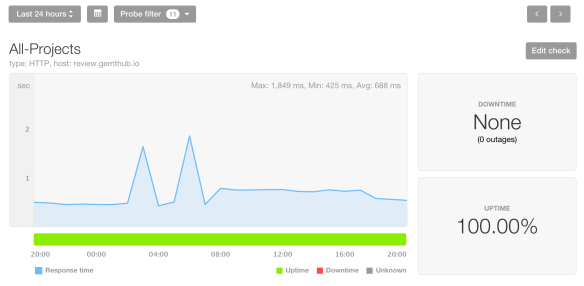
From today at 08:06 GMT GerritHub users are served by our brand new infrastructure geo-located in Canada, Quebec, Beauharnois. It is the first time we applied a zero-downtime roll-out scheme, the PingDom uptime for the past 24h reported 100% uptime and 688 msec average response time for the page of the list of opened changes. The two response times spike on the above graphs are actually due to the old German infrastructure and happened before the start of the roll-out.

We can see the switch of the traffic to the new infrastructure from the increase of the overall response time (IP packets were routed from Germany to Canada causing extra hops); as the DNS propagation was spreading across the world, the overall number of hops gradually came back to normal.

Timeline of the events.

  • 08:00:00 GMT – Phase 1 – Set Gerrit READ-ONLY. All changes and Git repositories started to refuse push and updates.
  • 08:00:01 GMT – Phase 2 – Wait for pending replication to complete. Replication queue was empty; there was no need to wait.
  • 08:00:02 GMT – Phase 3 – Mirror DB and Git for the last time, delta-reindex, DB upgrade and Gerrit restart. It has been the longest part of the roll-out and lasted 5′ 32”, aligned with our estimates.
  • 08:05:34 GMT – Phase 4 – Cache warm-up. 20K projects, 8K accounts and 4.6K groups were pre-loaded in Gerrit. This step was optional but allowed us to redirect all the traffic without risks of causing thread spikes on the new infrastructure.
  • 08:06:23 GMT – Phase 5 – Redirect traffic to the new infrastructure.

Did anybody notice the rollout?

During the rollout the Git projects and Gerrit changes were read-only for 6′ and 23”. According to the logs, 493 Git/HTTP and 172 Git/SSH invocations were made and completed successfully: none of them failed.

What is the situation right now?

The new infrastructure public IP (192.99.233.76) has almost completed his DNS propagation around the world, the only countries not entirely covered are Australia and China. The rest of the world is coming directly to Canada avoid the German hops. Metrics are good, low CPU utilization and threads consumption compared to the old German infrastructure, symptom of the reduction of the execution and serving times and latency.

What’s next?

From now on we will continue to use this Blue/Green roll-out strategy, possibly improving in the ReadOnly window by introducing live distributed reindex and cache warm-up.

We fully commit to Zero-Downtime and Stability, the most valuable assets for our clients.

GitHub API change causes problems to Jenkins and Gerrit

GitHub has recently changed his API default permissions and has caused big problems and outages to Jenkins or Gerrit instance configured for with OAuth 2.0 authentication.

GerritHub.io unfortunately has been impacted and this has caused two outages today:

  1. 0:40 – 1:10 CEST (GitHub API error temporary overload – automatically resolved)
  2. 10:50 – 11:25 CEST (GitHub API error overload causing the slowdown of HTTP calls and subsequent exhaust of our DBMS connection pooling)

The second outage was more serious as the GitHub API problems happened exactly at peak hours for European customers.

What is the current situation?

We have added the extra “read:org” Scope permissions to the default public access to GerritHub.io in order to prevent the GitHub API from failing. This change requires you to logout and login back to GerritHub.io to approve the extra permission flag.

IMPORTANT NOTE: Previous authenticated sessions are not valid anymore (batch users for Jenkins Jobs) for reading your GitHub organisation ownership and, as a consequence, your Gerrit permissions cannot be fully evaluated. You need to login on behalf of the batch users to GerritHub.io and accept the new GitHub permissions in order to get the new valid OAuth token.

The system is back up-and-running but is slower than usual, due to the extra throttling applied by GitHub cause by the error overload. As people will start logging in again and approving the new permissions, the error rate should drop and the situation will come back to normal.

What if I still have problems after having logged in and approved the read:org permissions?

In case of any further issues, please contact GerritForge Support:
www.gerritforge.com/support

[EDIT: 17:53 BST]

We have been monitoring the situation during the day but the performance of the system was not recovering as quickly as we wanted. The problem was related to the batch users that were still running in background using OAuth tokens not authorised anymore to perform their actions.

One user from RedHat pointed out:

“You can see it triggered job and the Build results is SUCCESS. But there is no votes or verified status.”

This was caused by the batch user (configured in this case on Jenkins) was still authenticated through its old OAuth token but not authorised anymore to provide the “Verified” status. Batch users are typically not using the GUI and so have not a lot of chances of getting a renewed OAuth token with the correct permissions.

Current situation: workaround in place.

The OAuth Scope problem was only impacting those users associated to a public GitHub plan and thus using the default scopes user:email + public:repo. All the other users associated to a private GitHub plan had already granted access to all private information, including the full list of their public and private organisations.

The workaround in place uses the weakest link of the chain applied to the GitHub’s protection of the user’s organisations memberships:

  • A logged in with scopes [user:email + public:repo] cannot access its own list of organisations (strongest link).
  • The same user can however open a web browser and navigate, even without being authenticated, the URL https://github.com/username and extract the list of organisations on the bottom-left of the page under the H3 tag “Organizations” (weakest link)

The latest patch applied later today just apply this principle using the weakest link (page-scraping with anonymous HTTP-GET) as compensation of the failure to overcome the strongest link.

NOTE: The workaround allows to fill-up the Gerrit cache and gradually eliminates the GitHub throttling on the failed API calls. It allows the service to come back much more quickly to the expected normal response times. You are better anyway to authenticate to GerritHub.io interactively in order to get a renewed OAuth token as hopefully the workaround won’t be necessary anymore in the next few days.